.png?width=180&height=32&name=NW%20Logo%20(2).png)
Issue
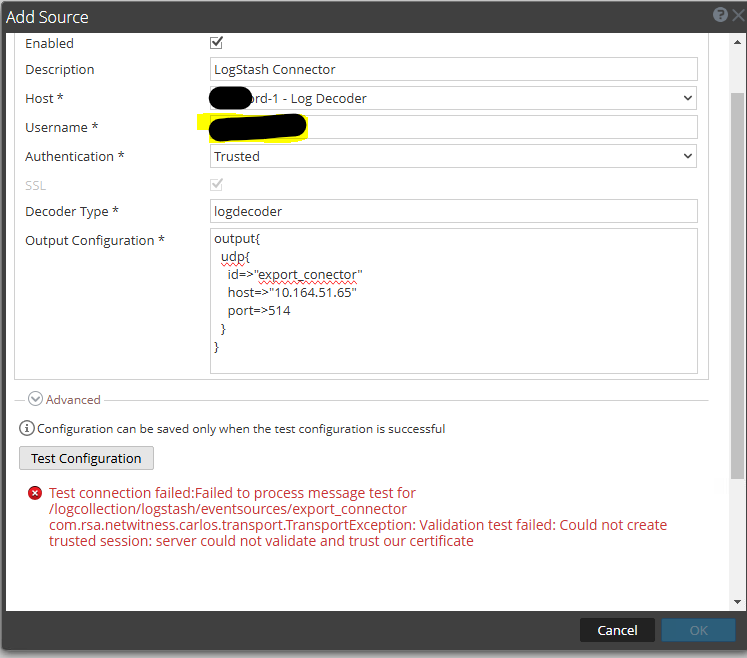
By default, trusted authentication will only work for Export Connector (logstash) data sources if the log collector service is co-located on the same host as the Log Decoder data source. If you attempt to use Trusted Authentication on a data source that is on another host, you will receive a message like this when attempting to test the configuration:
Resolution
In order for the Log Decoder Data Source to trust the Log Collector Export Connector, you must manually add the Log Collector's node-cert.pem to the Log Decoder's trusted certificate list with the following steps:
On the Log Collector host where the Export Connector is intended to be installed and configured:
-
scp this file: /etc/pki/nw/node/node-cert.pem to the Log Decoder Data Source to in the /root/ directory. Example:
scp /etc/pki/nw/node/node-cert.pem root@192.168.5.166:/root - Obtain the salt-minion ID of the Log Collector, which will be used for verification purposes later. Example:
[root@NW11-VLC ~]# cat /etc/salt/minion
master: nw-node-zero
hash_type: sha256
log_level: warning
log_level_logfile: info
id: 8c325d86-fadc-4909-a697-3b601038dd20
On the Log Decoder where the Data Source is located:
- SSH to the host and open NwConsole. Example:
[root@NEW-N11-ENDPOINT ~]# NwConsole
RSA NetWitness NextGen Console 12.5.1.3
Copyright (c) 2001-2025, RSA Security LLC or its affiliates. All Rights Reserved.

Type "help" for a list of commands or "man" for a list of manual pages. - Login using an Administrator level service account. Example:
Type "help" for a list of commands or "man" for a list of manual pages.
> login 127.0.0.1:50002 admin netwitness
Successfully logged in to 127.0.0.1:50002 as session 9300 - Add the Certificate you SCP'd from the Log Collector earlier with the following command:
-
send /sys peerCert op=add --file-data=/root/node-cert.pem
- Example:
[127.0.0.1:50002] /> send /sys peerCert op=add --file-data=/root/node-cert.pem
Success
-
- While still in NwConsole, list out the certificates on the Log Decoder and ensure you see the matching salt-minion ID from the Log Collector present in that list (8c325d86-fadc-4909-a697-3b601038dd20). Example:
[127.0.0.1:50002] /> send /sys peerCert op=list- Example of the newly added certificate and how it appears in that list (usually near the bottom). Note the matching salt-minion ID:
"ea03eff5.0" C = US, ST = VA, L = Reston, O = RSA, OU = NetWitness, CN = 8c325d86-fadc-4909-a697-3b601038dd20
sha-1:71:00:44:CF:DF:4E:51:FA:12:5D:D9:C1:87:D6:76:24:9E:4D:4F:04
- Example of the newly added certificate and how it appears in that list (usually near the bottom). Note the matching salt-minion ID:
On the Log Decoder, restart the Log Decoder service:
systemctl restart nwlogdecoder
On the Log Collector, restart the Log Collector and Logstash services:
systemctl restart logstash nwlogcollector
Wait for everything to come back up fully, then try and add the event source back with Trusted authentication .
Notes
Reference Links for the Export Connector:
https://50269063.hs-sites.com/knowledge-base/ConfigureLogstashEventSourcesinNetWitness
https://50269063.hs-sites.com/knowledge-base/669112
Product Details
NetWitness Product Set: NetWitness Logs & Network
NetWitness Product/Service Type: Log Collector, Log Decoder, Logstash, Export Connector
NetWitness Version/Condition: 12.4+
Platform: AlmaLinux
Approval Reviewer Queue
Technical approval queue