.png?width=180&height=32&name=NW%20Logo%20(2).png)
F5 BIG IP - NetWitness Perfect Forward Secrecy Inspection VisibilityF5 BIG IP - NetWitness Perfect Forward Secrecy Inspection Visibility
This topic discusses Perfect Forward Secrecy (PFS) Inspection Visibility with F5 BIG-IP Local Traffic Manager (LTM) and NetWitness Decoder integration.
NetWitness Decoder allows administrators to receive session keys from PFS sessions and decrypt each session traffic. It can receive session keys through its RESTful port, the PFS encrypted traffic through its capture interface, and supports the traffic decryption for inspection.
This solution utilizes functionality in iRule to extract session keys and deliver them to NetWitness Decoder via a sideband connection.
Prerequisites
A few prerequisites need to be considered in your environment for the integration of BIG-IP LTM and NetWitness Decoder.
-
Deploy and Configure BIG IP LTM External Virtual Server (version 15.1.5 and above)
-
Configure Client SSL Profile with TLS 1.3 enabled.
-
Configure Server SSL Profile with TLS 1.3 enabled.
-
-
Deploy and Configure NetWitness Decoder NON-FIPS (version 12.0 and above)
-
Allow NetWitness Decoder RESTful port (default 50104) in your Network Firewall to receive keys from BIG-IP LTM.
-
NetWitness Decoder receives keys via HTTPS on RESTful port.
-
-
Create an Administrator account on the Decoder Device with role permissions security.roles: decoder.manage to forward TLS keys to Decoder.
-
Example name: bigip-service
-
-
Consider deploying NetWitness Decoder close to BIG-IP LTM so that it's feasible to mirror the encrypted traffic via TAP or Switch and avoid Network Latency in receiving TLS keys.
-
Deployment
-
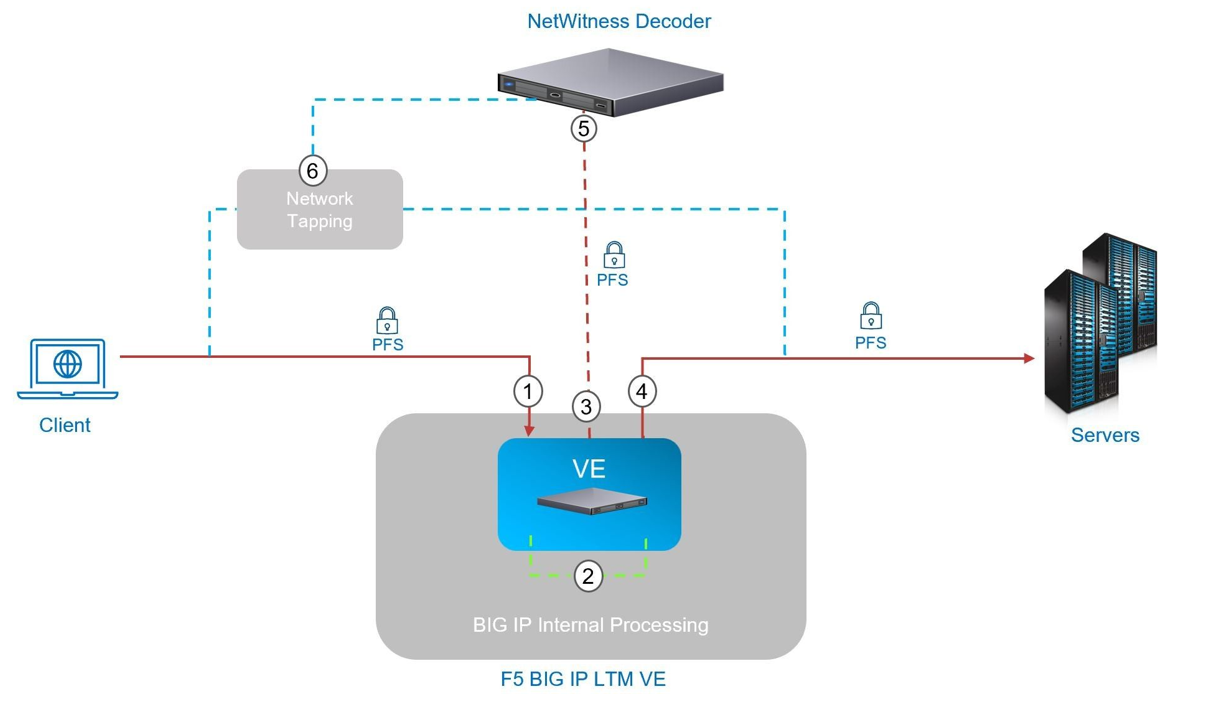
A client connects to BIG-IP LTM using TLS with PFS cipher. The External Virtual Server has clientssl profile to decrypt traffic for inspection.
-
While inspecting the traffic an iRule on External Virtual Server collects the session keys and makes a sideband connection to Internal Virtual Server with the NetWitness Decoder as a pool member. The Internal Virtual Server has a serverssl profile to ensure traffic between BIG-IP LTM and NetWitness Decoder is protected since session keys are forwarded.
-
The Internal Virtual Server has a HTTP profile applied to manage the key transfer via HTTPS between BIG-IP LTM and NetWitness Decoder. Oneconnect profile is utilized and session keys will be sent on existing connections if available to reduce the connection setup overhead with NetWitness Decoder.
-
The External Virtual Server also has a serverssl profile to re-encrypt the traffic back to server pool.
-
The NetWitness Decoder receives the TLS keys from BIG-IP LTM on its RESTful port and decrypts the traffic ingested.
-
The Payload is not sent from BIG-IP LTM to NetWitness Decoder, this is received either from port mirroring configurations or a Network TAP infrastructure as shown above.
BIG-IP LTM Configurations
The BIG-IP configuration objects required include the following:
-
HTTPS Monitor for monitoring NetWitness Decoder Node and Pool status (e.g online, offline etc…)
-
Node and Pool objects for NetWitness Decoder.
-
HTTP profile for managing key transfer to NetWitness Decoder via HTTPS.
-
Server SSL profile for HTTPS sideband connection to NetWitness Decoder.
-
Internal Virtual Server for receiving session keys and sideband communication with NetWitness Decoder.
-
iRule: for session keys copying and sideband communication with Internal Virtual Server.
HTTPS Monitor
-
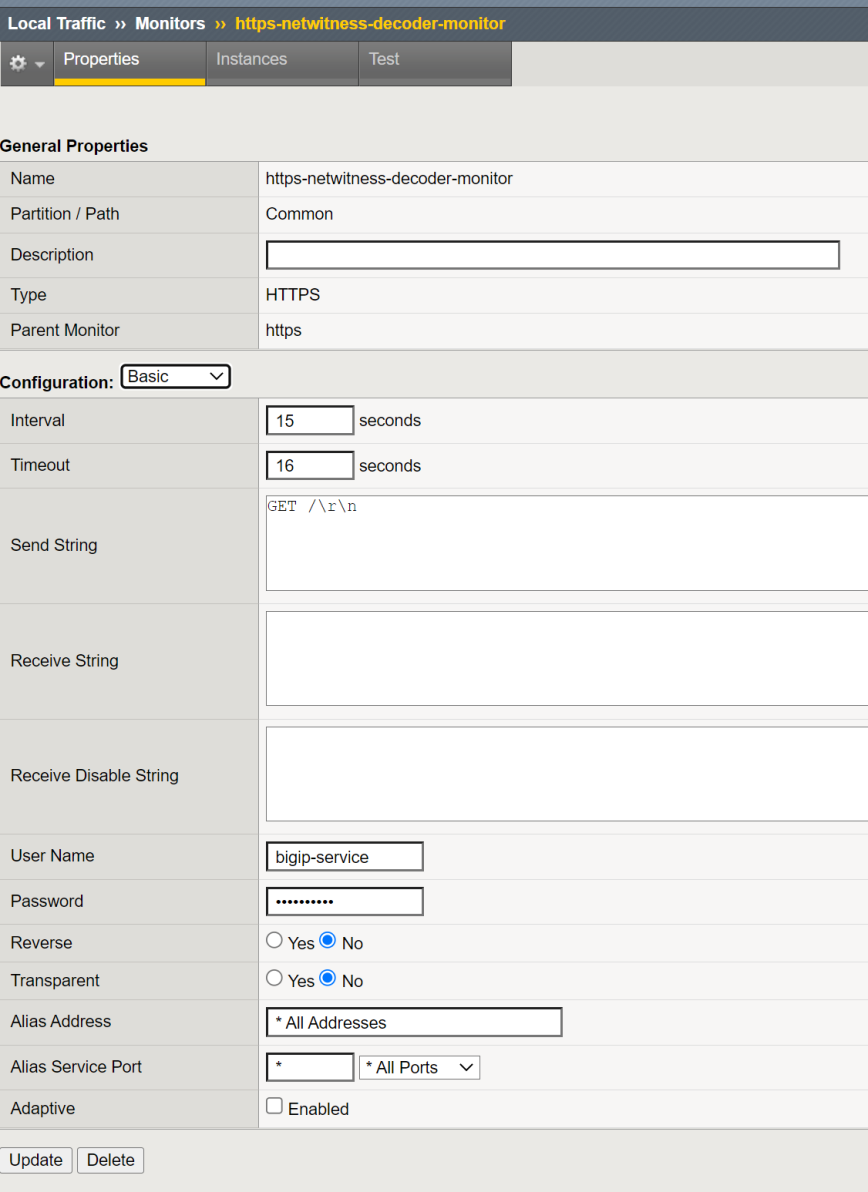
Configure HTTPS monitor for NetWitness Decoder.
-
Set the User Name and Password of the Administrator account created on Decoder device for BIG-IP transactions. Example Configuration using bigip-service account.
ltm monitor https /Common/https-netwitness-decoder-monitor
{
adaptive disabled
defaults-from /Common/https
destination *.50104
interval 15
ip-dscp 0
password
recv none
recv-disable none
send "GET /\r\n"
ssl-profile /Common/serverssl-secure
time-until-up 0
timeout 16
username bigip-service
}
Pool & Node
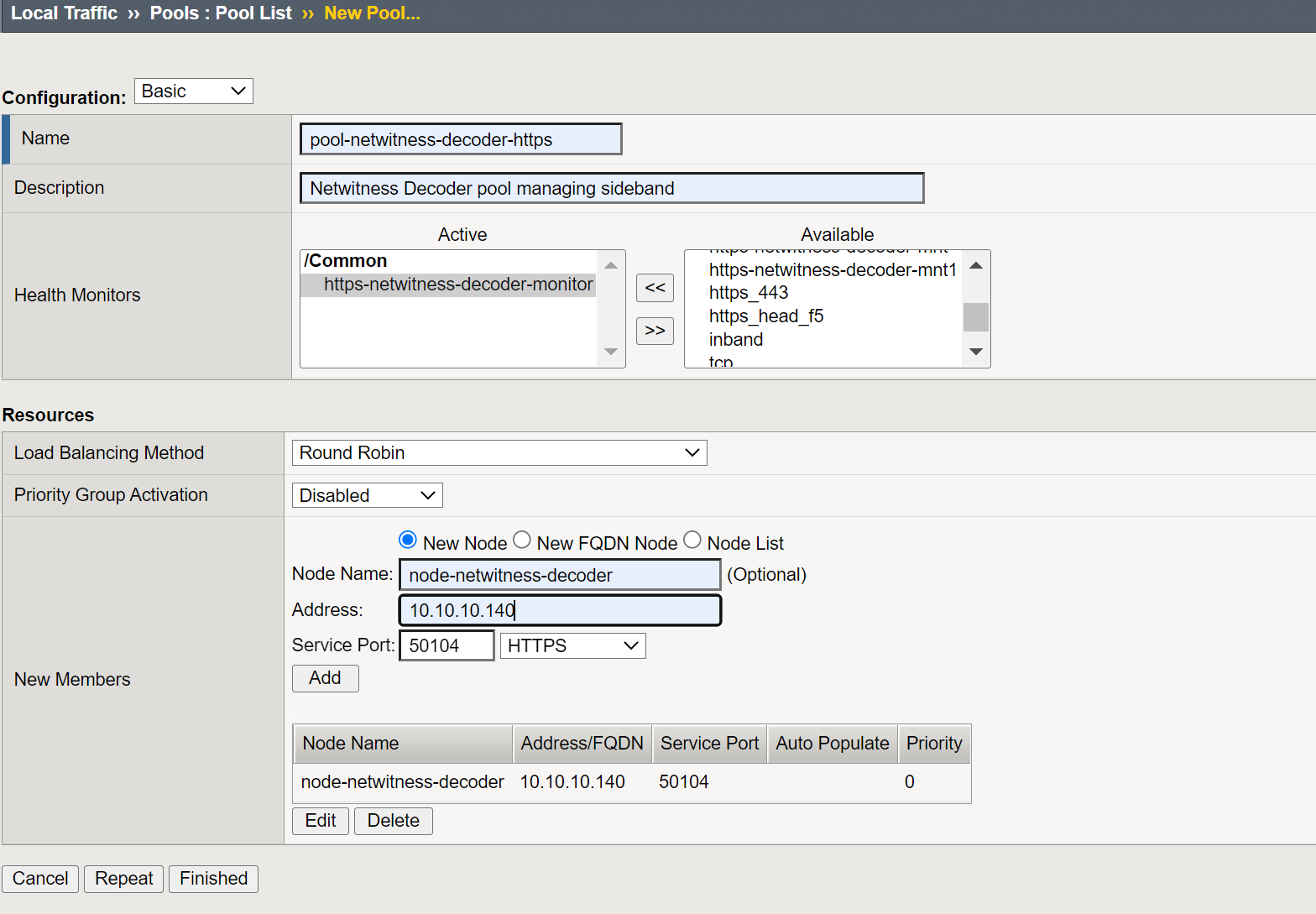
Configure Pool and Node objects.
-
Select Health Monitors https-NetWitness-decoder-monitor
-
Add New Node with the following:
-
Set Node Name example: node-NetWitness-decoder
-
Address:
, Service Port: 50104 HTTPS and then click Add.
-
-
Click Finished to create Pool with a Node.
ltm pool /Common/pool-netwitness-decoder-https {
members {
/Common/node-netwitness-decoder:50104 {
address 10.10.10.140
}
}
monitor /Common/https-netwitness-decoder-monitor
}
HTTP Profile
-
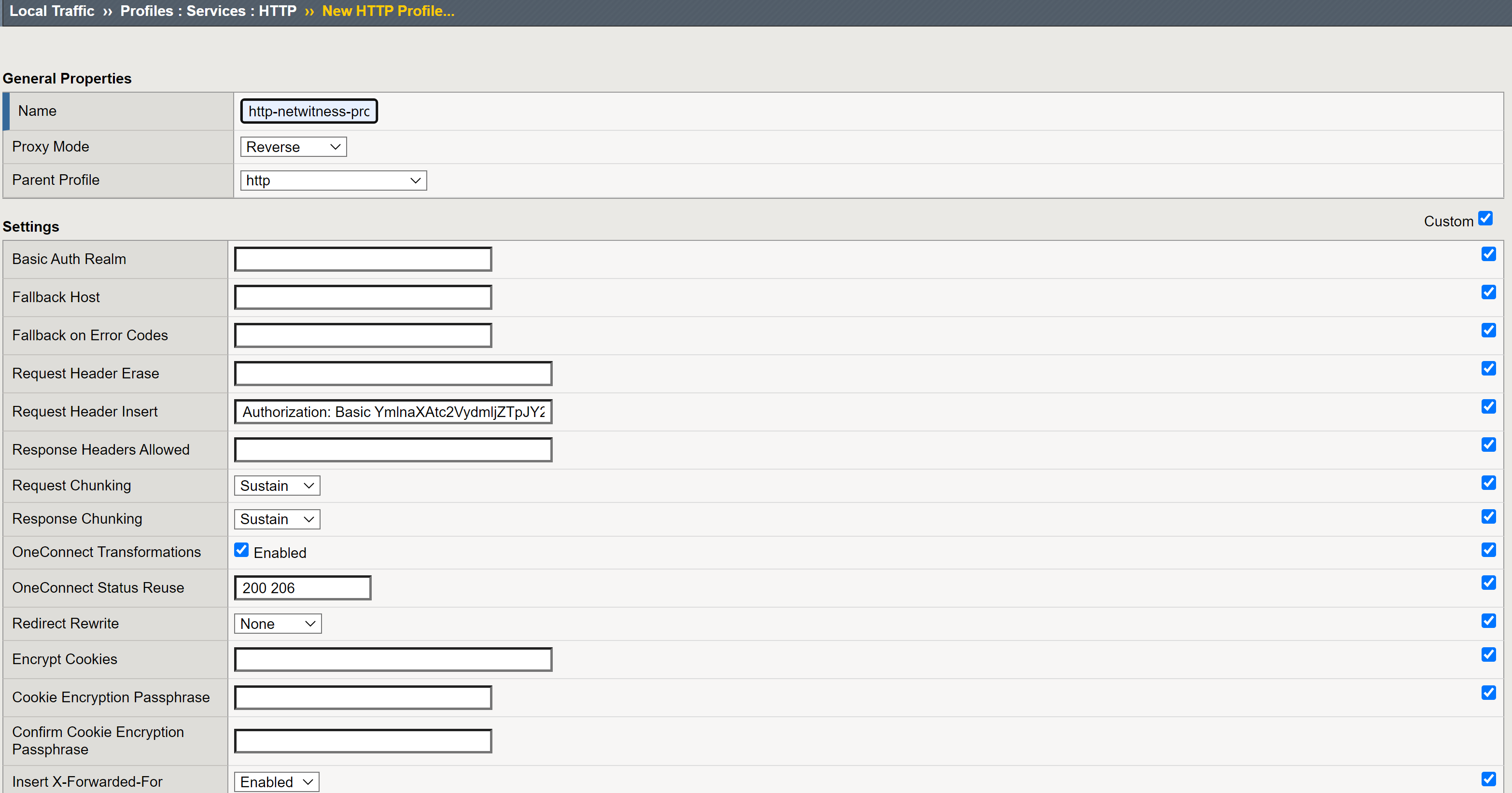
Configure HTTP Profile Name http-NetWitness-profile to authenticate NetWitness Decoder device and send TLS keys.
-
Set Parent Profile as http
-
Check the Custom check box to edit the Settings.
-
Set Request Header Insert field with basic Authorization header string
-
"Authorization: Basic
" -
Example: "Authorization: Basic YmlnaXAtc2VydmljZTpJY2FuU2VleW91QDEyMyE="
-
Where
-
username - Administrator account on Decoder device (example: bigip-service)
-
password - The account password
-
-
-
Set Insert X-Forwarded-For as Enabled , this would add X-Forwarded-For header with the original Client IP of the session.
Rest of the other configurations can remain as default values.
ltm profile http /Common/http-NetWitness-profile {
accept-xff disabled
app-service none
basic-auth-realm none
defaults-from /Common/http
encrypt-cookies none
enforcement {
known-methods { CONNECT DELETE GET HEAD LOCK OPTIONS POST PROPFIND PUT TRACE UNLOCK }
max-header-count 64
max-header-size 32768
max-requests 0
pipeline allow
rfc-compliance disabled
truncated-redirects disabled
unknown-method allow
}
fallback-host none
fallback-status-codes none
header-erase none
header-insert "Authorization: Basic YmlnaXAtc2VydmljZTpJY2FuU2VleW91QDEyMyE="
hsts {
include-subdomains enabled
maximum-age 16070400
mode disabled
preload disabled
}
insert-xforwarded-for enabled
lws-separator none
lws-width 80
oneconnect-status-reuse "200 206"
oneconnect-transformations enabled
proxy-type reverse
redirect-rewrite none
request-chunking sustain
response-chunking sustain
response-headers-permitted none
server-agent-name BigIP
sflow {
poll-interval 0
sampling-rate 0
}
via-request preserve
via-response preserve
xff-alternative-names none
}
Server SSL Profile
-
Set server-ssl profile Name NetWitness-serverssl-secure
-
Select Advanced from Configuration.
-
Set f5-secure from Ciphers > Cipher Group.
-
(Optional) Disable no-TLS1.3 in options which enables TLS 1.3 between BIG-IP and NetWitness Decoder.
-
Click Update to create server-ssl profile.
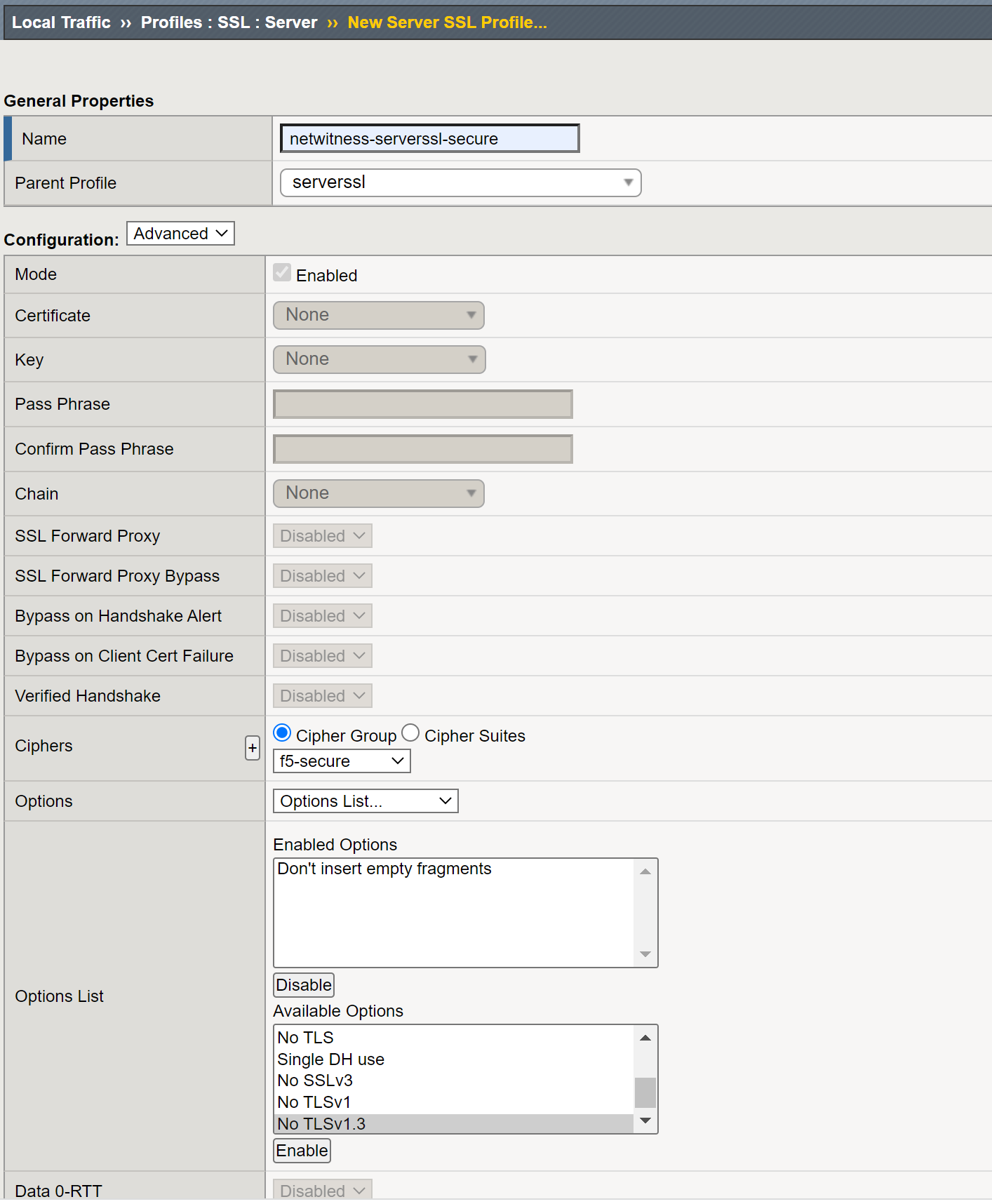
ltm profile server-ssl /Common/NetWitness-serverssl-secure {
app-service none
cipher-group /Common/f5-secure
ciphers none
defaults-from /Common/serverssl
options { no-ssl }
renegotiation disabled
}
Internal Virtual Server
-
Create an Internal Virtual server to manage sideband connection to NetWitness Decoder and forward keys.
-
Set Name as NetWitness-virtual-server-sideband and add Description for virtual server.
-
Let the Source Address be blank, and it would default to 0.0.0.0.
-
Set Destination Address/Mask to 1.1.1.1; this is a non-routable IP address and is used internally.
-
Set Service Port to 56104 , a virtual non-routable port used internally.
-
Select HTTP Profile (Client) http-NetWitness-profile that was created earlier. By default, Server inherit Client profile.
-
Select SSL Profile (Server) NetWitness-serverssl-secure which was created earlier. This would be used by the Pool pool-NetWitness-decoder-https when connecting to NetWitness Decoder.
-
Select Source Address Translation Auto-Map.
-
Select OneConnect Profile oneconnect.
-
Select Default Pool pool-NetWitness-decoder-https which was created earlier.
-
Click Finished to create Internal Virtual Server.
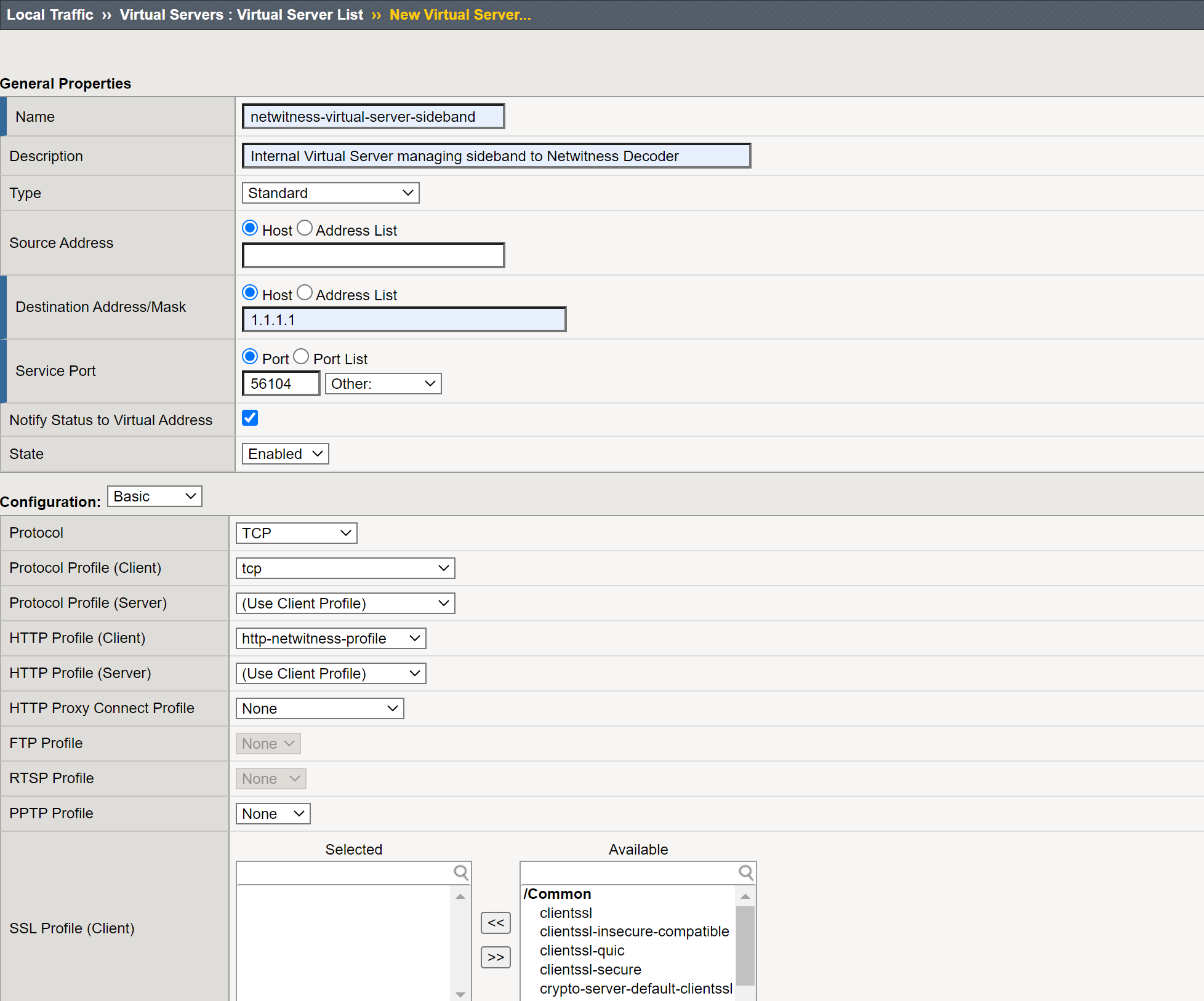
ltm virtual /Common/NetWitness-virtual-server-sideband {
description "Internal Virtual Server managing sideband to NetWitness Decoder"
destination /Common/1.1.1.1:56104
ip-protocol tcp
mask 255.255.255.255
pool /Common/pool-NetWitness-decoder-https
profiles {
/Common/http-NetWitness-profile { }
/Common/NetWitness-serverssl-secure {
context serverside
}
/Common/oneconnect { }
/Common/tcp { }
}
serverssl-use-sni disabled
source 0.0.0.0/0
source-address-translation {
type automap
}
translate-address enabled
translate-port enabled
}
iRule Session keys copying and Sideband communication
Configuration
-
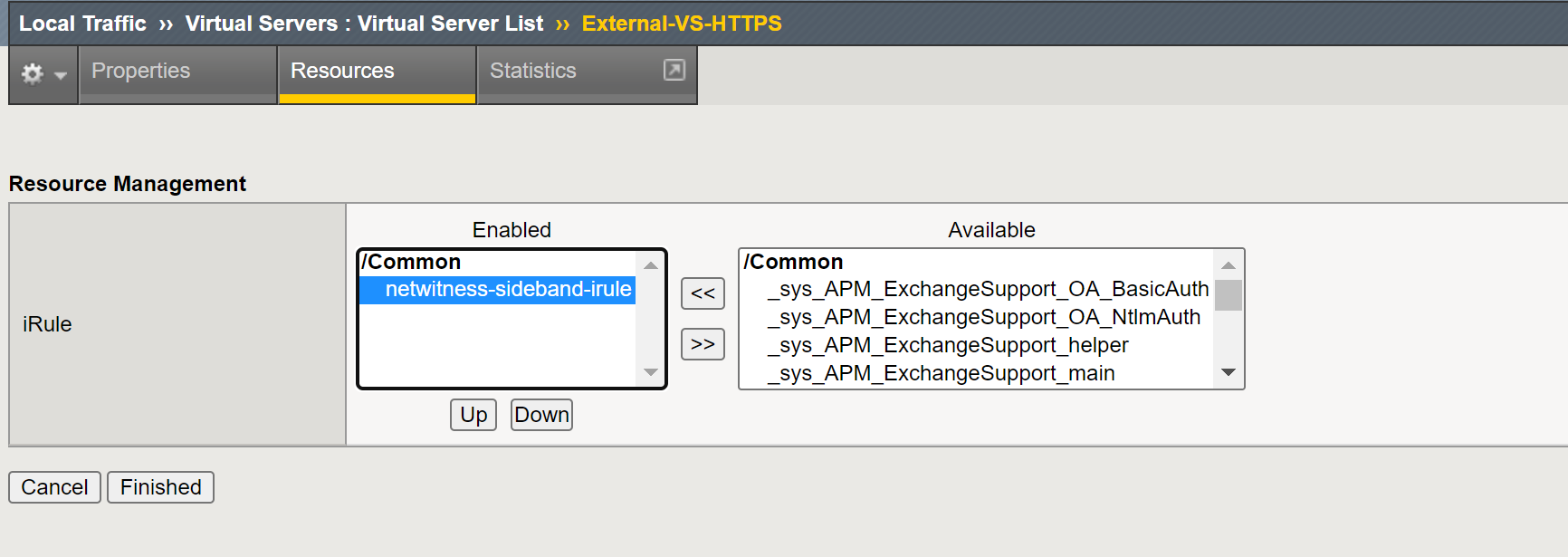
Configure and add the following netwitness-sideband-irule iRule in your External Virtual Server, as an Administrator
-
Set variable static::virtual_server in RULE_INIT with name of Internal Virtual Server of your environment.
-
Example set static::virtual_server "NetWitness-virtual-server-sideband"
-
-
(Optional) If you would like to disable extracting keys for Client side communication, then comment the routine CLIENTSSL_HANDSHAKE.
-
(Optional) If you would like to disable extracting keys for Server side communication, then comment the routine SERVERSSL_HANDSHAKE.
-
(Optional) For any additional troubleshooting uncomment the log messages.
iRule NetWitness-sideband-irule
# The script extracts TLS keys from PFS (Perfect Forward Secrecy) communication between client and server, then it forwards
# the keys to internal virtual server via sideband connection. The internal virtual server then send the keys to
# NetWitness Decoder for TLS Decryption.
#
# Configuration Steps:
#
# 1. (Required) As an administrator you would need to set variable static::virtual_server with name of internal virtual server of your environment.
# 2. (Optional) If you would like to disable extracting keys for Client side communication, then comment the routine CLIENTSSL_HANDSHAKE.
# 3. (Optional) If you would like to disable extracting keys for Server side communication, then comment the routine SERVERSSL_HANDSHAKE.
# 4. (Optional) For any additional troubleshooting uncomment the log messages.
#
#
# Note: By default the script enables routines CLIENTSSL_HANDSHAKE and SERVERSSL_HANDSHAKEto to send ssl keys for client and server communication. If you
# are not mirroring the traffic from client or server to NetWitness Decoder then you can consider disabling the corresponding routines in
# the script, this would avoid forwarding keys to NetWitness Decoder.
when RULE_INIT {
# Here, you must define the name of the sideband virtual server to send secrets
set static::virtual_server "NetWitness-virtual-server-sideband"
set static::sslkeys_query "/decoder?msg=sslKeys"
}
when CLIENTSSL_HANDSHAKE
{
call sendSecrets "Client HandShake"
}
when SERVERSSL_HANDSHAKE
{
call sendSecrets "Server Handshake"
}
proc sendSecrets {mode}
{
if {[SSL::cipher version] == "TLSv1.3" } {
#log local0. "$mode: CLIENT_HANDSHAKE_TRAFFIC_SECRET [SSL::clientrandom] [SSL::tls13_secret client hs]"
set secrets "random=[SSL::clientrandom]"
if { [SSL::tls13_secret client early] ne "" } {
set secrets "$secrets&CETS=[SSL::tls13_secret client early]"
}
set secrets "$secrets&CHTS=[SSL::tls13_secret client hs]&SHTS=[SSL::tls13_secret server hs]&CTS0=[SSL::tls13_secret client app]&STS0=[SSL::tls13_secret server app]"
if { [catch {call sidebandSend $secrets} ] } {
#log local0. "$mode $static::virtual_server sideband is not reachable, ssl version [SSL::cipher version]"
return
}
}
else
{
set secrets "random=[SSL::clientrandom]&premaster=[SSL::sessionsecret]"
if { [catch {call sidebandSend $secrets} ] } {
#log local0. "$mode $static::virtual_server sideband is not reachable, ssl version [SSL::cipher version]"
return
}
}
}
proc sidebandSend {secrets} {
#log local0. "$static::virtual_server launching sidebandSend ..."
set cmp_unit [TMM::cmp_unit]
# Key for session table
set key "${cmp_unit}_conn_${static::virtual_server}"
# Session table data for $key for this dest_addr
set conn [session lookup dest_addr $key]
if { $conn eq "" } {
set conn [connect -timeout 1000 -idle 300 -status conn_status $static::virtual_server]
if { $conn_status ne "connected" }{
#log local0. "Failed to connect to virtual_server $static::virtual_server"
return
}
session add dest_addr $key "$conn" 300
}
else {
# Attempt sideband connection re-use
set conn_info [connect info -status $conn]
set conn_state [lindex [lindex $conn_info 0] 0]
if { $conn_state ne "connected" }{
set conn [connect -timeout 1000 -idle 300 -status conn_status $static::virtual_server]
if { $conn_status ne "connected" }{
#log local0. "Failed to connect on connection re-use to virtual_server $static::virtual_server"
return
}
session add dest_addr $key "$conn" 300
}
}
#log local0. "Sending keys to virtual_server $static::virtual_server ..."
set send_bytes [send -timeout 1000 -status send_status $conn "GET $static::sslkeys_query&$secrets HTTP/1.0\r\n\r\n"]
#log local0. "Sent keys to virtual_server $static::virtual_server ..."
recv -timeout 1 $conn
}
-
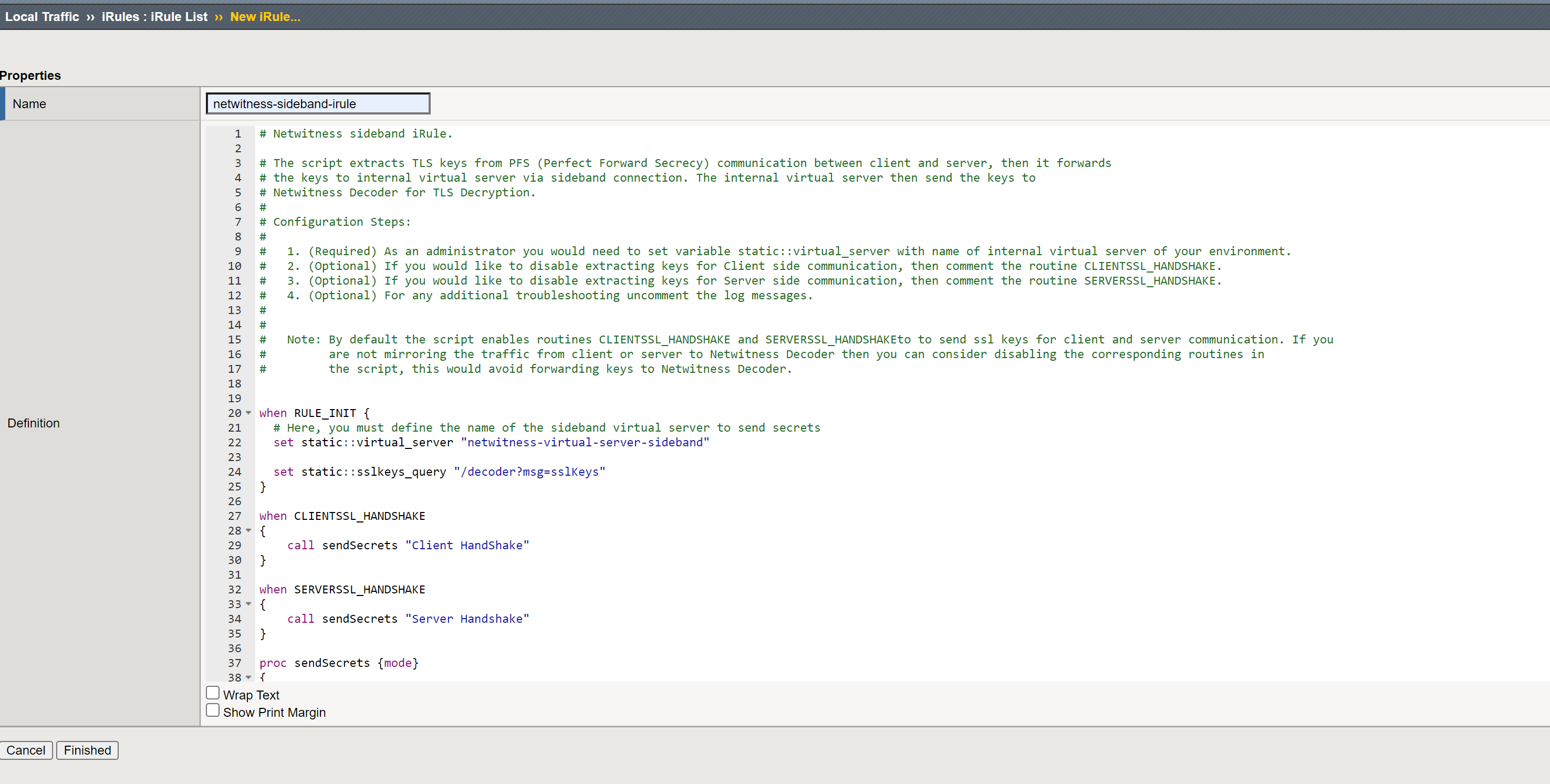
Create iRule in iRule List create wizard
-
Copy the above iRule content to Definition
-
Click Finished to save iRule
Example: Add iRule to External Virtual Server
Select iRule netwitness-sideband-irule and click Finished to add iRule.
(Optional) Configure GENEVE Protocol Parsing
From NetWitness 12.5, Decoder supports parsing GENEVE protocol. GENEVE network protocol is a network encapsulation protocol that allows for flexible and extensible data formats for network virtualization. The GENEVE packet format consists of a compact tunnel header encapsulated in UDP over either IPv4 or IPv6.
The GENEVE header is followed by a set of variable-length options fields in Type-Length-Value format, referred to as GENEVE Tunnel Options. The index configuration defines the GENEVE Tunnel Options. The vendor must provide the specifications for GENEVE Tunnel Options, which must be mapped to the NetWitness format. For more information on how to configure GENEVE Tunnel Options, see the topic "GENEVE Tunnel Options" under "Index Customization" in the Core Database Tuning Guide for NetWitness Platform.