.png?width=180&height=32&name=NW%20Logo%20(2).png)
Issue
When trying to deploy Log Parser Rules to Log decoders. It throws " failed deploying rules to some Log Decoders for log parser" error as below.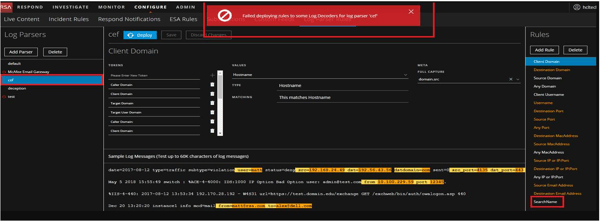
Below log reveals which Log decoder has this problem.
/var/log/netwitness/content-server/content-server.log
Caused by: com.rsa.asoc.transport.nw.session.NextgenException: Invalid username or password
at com.rsa.asoc.transport.nw.session.QueuingMessageListener.receive(QueuingMessageListener.java:188)
at com.rsa.asoc.transport.nw.session.NextgenConnection.receive(NextgenConnection.java:63)
at com.rsa.asoc.transport.nw.session.QueuingMessageListener.sendAndReceive(QueuingMessageListener.java:223)
at com.rsa.asoc.transport.nw.session.NextgenConnection.sendAndReceive(NextgenConnection.java:63)
at com.rsa.asoc.transport.nw.session.QueuingMessageListener.sendAndReceive(QueuingMessageListener.java:231)
at com.rsa.asoc.transport.nw.session.NextgenConnection.sendAndReceive(NextgenConnection.java:63)
at com.rsa.asoc.transport.nw.session.QueuingMessageListener.sendAndReceive(QueuingMessageListener.java:249)
at com.rsa.asoc.transport.nw.session.NextgenConnection.sendAndReceive(NextgenConnection.java:63)
at com.rsa.asoc.transport.nw.session.NextgenConnection.doNetwitnessLogin(NextgenConnection.java:386)
at com.rsa.asoc.transport.nw.session.NextgenConnection.createSessionInternal(NextgenConnection.java:365)
at com.rsa.asoc.transport.nw.session.NextgenConnection.access$100(NextgenConnection.java:64)
at com.rsa.asoc.transport.nw.session.NextgenConnection$1.load(NextgenConnection.java:114)
at com.rsa.asoc.transport.nw.session.NextgenConnection$1.load(NextgenConnection.java:110)
at com.google.common.cache.LocalCache$LoadingValueReference.loadFuture(LocalCache.java:3528)
at com.google.common.cache.LocalCache$Segment.loadSync(LocalCache.java:2277)
at com.google.common.cache.LocalCache$Segment.lockedGetOrLoad(LocalCache.java:2154)
at com.google.common.cache.LocalCache$Segment.get(LocalCache.java:2044)
at com.google.common.cache.LocalCache.get(LocalCache.java:3952)
at com.google.common.cache.LocalCache.getOrLoad(LocalCache.java:3974)
at com.google.common.cache.LocalCache$LocalLoadingCache.get(LocalCache.java:4958)
at com.rsa.asoc.transport.nw.session.NextgenConnection.createSession(NextgenConnection.java:301)
at com.rsa.asoc.transport.nw.session.NextgenConnection.createSession(NextgenConnection.java:264)
at com.rsa.asoc.nw.nextgen.helper.config.LocalCredentialsNextgenConnectionHandler.createSession(LocalCredentialsNextgenConnectionHandler.java:63)
at com.rsa.asoc.nw.nextgen.helper.DefaultNextgenRepositoryEngine.send(DefaultNextgenRepositoryEngine.java:126)
at com.rsa.asoc.nw.nextgen.helper.DefaultNextgenRepositoryEngine.send(DefaultNextgenRepositoryEngine.java:101)
at com.rsa.asoc.nw.nextgen.helper.DefaultNextgenRepositoryEngine.send(DefaultNextgenRepositoryEngine.java:87)
at com.rsa.asoc.nw.nextgen.helper.DefaultNextgenRepositoryEngine.send(DefaultNextgenRepositoryEngine.java:80)
at com.rsa.asoc.content.server.service.parser.ParserManagerBase.isLogDecoderServiceReady(ParserManagerBase.java:194)
... 26 common frames omitted
2019-07-29 09:46:24,714 [ clientInboundChannel-296] INFO Parser|Unable to deploy parser cefmsg-tokens.xml on following log decoders: [ mydecoder - Log Decoder]
/var/log/messages in that log decoder:
Jul 29 09:39:53 mydecoder NwLogDecoder[28165]: [Login] [audit] Failed login attempt for nonexistent user 'content-server' from 10.150.30.12:52156
Caused by: com.rsa.asoc.transport.nw.session.NextgenException: Invalid username or password
at com.rsa.asoc.transport.nw.session.QueuingMessageListener.receive(QueuingMessageListener.java:188)
at com.rsa.asoc.transport.nw.session.NextgenConnection.receive(NextgenConnection.java:63)
at com.rsa.asoc.transport.nw.session.QueuingMessageListener.sendAndReceive(QueuingMessageListener.java:223)
at com.rsa.asoc.transport.nw.session.NextgenConnection.sendAndReceive(NextgenConnection.java:63)
at com.rsa.asoc.transport.nw.session.QueuingMessageListener.sendAndReceive(QueuingMessageListener.java:231)
at com.rsa.asoc.transport.nw.session.NextgenConnection.sendAndReceive(NextgenConnection.java:63)
at com.rsa.asoc.transport.nw.session.QueuingMessageListener.sendAndReceive(QueuingMessageListener.java:249)
at com.rsa.asoc.transport.nw.session.NextgenConnection.sendAndReceive(NextgenConnection.java:63)
at com.rsa.asoc.transport.nw.session.NextgenConnection.doNetwitnessLogin(NextgenConnection.java:386)
at com.rsa.asoc.transport.nw.session.NextgenConnection.createSessionInternal(NextgenConnection.java:365)
at com.rsa.asoc.transport.nw.session.NextgenConnection.access$100(NextgenConnection.java:64)
at com.rsa.asoc.transport.nw.session.NextgenConnection$1.load(NextgenConnection.java:114)
at com.rsa.asoc.transport.nw.session.NextgenConnection$1.load(NextgenConnection.java:110)
at com.google.common.cache.LocalCache$LoadingValueReference.loadFuture(LocalCache.java:3528)
at com.google.common.cache.LocalCache$Segment.loadSync(LocalCache.java:2277)
at com.google.common.cache.LocalCache$Segment.lockedGetOrLoad(LocalCache.java:2154)
at com.google.common.cache.LocalCache$Segment.get(LocalCache.java:2044)
at com.google.common.cache.LocalCache.get(LocalCache.java:3952)
at com.google.common.cache.LocalCache.getOrLoad(LocalCache.java:3974)
at com.google.common.cache.LocalCache$LocalLoadingCache.get(LocalCache.java:4958)
at com.rsa.asoc.transport.nw.session.NextgenConnection.createSession(NextgenConnection.java:301)
at com.rsa.asoc.transport.nw.session.NextgenConnection.createSession(NextgenConnection.java:264)
at com.rsa.asoc.nw.nextgen.helper.config.LocalCredentialsNextgenConnectionHandler.createSession(LocalCredentialsNextgenConnectionHandler.java:63)
at com.rsa.asoc.nw.nextgen.helper.DefaultNextgenRepositoryEngine.send(DefaultNextgenRepositoryEngine.java:126)
at com.rsa.asoc.nw.nextgen.helper.DefaultNextgenRepositoryEngine.send(DefaultNextgenRepositoryEngine.java:101)
at com.rsa.asoc.nw.nextgen.helper.DefaultNextgenRepositoryEngine.send(DefaultNextgenRepositoryEngine.java:87)
at com.rsa.asoc.nw.nextgen.helper.DefaultNextgenRepositoryEngine.send(DefaultNextgenRepositoryEngine.java:80)
at com.rsa.asoc.content.server.service.parser.ParserManagerBase.isLogDecoderServiceReady(ParserManagerBase.java:194)
... 26 common frames omitted
2019-07-29 09:46:24,714 [ clientInboundChannel-296] INFO Parser|Unable to deploy parser cefmsg-tokens.xml on following log decoders: [ mydecoder - Log Decoder]
/var/log/messages in that log decoder:
Jul 29 09:39:53 mydecoder NwLogDecoder[28165]: [Login] [audit] Failed login attempt for nonexistent user 'content-server' from 10.150.30.12:52156
Cause
This is due to certificates missing for the Content Server in Log Decoder.Resolution
Please use the following steps to re-provision the Log Decoder.- Remove the Log Decoder Component from Netwitness GUI->Admin->Hosts page by selecting Log Decoder and clicking "-" button to choose "Remove Host".
- SSH into the Log Decoder and note the UUID using the following command:
cat /etc/salt/minion
- SSH into the Netwitenss Admin Server and run the following command with the UUID collected in the previous step.
orchestration-cli-client --remove-key <UUID>For example:orchestration-cli-client --remove-key a3f9d06f-4f67-4721-9e74-1f127e24e4ad
- Go back to Log Decoder SSH session and run nwsetup-tui
- In the NetWitness Platform Install or Upgrade pane, select option 1 Install (Fresh Install).
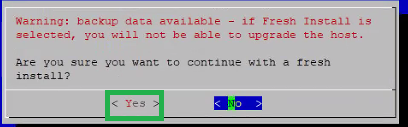
- If you see the following warning, click Yes to continue.
- Make sure to have the Deployment Admin password as it is required to continue.
- Do not change the name or IP address.
- Once this process completes the installation, go to next step.
- Login to Netwitness GUI->Admin->Hosts page and click the Discover button.
- The Log Decoder pops-up and click Enable.
- Once the Log Decoder host is added. Select the Log Decoder host and click Install. Then choose the Log Decoder category under the Install Services panel.
Product Details
RSA Product Set: NetWitness Logs & NetworkRSA Product/Service Type: Core Appliance
RSA Version/Condition: 11.3.1.0
Platform: CentOS
O/S Version: 7
Summary
These steps outline the procedure to fix Log parser rule deployment error by reprovisioning the service.
Approval Reviewer Queue
RSA NetWitness Suite Approval Queue