.png?width=180&height=32&name=NW%20Logo%20(2).png)
Issue
Security Analytics UI gives 'Update Error' in Hosts page Updates after Security Analytics server upgrade to 10.5.1.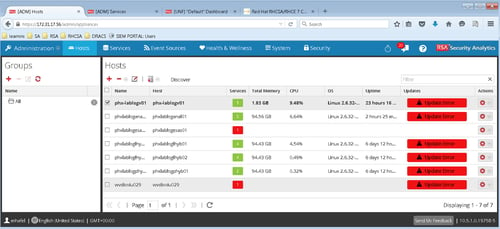
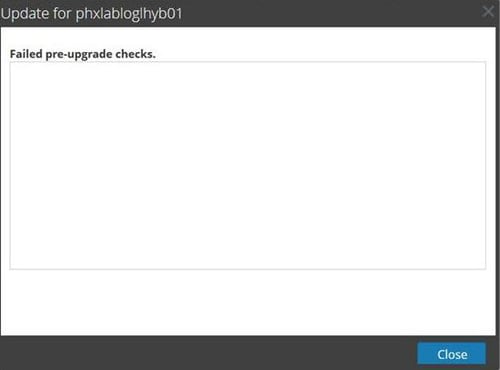
Click on 'Update Error', a window popup with 'Failed pre-upgrade checks Error'.
Following events are logged in /var/log/messages when clicking 'Check Updates'.
2015-10-26 21:27:55,774 [Appliances Check Updates Daemon 1271788055] INFO com.rsa.smc.sa.admin.service.DefaultUpdateRepositoryManifestService - Performing system update pre-check for host
2015-10-26 21:27:55,774 [Appliances Check Updates Daemon 1271788055] ERROR com.rsa.smc.sa.admin.management.update.UpdateRepositoryManifestFileManager - Could not access version information from host 127.0.0.1. Wait a few seconds and select Check Updates again
2015-10-26 21:27:55,775 [Appliances Check Updates Daemon 1271788055] ERROR com.rsa.smc.sa.admin.service.DefaultUpdateRepositoryManifestService - Unknown version for SA server host
2015-10-26 21:27:55,775 [Appliances Check Updates Daemon 1271788055] ERROR com.rsa.smc.sa.admin.service.DefaultUpdateRepositoryManifestService - Host manifest file is not available
Cause
This issue can occur due to one of the following reasons:- The host.manifest file is missing
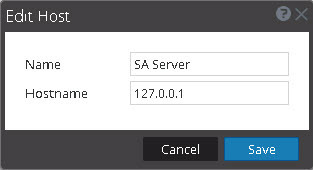
- The Security Analytics hostname is not set to the loopback IP address on the Hosts page.
Resolution
To resolve the issue, follow the steps below.- Make sure that the host.manifest file is on the Security Analytics server in the /var/netwitness/srv/www/rsa/updates/RemoteRPMs/sa/10.5.1/manifest directory.
- If it does not exist, download SecurityAnalytics-10.5.1-Manifest-EL6.zip from SCOL (https://knowledge.rsasecurity.com) to a local directory.
- In the Security Analytics UI, select Administration > System.
- In the left panel, select Updates.
- In the Manual Updates tab, click Upload Files.
- The Upload File dialog is displayed.
- Click and browse to the local directory where you put the SecurityAnalytics-10.5.1-Manifest-EL6.zip file and select the file.
- Click Upload.
- Check /var/netwitness/srv/www/rsa/updates/RemoteRPMs/sa/10.5.1/manifest/ folder to verify that host.manifest exists.
- Go back to Hosts page and verify if Security Analytics server Hostname is 127.0.0.1. If yes, Click Check Updates to verify issue is resolved.
- Select the Security Analytics server on the Hosts page and click Edit.
- Set Hostname to 127.0.0.1 and click Save.
Product Details
RSA Product Set: Security AnalyticsRSA Product/Service Type: Security Analytics UI
RSA Version/Condition: 10.5.1
Approval Reviewer Queue
ASOC Approval Group