.png?width=180&height=32&name=NW%20Logo%20(2).png)
Issue
An attempt to modify or delete remote destination from VLC returns the following warming message.
Warning
Failed to update remote destination: Invalid or missing address: '<IP Address of LC>'
Try adding the device to SA if not already added.
Failed to update remote destination: Invalid or missing address: '<IP Address of LC>'
Try adding the device to SA if not already added.

Cause
It could be an issue if VLC/LC was added to SA Server manually using username/password and is not communicating with SA through trusted connection.Resolution
1) Check LC/VLC connected to SA through trusted connection.If using the trusted connection, Test Connection in the Add Service dialog will complete successfully with the Username and Password left blank.
2) Remove the Destination Collectors in Explore view
a. Get Destination Group name
From the Explore view, right click on
Administration->services->VLC->Explore->event-broker->config->destinations, select
Properties, select
List from the dropdown menu and press the
Send button.
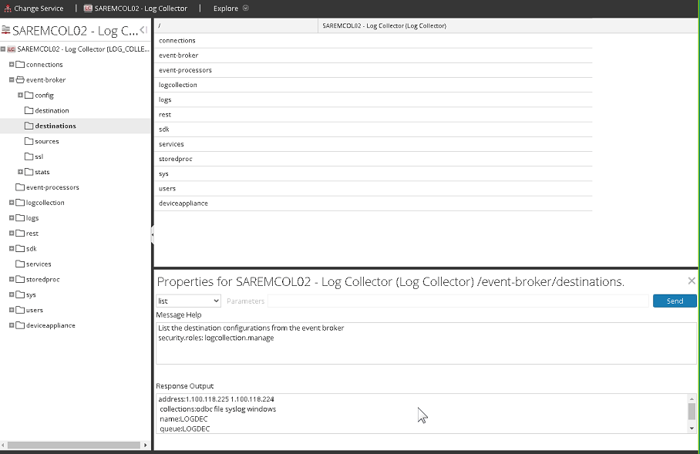
b. Find the Destination Group name and remove using the option remove
Select
remove from the dropdown menu, add
name=

3) Add the Destination Group again
From the Log Collector's Config->Event Destinations, press the + icon under the Destination Groups pane.
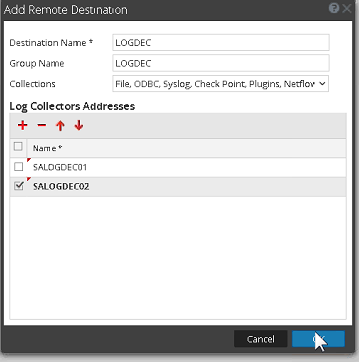

Product Details
NetWitness Product Set: NetWitness PlatformNetWitness Product/Service Type: All Nodes
NetWitness Version/Condition: 12.x
Platform: CentOS/Alma
Approval Reviewer Queue
Technical approval queue