.png?width=180&height=32&name=NW%20Logo%20(2).png)
Issue
Following a successful upgrade of my SA server from 10.6.5 to 11.1.0 Netwitness server, I cannot login using user 'admin' and either my former password or the former default 'netwitness'. I get the message that the account is locked.
Workaround
1. If the Netwitness UI is unreachable you will need to restart the jetty and nginx services. If not then proceed to the next step:a. SSH to Netwitness head-server as root user.
b. Execute the below commands to restart the jetty and nginx services:
#systemctl restart jetty
#systemctl restart nginx
2. Log in to the Netwitness GUI using the deploy_admin user. By default the password for the deploy_admin is netwitness.
#systemctl restart nginx
3. Navigate to the ADMIN > Security screen.

4. Click on the check box for the admin user.

5. Click the unlock button

6. Click on the checkbox for the admin user again.

7. Click the "Reset Password" button.
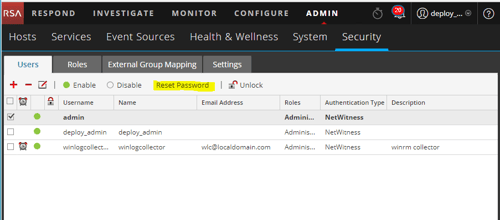
8. Set a new password for the admin user.
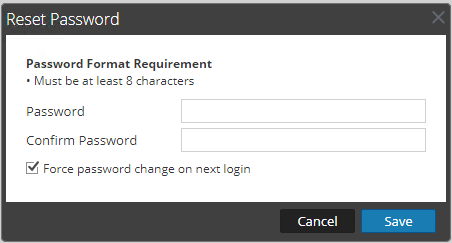
Resolution
Login using deploy_admin user and reset admin password accordingly.See workaround section for further details.
Internal Comments
The versions section of the "articles properties" does not have an option to select version 11.1 for Netwitness Logs and Packets. Once added this field will be populated.
Product Details
Summary
Following the upgrade of NetWitness Logs and Packets, the NetWitness UI cannot be logged into as admin (account locked).
Approval Reviewer Queue
RSA NetWitness Suite Approval Queue