Generate List Dialog
Generate List PanelGenerate List Panel
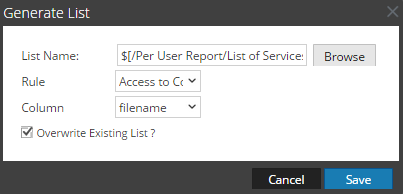
The Generate List dialog allows you to generate and customize a list.
Workflow
This workflow shows the procedure to create and schedule a report.
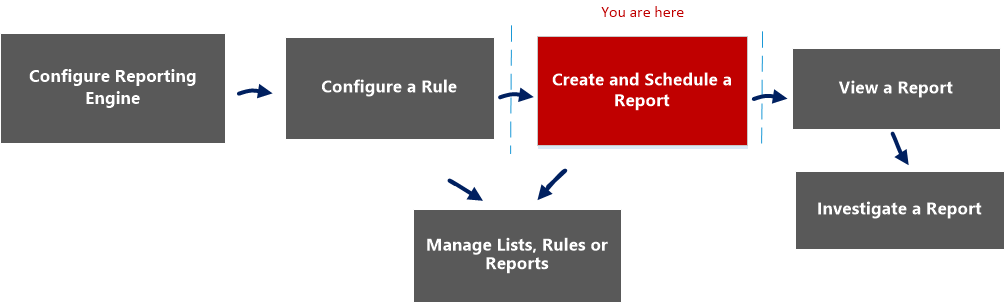
What do you want to do?
- Role: Administrator / Analyst
- I want to ...:
Configure Reporting Engine
- Show me how:
For more information, see "Step 3: Configure Reporting Engine Data Sources" topic in the Reporting Engine Configuration Guide
- Role: Administrator / Analyst
- I want to ...: Create a List or List Group/Create or Deploy a Rule/Test a Rule
- Show me how: Configure a Rule
- Role:
Administrator / Analyst
- I want to ...:
Create and Schedule a Report*
- Show me how:
- Role: Administrator / Analyst
- I want to ...: View a report or list of all reports
- Show me how: View a Report
- Role: Administrator / Analyst
- I want to ...: Investigate a Report
- Show me how: Investigate a Report
- Role: Administrator / Analyst
- I want to ...: Manage/Access Control for lists, Rules or Reports*
- Show me how: Manage Lists, Rules or Reports
*You can complete these tasks here.
Related Topics
Quick View
The following figure is an example of the Generate List dialog.
To access this view:
-
Go to Reports.
The Manage tab is displayed.
-
Click Reports.
The Report view is displayed.
-
In the Reports panel, select a report and click
> Schedule Report.The Schedule a Report view tab is displayed.
-
In the Output Actions section, in Dynamic List panel, click
.The Generate List dialog is displayed.
Features
The following table lists the features in the Generate List dialog.
- Field: List Name
- Description: The name of the list chosen from the List Selection panel.
- Field: Browse
- Description: Click this button to select a list from the List Selection Window dialog.
- Field: Rule
- Description: Select a rule to be used to create the list.
- Field: Column
- Description: Select a value for the column.
- Field: Overwrite Existing List?
- Description: Overwrites the existing list.
- Field: Save
- Description: Adds the desired list to the Generate List panel of the Schedule Report view.
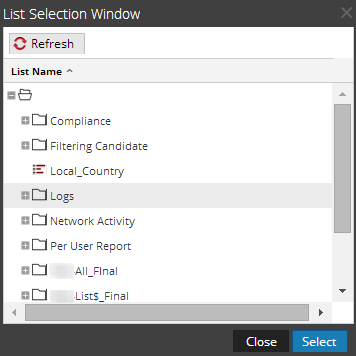
The List Selection Window dialog consists of lists that are defined in the Lists panel. Here, you can select a list to associate it with the report. The following figure shows the dialog.
This section contains the following topics: