.png?width=180&height=32&name=NW%20Logo%20(2).png)
Global Notifications Panel
Global Notifications panel introduces the features for configuring notification settings. Global Notifications configurations define notifications settings for Event Source Management (ESM), Health and Wellness, Global Audit Logging, Event Stream Analysis (ESA), and Respond.
In the Global Notifications panel, you can configure the following global notification settings:
- Notification Outputs
- Notification Servers
- Templates
Note: ESA SNMP notifications are not supported for NetWitness 11.3 and later.
WorkFlow

What do you want to do?
Related Topics
Quick Look
To access the Notifications configuration panel:
- In the main menu, select
 (Admin) > System.
 - In the options panel, select Global Notifications.
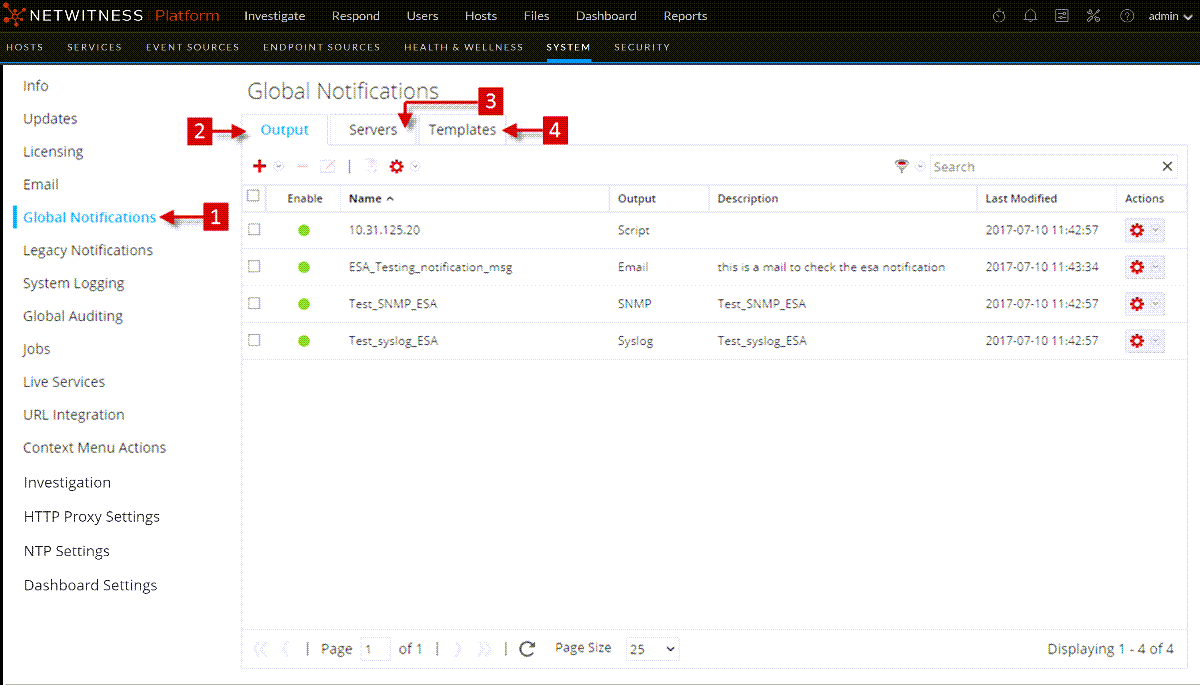
Toolbar and Features
The Global Notifications panel has three tabs: Output, Servers, and Templates.
This table describes the columns in the grid for Notification Outputs and Notification Servers.
This table describes the columns in the grid for Notification Templates.
Global Notifications Panel Toolbar
The Global Notifications panel toolbar is at the top of the Output, Servers, and Templates tabs.
The following figure shows the toolbar on the Output and Servers tabs.

The following figure shows the toolbar on the Templates tab.

The following table describes the features of the Global Notifications panel toolbar.