.png?width=180&height=32&name=NW%20Logo%20(2).png)
Hosts and Services Basics
This guide gives administrators the standard procedures for adding and configuring hosts and services in NetWitness. After introducing you to the basic purpose of hosts and services and how they function within the NetWitness network, this guide covers:
- Tasks you must complete to set up hosts and services in your network
- Additional procedures that you complete based on the long-term and daily, operational needs of your enterprise
- Reference topics that describe the user interface
Go to the NetWitness All Versions Documents page and find NetWitness Platform guides to troubleshoot issues.
What Is a Host?
A host is the machine on which a service runs and can be a physical or virtual machine. See the "NetWitness Detailed Host Deployment Diagram" in the NetWitness Deployment Guide for an illustration of how hosts are deployed.
What Is a Category?What Is a Category?
A category assigns a service or services to a host when you install a host from the Hosts view. You choose a host Category in the Install Services dialog which is displayed when you select a host in the Hosts view and click  . The following table lists each category and the services it installs. See the "NetWitness Detailed Host Deployment Diagram" in the NetWitness Deployment Guide for an illustration of how hosts are deployed.
- Category:
Analyst UI
- Services Installed:
Investigate Server, Broker, NetWitness UI, Reporting Engine, Respond Server
- Category:
Archiver
- Services Installed:
Workbench and Archiver
- Category:
Broker
- Services Installed:
Broker
- Category:
Concentrator
- Services Installed:
Concentrator
- Category:
Endpoint
- Services Installed:
Endpoint Server
- Category:
Endpoint Broker
- Services Installed:
Endpoint Broker Server
- Category:
Endpoint Log Hybrid
- Services Installed:
Log Collector, Log Decoder, Endpoint Server, and Concentrator
- Category:
ESA Primary
- Services Installed:
Contexthub Server and ESA Correlation
- Category:
ESA Secondary
- Services Installed:
ESA Correlation
- Category:
Log Collector
- Services Installed:
Log Collector
- Category:
Log Decoder
- Services Installed:
Log Collector and Log Decoder
- Category:
Log Hybrid
- Services Installed:
Log Collector, Log Decoder, and Concentrator
- Category:
Log Hybrid - Retention
- Services Installed:
Log Collector and Log Decoder (deployed on NetWitness Series 6 Hybrid hardware with Log Hybrid-Retention Optimization)
- Category:
Malware Analysis
- Services Installed:
Malware Analysis and Broker
- Category:
Network Decoder
- Services Installed:
Decoder (Packets)
- Category:
Network Hybrid
- Services Installed:
Concentrator and Network Decoder
- Category:
New Health and Wellness
- Services Installed:
Metrics Server
- Category:
UEBA
- Services Installed:
UEBA
- Category:
Warehouse Connector
- Services Installed:
Warehouse Connector
What Is a Service?
A service performs a unique function, such as collecting logs or archiving data. Each service runs on a dedicated port and is modeled as a plug-in to enable or disable, according to the function of the host.
You must configure the following Core services first:
- Network Decoder
- Concentrator
- Broker
- Log Decoder
All the services are listed below and each service except the Log Collector has its own guide or shares a guide in the Host and Services Configuration Guides section of the NetWitness documentation page on NetWitness Community at https://community.netwitness.com/s/netwitness-platform-documentation. The Log Collector has its own set of configuration guides to handle the configuration for all the supported event collection protocols. For Log Collector information, see Log Collection Guides.
- Services:
NW Server
- Services:
Admin
Config
Content
Integration
Investigate
License
Orchestration
Reporting Engine
Respond
SecurityResponse Actions
- Notes:
Resides within the NW Server
Resides within the NW Server
Resides within the NW Server
Resides within the NW Server
Resides within the NW Serverr
Resides within the NW Server
Resides within the NW Server
Resides within the NW Server
Resides within the NW ServerResides within the NW Server
- Services:
Analyst UI
- Notes:
- Services:
Broker
Investigate Server
NetWitness UI
Reporting Engine
Respond Server - Notes:
Implemented with the Analyst UI
Implemented with the Analyst UI
Implemented with the Analyst UI
Implemented with the Analyst UI
Implemented with the Analyst UI
- Services:
Archiver
- Services:
Archiver
Workbench - Notes:
Core Service
- Services:
Broker
- Services:
Broker
- Notes:
Core Service
- Services:
Concentrator
- Services:
Concentrator
- Notes:
Core Service
- Services:
Endpoint
- Notes:
- Services:
Endpoint Server
- Notes:
- Services:
Endpoint Broker
- Services:
Endpoint Broker Server
- Notes:
- Services:
Endpoint Log Hybrid
- Services:
Log Collector
Log Decoder
Endpoint Server
Concentrator - Notes: Core Service
Core Service
Core Service
- Services:
ESA Primary
- Services:
Contexthub
ESA Correlation - Notes:
- Services:
ESA Secondary
- Services:
ESA Correlation
- Notes:
- Services:
Log Collector
- Services:
Log Collector
- Notes: Core Service
- Services:
Log Decoder
- Services:
Log Collector
Log Decoder - Notes:
Core Service
- Services:
Log Hybrid
- Services:
Log Collector
Log Decoder
Concentrator - Notes:
Core Service
Core Service
- Services:
Log Hybrid - Retention
- Notes:
Deployed on Series 6 Hybrid hardware with Log Hybrid-Retention Optimization.
- Services: Log Collector
Log Decoder - Notes:
Core Service
- Services:
Malware Analysis
- Services:
Malware Analysis
Broker - Notes:
Core Service
- Services:
Network Decoder
- Services:
Decoder (Packets)
- Notes: Core Service
- Services:
Network Hybrid
- Services:
Concentrator
Network Decoder - Notes:
Core Service
Core Service
- Services:
New Health and Wellness
- Notes:
- Services: Metrics Server
- Notes:
- Services:
UEBA
- Services:
UEBA
- Notes:
- Services:
Warehouse Connector
- Services:
Warehouse Connector
- Notes:
Command line installation
You must configure hosts and services to communicate with the network and each other so they can perform their functions such as storing or capturing data. For information about ports and a comprehensive list of ports for all services, see "Network Architecture and Ports" in the Deployment Guide for NetWitness Platform. Go to the NetWitness All Versions Documents page and find NetWitness Platform guides to troubleshoot issues.
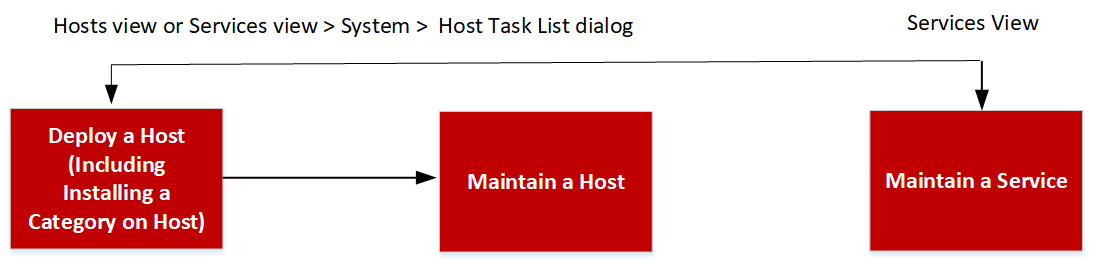
Setting Up a HostSetting Up a Host
You use the Hosts view to add a host to NetWitness. See Step 1. Deploy a Host for detailed instructions.
Maintaining HostsMaintaining Hosts
You use the main Hosts view (  (Admin) > Hosts) to add, edit, delete, and perform other maintenance tasks for the hosts in your deployment. You use the Host Task List dialog to perform tasks relating to a host and its communications with the network. See Hosts and Services Maintenance Procedures for detailed instructions.
After initial implementation of NetWitness, the major task you perform from the Hosts view is updating your NetWitness deployment to a new version.
Update Version Naming Convention
You use the Hosts view to apply the latest version updates from your Hosts and Services Maintenance Procedures. You must understand the update version naming convention to know which version you want to apply to the host. The naming convention is major-release.minor-release.service-pack.patch. For example, if you choose 11.6.1.2, you apply the following version to the host.
- 11 = major release
- 6 = minor release
- 1 = service pack
- 2 = patch
NetWitness supports multiple versions in your deployment. For more information, see Running in Mixed Mode. The NetWitness Server (NW Server Host) is updated first and all other hosts must have the same or earlier version as the NW Server Host.
The following example is a single version deployment with all hosts updated to 11.5.0.0.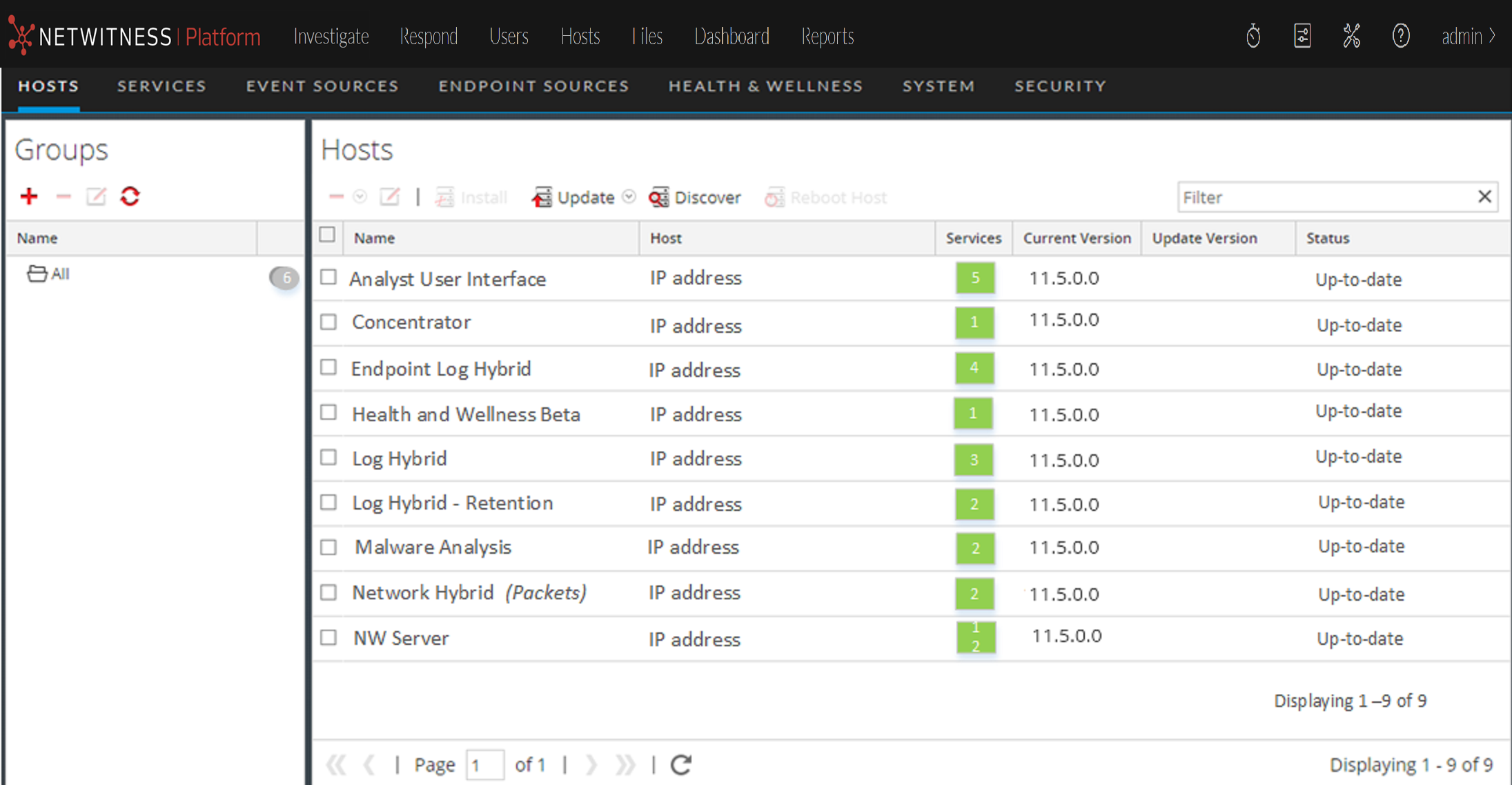
Maintaining ServicesMaintaining Services
You use the Services view ( (Admin) > Services) to add, edit, delete, monitor, and perform other maintenance tasks for the services in your deployment. See Hosts and Services Procedures for detailed instructions.
Services Implemented with the NetWitness Server
The services in the following list are implemented when you deploy the NW Server to support:
- The expansion of physical and virtual deployment platforms and improvements to host and service maintenance.
- Content, Investigate, Respond, and Source functionality.
Caution: You do not need to configure these services to deploy NetWitness. recommends that you monitor the operating status of these services using Health-and-Wellness. Do not attempt to modify the parameters in the Explore view without contacting Customer Support (https://community.netwitness.com/t5/support-information/how-to-contact-netwitness-support/ta-p/563897).
- Service: Admin
- Purpose:
The Administration (Admin) Server is the back-end service for administrative tasks in the NetWitness User Interface (UI). It abstracts authentication, global preferences management, and authorization support for the UI. The Admin server requires the Config server and the Security server to be online to perform its role.
- Service: Config
- Purpose:
The Configuration (Config) Server stores and manages configuration sets. A configuration set is any logical configuration group that is managed independently. The Config server facilitates the sharing of properties among services, provides configuration backup and restore facilities, and tracks changes to properties.
- Service:
Content
- Purpose:
The Content server manages the NetWitness provided and user-created parser rules. For more information on parser management, search for "parsers" in NetWitness Community.
- Service:
Integration
- Purpose:
The Integration Server manages interactions with external systems. The service handles the following outbound or inbound channels.
- REST API Gateway - gateway to external REST clients that assigns calls to the NetWitness Application Programming Interface (API).
- Notifications Dispatcher - centralized dispatcher for all outbound notifications originating in the NetWitness deployment.
- Service: Investigate
- Purpose: The Investigate server supports Investigate and Malware Analysis functionality. For more information see the NetWitness Investigate User Guide.
- Service: Orchestration
- Purpose: The Orchestration server provisions, installs, and configures all services in your NetWitness deployment.