Hosts View - Agent History Tab
Hosts View - Agent History TabHosts View - Agent History Tab
The Agent History tab lists the commands along with the respective status and additional details.
Quick Look
Below is an example of the Agent History tab:
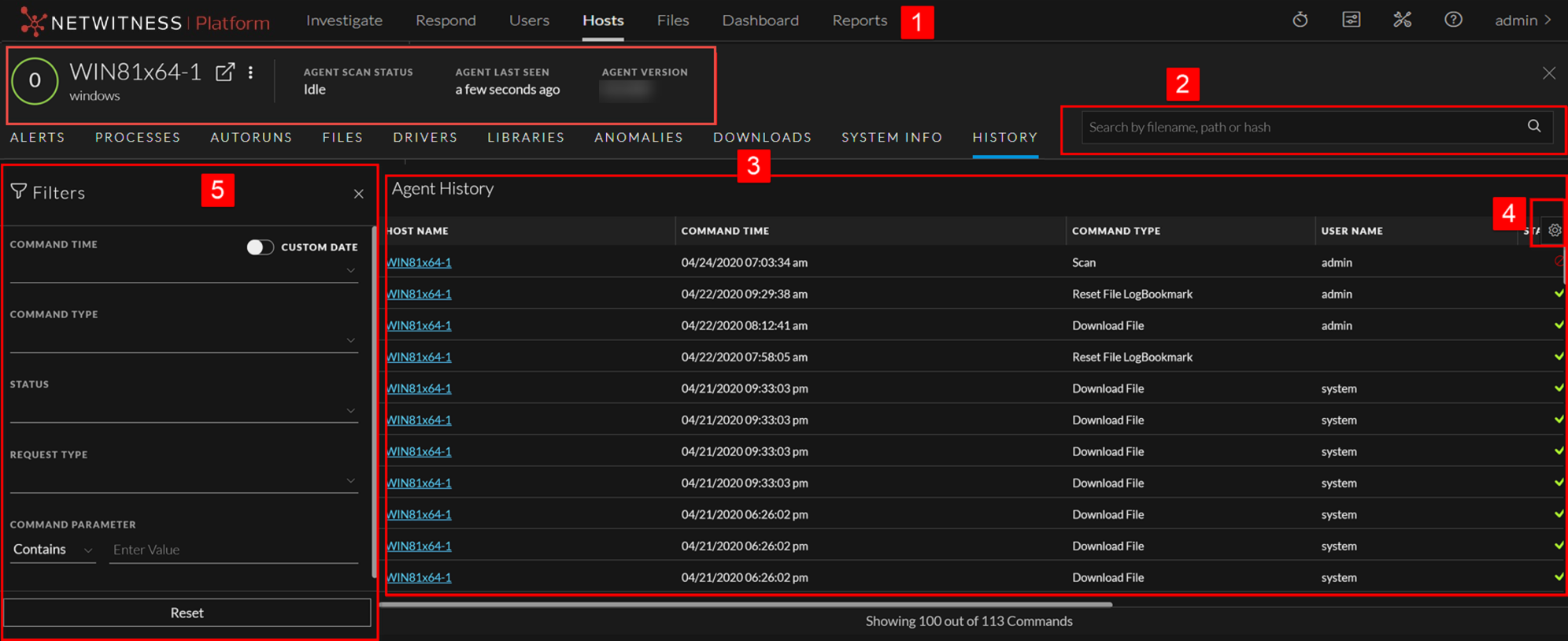
- Column 1: 1
- Column 2:
Agent and Scan Details. You can view the following agent and scan details of the selected host:
Host name - Name of the host. For example, WIN-ABC.
Risk score - Risk score of the host.
Operating System - Operating system on which the agent is running (Linux, Windows, or Mac).
Agent Scan Status - Current status of the scan - Idle, Scanning, Starting Scan, or Stopping Scan. For more information, see Scan Hosts.
Agent Last Seen - Time when the agent last communicated with the Endpoint server.
Agent Version - Version of the agent. For example, 11.3.0.0.
More - Provides options to:
- Start a scan for the selected hosts. For more information, see Scan Hosts.
- Extracts host attributes and endpoint data to a JSON file of the selected snapshot. For more information, see Export Host Attributes.
- Isolation host from the network. For more information, see Isolating Hosts from Network.
- Download MFT to the server. For more information, see Performing Host Forensics.
- Download System Dump to the server. For more information, see System and Process Memory Dump.
-
Perform remediation actions using the Remote Shell option. For more information, see Performing Host Forensics.
- Column 1: 2
- Column 2: Search files on host. Lets you search the files on the host (file name, file path, and SHA-256 checksum).
- Column 1: 3
- Column 2:
Details Panel- Displays information, such as:
- Command Time - Command issued time.
- Command Type - Type of the command (Identity, scan, stop scan, download file, MFT, process dump, system dump, start isolation, update isolation exclusion list, stop isolation, reset file logbookmark, and download multiple files, agent upgrade, and uninstall agent) issued.
- User Name - User who issued the command. For example, Analyst, System.
- Status - Status (success, pending, expired, failed, or cancelled) of the command issued.
Note: If the command's status is expired, it means that the agent is unable to process the command even after five retries.
- Command Parameter - Parameters associated with the command. For example, Command parameter for command type Download File is path = C:\Windows\System32\ | filename = cmd.exe | hash = 6f88fb88ffb0f1d5465c2826e5b4f523598b1b8378377c8378ffebc171bad18b
Note: Command types such as identity, scan, stop scan, stop isolation, system dump do not contain any associated command parameters.
- Processed Time - Time at which the command is completed, pending, expired, failed, or cancelled.
- Last Retrieval time - Last time when the command is issued to the agent.
- Total Retrieval - The number of times the command is issued to the agent.
Note: After you upgrade to NetWitness version 11.5, the commands executed in the previous versions are displayed automatically. The fields such as last retrieval time, total retrieval, and user do not contain any values. For system generated commands, the user field value shows as system.
- Column 1: 4
- Column 2:
Filter Files. You can filter commands by selecting the options in the Filters panel. For more information, see Filter Host Details.
- Column 1: 5
- Column 2: Settings Menu. You can set History view preferences by selecting columns from the Settings menu.