.png?width=180&height=32&name=NW%20Logo%20(2).png)
Issue
I am having an issue on RSA Link such as being unable to login or getting an error message when attempting to access content or downloads and I need to know how to contact RSA Customer Support for assistance.
Resolution
There are three different ways to get assistance with issues and questions relating to RSA Link, which are explained in the sections below.Case Management Portal
If you are able to successfully log in and have registered as a customer or partner then you can access the Case Management portal by clicking on the My Cases option in the website's main menu or by navigating directly to https://community.rsa.com/cases.
On the Case Management portal you will then need to click on the Create Case tab or the Create New Case button to access the case creation form.

You can then select the RSA Link Inquiries option in the I need assistance with drop down list and click Continue to proceed with opening a support case for your issue.
For additional instructions on opening support cases via the Case Management portal you can refer to the article entitled How to open a technical support case via the Case Management portal on RSA Link beginning with Step 4.
RSA Link Contact Form
For those that cannot log in to RSA Link or who do not have access to the Case Management portal, you can use the RSA Link Contact Form by hovering over the CREATE A CASE option in the menu on the RSA Customer Support community and clicking on the OPEN AN RSA LINK SUPPORT CASE option. Alternatively you can also navigate directly to https://community.rsa.com/contact.
Within the form, fill out your contact information underneath the Case Information section, including whether you would prefer to receive a response via email or phone.
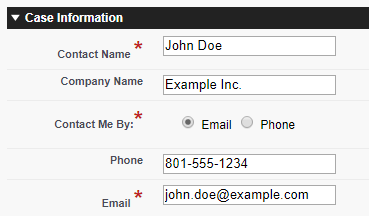
Use the Request For list to indicate which kind of issue you are experiencing on RSA Link.

You can then provide any additional information that may assist in resolving the issue such as your RSA product, your login username (which is generally your email address) and/or the serial number of your product, and then you can proceed with filling out the case subject and description.
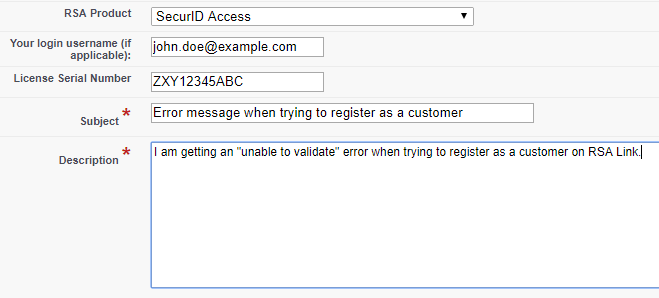
If you have any attachments related to the issue such as screenshots or network trace files, you can attach them to the case under the the Upload Attachments section. To submit the case, check the box labeled I'm not a robot to complete the reCAPTCHA challenge and then click the Submit Case button.

RSA Customer Support Community
An alternative to submitting a support case is to ask a question on the RSA Customer Support community on RSA Link, which you can access by clicking on the Support option in the website's main menu or by navigating directly to https://community.rsa.com/support. You can search the community to see if you question has already been answered, or you can post a new question by hovering over the ASK A QUESTION option in the community main menu and selecting the ASK A QUESTION ABOUT RSA LINK option, or you can click on the green button labeled Ask an RSA Link Question.
Notes
RSA and Dell employees that experience issues with RSA Link should engage the RSA Link team directly rather than following the methods outlined above.Product Details
RSA Link Users
Approval Reviewer Queue
Non-Product Approval Queue