.png?width=180&height=32&name=NW%20Logo%20(2).png)
Issue
Within RSA Link, users have the ability to subscribe to—or "follow"—communities and other pages (referred to as spaces) in order to receive email notifications whenever content is created or updated.While viewing a space on RSA Link, you can quickly tell whether or not you are following a space by looking in the top-right corner and examining the red buttons. If the left-most button is labeled Follow then this indicates that you are not yet following the space, whereas if the button is labeled Following it indicates that you are following the space. If you see the latter then you can click on that button to see what types of notifications you are receiving for the space.
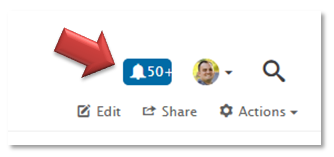
The Following checkbox indicates that you will receive notifications within your RSA Link inbox on the website, which is accessible at https://community.rsa.com/inbox or by clicking on the Notifications icon in the top-right next to your avatar image. (The icon will be blue with a number if you have one or more unread notifications, or will be gray if there are no unread notifications.)
The Inbox option indicates that email notifications will be sent to the email address with which you registered for RSA Link when content is published within the space, assuming your email preferences are not configured to prevent these notifications.
You may also see other options listed within the Following button if you have already configured any custom activity feeds.
However, this method of determining if a space is followed only shows for one space at a time and not a comprehensive list of the spaces followed.Resolution
If you want to see a list of all of the spaces you are following, you can quickly do so by clicking on your avatar image in the top-right corner of the page and then clicking on the Your Places link as shown below.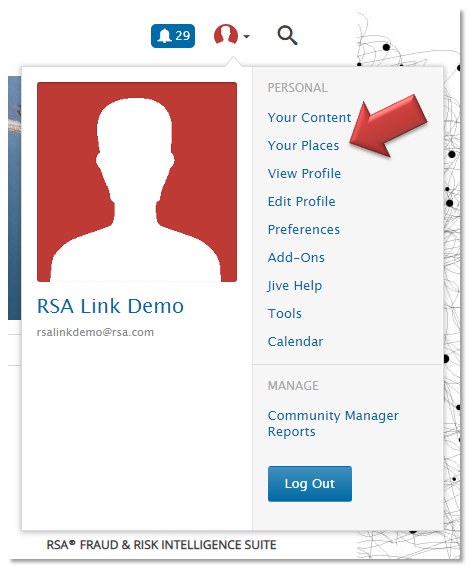
You will be taken to the Places tab within your profile which will display a list of your followed spaces by default, as shown in the example below. From this page you will be able to see the latest activity date/time and number of followers for each. You will also have the ability to adjust your follower settings (i.e. change whether or not you receive email notifications and/or add the space to custom activity feeds) or unfollow spaces from a single location.
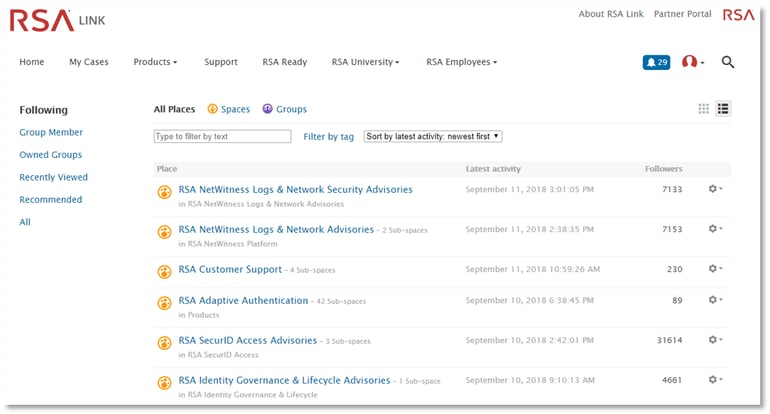
You can view and change your follower settings by clicking on the Settings button in the far right column for a space and then click on the Following link, which will display the follower settings for the space and provide the option to unfollow the space if you desire.
Notes
More information relating to this article can be found in the resources below.- RSA Link Frequently Asked Questions
- How do I subscribe to product advisories on RSA Link?
- Which email preferences in RSA Link are required in order to receive notifications for advisories?
- How to create a custom activity feed on RSA Link
- How to filter email notifications from RSA Link into a specific folder using Microsoft Outlook
If you have additional questions about this functionality, post a question on the RSA Customer Support community within RSA Link for assistance.
Product Details
All RSA Link Users
Approval Reviewer Queue
Non-Product Approval Queue