.png?width=180&height=32&name=NW%20Logo%20(2).png)
Issue
I have a coworker who is no longer with our company and I want to remove him from our company account in RSA Link so that he is no longer able to access our support cases and product downloads.
Resolution
These steps will prevent the removed user from accessing product downloads, but will not automatically revoke their access to the Case Management portal. To have their access revoked in that portal as well, contact RSA Customer Support and reference this article while providing the email address of the user to be removed.
Perform the steps below to remove a user from your company account from within the RSA Case Management portal.- Navigate to RSA Link in a web browser and click on the My Cases option in the main menu to access the Case Management portal.

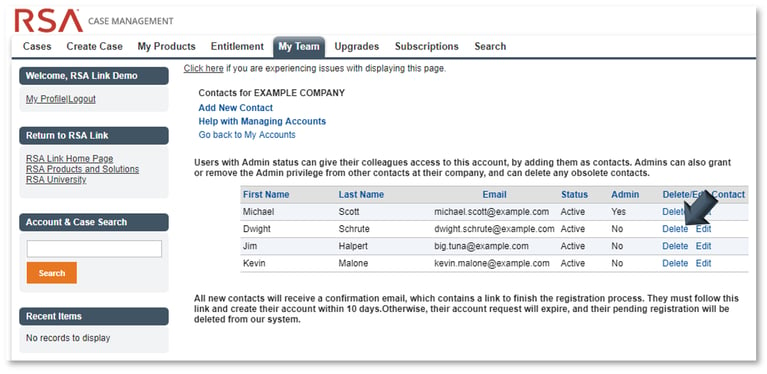
- Click on the My Team tab within the RSA Link Case Management portal.

- Underneath the My Accounts section, click on the hyperlink for your company name underneath the Site Name column.

- Locate the user you wish to remove from the account and click on the respective Delete hyperlink.
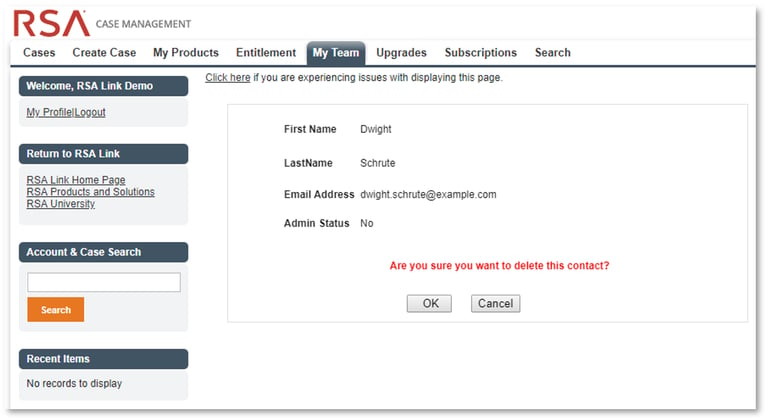
- Click on the OK button to confirm that you wish to delete the user.
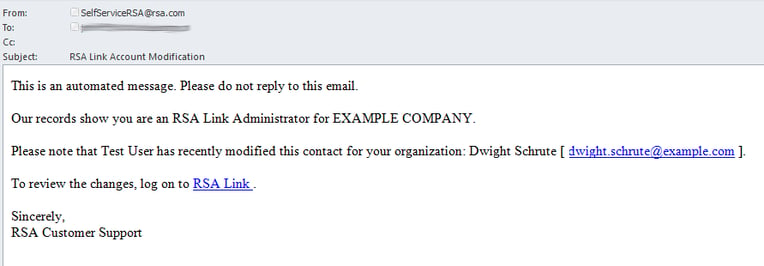
You and all other admin users on your company account will then receive an email confirmation that the user was deleted, as shown below.
Notes
An email will also be sent to the email address of the user that was removed, copying the admin user that performed the removal, to inform him/her that the account has been removed. See the example below.
Product Details
RSA Link (community.rsa.com)RSA Case Management (community.rsa.com/cases)
Version Upgrades Portal (community.rsa.com/version-upgrades)
myRSA (my.rsa.com)
Approval Reviewer Queue
Non-Product Approval Queue