.png?width=180&height=32&name=NW%20Logo%20(2).png)
Issue
Host page is showing errors in the "Status" column after performing manual upgrade.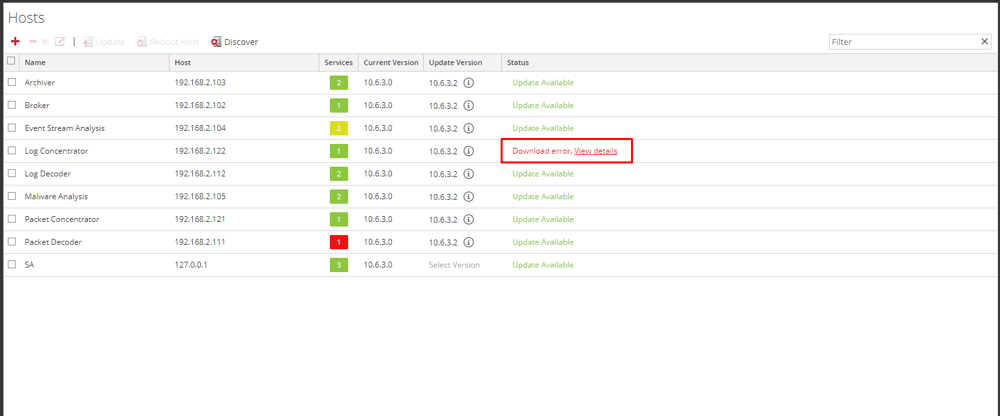
Tasks
A manual upgrade will not update the Mongo database responsible for the Host status, thus we must adjust it manually if there is error.
> db.appliance_update.remove({"identity" : "60547245-3ac3-40c4-8dc6-64f73aee8055"})
> db.appliance_update.find().pretty()
>
> db.appliance_update.find().pretty()
>
Resolution
To resolve the issue for 10.6.x run the following commands on the SA server:
- Open the Puppet Mongo DB.
[root@sa-server ~]# mongo puppet
TokuMX mongo shell v1.4.2-mongodb-2.4.10
connecting to: puppet
TokuMX mongo shell v1.4.2-mongodb-2.4.10
connecting to: puppet
- List all the collections which include appliance_update responsible of the Status column
> show collections
system.indexes 564.00B (uncompressed), 32.00KB (compressed)
nodes 3.76KB (uncompressed), 72.00KB (compressed)
repos 3.38KB (uncompressed), 32.00KB (compressed)
host_manifest 4.23KB (uncompressed), 32.00KB (compressed)
appliance_update 343.00B (uncompressed), 32.00KB (compressed) - We must search in the DB using the Node ID or we can just list all the entries
> db.appliance_update.find().pretty()> db.appliance_update.find({"identity" : " 60547245-3ac3-40c4-8dc6-64f73aee8055"}).pretty()
{
"_id" : ObjectId("5b6c1126e4b0bf6f209ab457"),
"_class" : "com.rsa.smc.sa.admin.management.domain.bean.ApplianceUpdate",
"identity" : " 60547245-3ac3-40c4-8dc6-64f73aee8055",
"status" : " SYNC_ERORR",
"acceptWarning" : false,
"updatedPackageCount" : 0,
"numberOfPackages" : 0,
"packageUpdateError" : false,
"version" : {
"version" : {
"major" : 10,
"minor" : 6,
"servicePack" : 3
},
"patch" : 2
}
} - Finally, we have to remove this entry or we can remove the whole DB in case needed
> db.appliance_update.remove({"identity" : "60547245-3ac3-40c4-8dc6-64f73aee8055"})
> db.appliance_update.find().pretty()
>
> db.appliance_update.find().pretty()
>
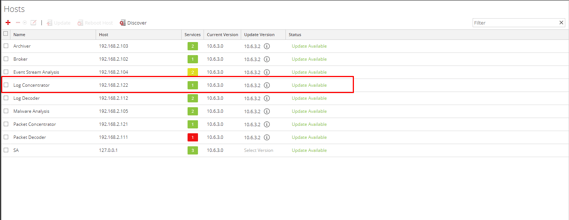
- Navigate again to the host page and double-check the status again
To resolve the issue for 11.x run the following commands on the NW Admin server:
- Open the Mongo DB on the NW Admin server with the deploy_admin password
[root@NWSERVER ~]# mongo admin -u deploy_admin -p
MongoDB shell version v3.4.13
Enter password:
connecting to: mongodb://127.0.0.1:27017/admin
MongoDB server version: 3.4.13
> use sa
switched to db sa - List all the collections which include appliance_update responsible of the Status column
> show collections
OOTBInfo
alertPreferences
appliance_update
atdtopology
counter
dashboard
dashlet
databaseDriver
enrichmentSource
entitlement
host_manifest
imPreferences
log_device_parser
mapping
metaType
meteredLicenseDeviceHistory
notification
odbcDsnTemplate
outputActionProvider
parserType
predicate
reporterPreferences
repos
rule
ruleTemplate
statsWidgetPreference
template
userConnectionAttribute
userInvestigationDevicePreferences
userInvestigationPreferences
userPredicate
OOTBInfo
alertPreferences
appliance_update
atdtopology
counter
dashboard
dashlet
databaseDriver
enrichmentSource
entitlement
host_manifest
imPreferences
log_device_parser
mapping
metaType
meteredLicenseDeviceHistory
notification
odbcDsnTemplate
outputActionProvider
parserType
predicate
reporterPreferences
repos
rule
ruleTemplate
statsWidgetPreference
template
userConnectionAttribute
userInvestigationDevicePreferences
userInvestigationPreferences
userPredicate
- We need to search in the DB using the Node ID or we can just list all the entries
> db.appliance_update.find().pretty()
{
"_id" : "8cd5fdd5-028d-4490-9da8-5a87b6c44751",
"_class" : "com.rsa.smc.sa.admin.management.domain.bean.ApplianceUpdate",
"status" : "REBOOTED",
"acceptWarning" : false,
"version" : {
"major" : 11,
"minor" : 1,
"servicePack" : 0,
"patch" : 0
}
}
{
"_id" : "8edf9b77-7bdc-48cd-858f-5766c277e4c1",
"_class" : "com.rsa.smc.sa.admin.management.domain.bean.ApplianceUpdate",
"status" : "REBOOTED",
"acceptWarning" : false,
"version" : {
"major" : 11,
"minor" : 1,
"servicePack" : 0,
"patch" : 0
}
}
{
"_id" : "a9e37c64-8331-47c9-ae97-eb365c4f293f",
"_class" : "com.rsa.smc.sa.admin.management.domain.bean.ApplianceUpdate",
"status" : "REBOOTED",
"acceptWarning" : false,
"version" : {
"major" : 11,
"minor" : 1,
"servicePack" : 0,
"patch" : 0
}
}
{
"_id" : "621ee484-eaed-4f70-a965-6994ae43a727",
"_class" : "com.rsa.smc.sa.admin.management.domain.bean.ApplianceUpdate",
"status" : "REBOOTED",
"acceptWarning" : false,
"version" : {
"major" : 11,
"minor" : 1,
"servicePack" : 0,
"patch" : 0
}
}
{
"_id" : "529e5432-5c74-4521-8dad-1cc6a0735902",
"_class" : "com.rsa.smc.sa.admin.management.domain.bean.ApplianceUpdate",
"status" : "REBOOTED",
"acceptWarning" : false,
"version" : {
"major" : 11,
"minor" : 1,
"servicePack" : 0,
"patch" : 0
}
}
{
"_id" : "a6bcae5b-6194-40f4-be71-c44ea32a5c8b",
"_class" : "com.rsa.smc.sa.admin.management.domain.bean.ApplianceUpdate",
"status" : "REBOOTED",
"acceptWarning" : false,
"version" : {
"major" : 11,
"minor" : 1,
"servicePack" : 0,
"patch" : 0
}
}
{
"_id" : "44f0b8ad-55cb-440f-8e42-95caa049b4a1",
"_class" : "com.rsa.smc.sa.admin.management.domain.bean.ApplianceUpdate",
"status" : "REBOOTED",
"acceptWarning" : false,
"version" : {
"major" : 11,
"minor" : 1,
"servicePack" : 0,
"patch" : 0
}
}
{
"_id" : "9b7d54e1-d91e-4bc5-b4e6-9d520291fbf6",
"_class" : "com.rsa.smc.sa.admin.management.domain.bean.ApplianceUpdate",
"status" : "REBOOTED",
"acceptWarning" : false,
"version" : {
"major" : 11,
"minor" : 1,
"servicePack" : 0,
"patch" : 0
}
}
{
"_id" : "32c5b77d-309d-45ea-9134-9cd5c04791d8",
"_class" : "com.rsa.smc.sa.admin.management.domain.bean.ApplianceUpdate",
"status" : "REBOOTED",
"acceptWarning" : false,
"version" : {
"major" : 11,
"minor" : 1,
"servicePack" : 0,
"patch" : 0
}
}
{
"_id" : "0916729d-2857-4b3e-b61c-f110daacba07",
"_class" : "com.rsa.smc.sa.admin.management.domain.bean.ApplianceUpdate",
"status" : "INSTALL_COMPLETED",
"acceptWarning" : false,
"version" : {
"major" : 11,
"minor" : 1,
"servicePack" : 0,
"patch" : 0
},
"taskId" : "5ae1e4c18a8efe030768d6f9",
"hostType" : "ESASecondary"
}
{
"_id" : "dabc05db-9491-4742-855a-7030b126ab2a",
"_class" : "com.rsa.smc.sa.admin.management.domain.bean.ApplianceUpdate",
"status" : "INSTALL_COMPLETED",
"acceptWarning" : false,
"version" : {
"major" : 11,
"minor" : 1,
"servicePack" : 0,
"patch" : 0
},
"taskId" : "5ae1e98a8a8efe030768d6fb",
"hostType" : "EndpointHybrid"
}
{
"_id" : "14e269fb-99bc-4d51-9509-61fd8613f120",
"_class" : "com.rsa.smc.sa.admin.management.domain.bean.ApplianceUpdate",
"status" : "INSTALL_COMPLETED",
"acceptWarning" : false,
"version" : {
"major" : 11,
"minor" : 1,
"servicePack" : 0,
"patch" : 0
},
"taskId" : "5ae1eb0d8a8efe030768d6fd",
"hostType" : "EndpointLogHybrid"
}
{
"_id" : "80dc99c0-b0fe-49bc-8cc4-0e12d7cd94e4",
"_class" : "com.rsa.smc.sa.admin.management.domain.bean.ApplianceUpdate",
"status" : "INSTALL_COMPLETED",
"acceptWarning" : false,
"version" : {
"major" : 11,
"minor" : 1,
"servicePack" : 0,
"patch" : 0
},
"taskId" : "5ae1ef298a8efe030768d700",
"hostType" : "LogCollector"
}
{
"_id" : "773b48d5-266c-493d-86d5-89b06a3cd839",
"_class" : "com.rsa.smc.sa.admin.management.domain.bean.ApplianceUpdate",
"status" : "UNSUPPORTED",
"acceptWarning" : false,
"message" : "Update error",
"updateMessageInfo" : {
"headlineMsg" : "Error Message",
"message" : "Updating this host is not supported. Possible reasons may be it was provisioned incorrectly, added to NetWitness Suite manually, or the platform/operating system is unsupported.",
"updateMessages" : [ ]
},
"version" : {
"major" : 11,
"minor" : 1,
"servicePack" : 0,
"patch" : 0
}
}
{
"_id" : "8cd5fdd5-028d-4490-9da8-5a87b6c44751",
"_class" : "com.rsa.smc.sa.admin.management.domain.bean.ApplianceUpdate",
"status" : "REBOOTED",
"acceptWarning" : false,
"version" : {
"major" : 11,
"minor" : 1,
"servicePack" : 0,
"patch" : 0
}
}
{
"_id" : "8edf9b77-7bdc-48cd-858f-5766c277e4c1",
"_class" : "com.rsa.smc.sa.admin.management.domain.bean.ApplianceUpdate",
"status" : "REBOOTED",
"acceptWarning" : false,
"version" : {
"major" : 11,
"minor" : 1,
"servicePack" : 0,
"patch" : 0
}
}
{
"_id" : "a9e37c64-8331-47c9-ae97-eb365c4f293f",
"_class" : "com.rsa.smc.sa.admin.management.domain.bean.ApplianceUpdate",
"status" : "REBOOTED",
"acceptWarning" : false,
"version" : {
"major" : 11,
"minor" : 1,
"servicePack" : 0,
"patch" : 0
}
}
{
"_id" : "621ee484-eaed-4f70-a965-6994ae43a727",
"_class" : "com.rsa.smc.sa.admin.management.domain.bean.ApplianceUpdate",
"status" : "REBOOTED",
"acceptWarning" : false,
"version" : {
"major" : 11,
"minor" : 1,
"servicePack" : 0,
"patch" : 0
}
}
{
"_id" : "529e5432-5c74-4521-8dad-1cc6a0735902",
"_class" : "com.rsa.smc.sa.admin.management.domain.bean.ApplianceUpdate",
"status" : "REBOOTED",
"acceptWarning" : false,
"version" : {
"major" : 11,
"minor" : 1,
"servicePack" : 0,
"patch" : 0
}
}
{
"_id" : "a6bcae5b-6194-40f4-be71-c44ea32a5c8b",
"_class" : "com.rsa.smc.sa.admin.management.domain.bean.ApplianceUpdate",
"status" : "REBOOTED",
"acceptWarning" : false,
"version" : {
"major" : 11,
"minor" : 1,
"servicePack" : 0,
"patch" : 0
}
}
{
"_id" : "44f0b8ad-55cb-440f-8e42-95caa049b4a1",
"_class" : "com.rsa.smc.sa.admin.management.domain.bean.ApplianceUpdate",
"status" : "REBOOTED",
"acceptWarning" : false,
"version" : {
"major" : 11,
"minor" : 1,
"servicePack" : 0,
"patch" : 0
}
}
{
"_id" : "9b7d54e1-d91e-4bc5-b4e6-9d520291fbf6",
"_class" : "com.rsa.smc.sa.admin.management.domain.bean.ApplianceUpdate",
"status" : "REBOOTED",
"acceptWarning" : false,
"version" : {
"major" : 11,
"minor" : 1,
"servicePack" : 0,
"patch" : 0
}
}
{
"_id" : "32c5b77d-309d-45ea-9134-9cd5c04791d8",
"_class" : "com.rsa.smc.sa.admin.management.domain.bean.ApplianceUpdate",
"status" : "REBOOTED",
"acceptWarning" : false,
"version" : {
"major" : 11,
"minor" : 1,
"servicePack" : 0,
"patch" : 0
}
}
{
"_id" : "0916729d-2857-4b3e-b61c-f110daacba07",
"_class" : "com.rsa.smc.sa.admin.management.domain.bean.ApplianceUpdate",
"status" : "INSTALL_COMPLETED",
"acceptWarning" : false,
"version" : {
"major" : 11,
"minor" : 1,
"servicePack" : 0,
"patch" : 0
},
"taskId" : "5ae1e4c18a8efe030768d6f9",
"hostType" : "ESASecondary"
}
{
"_id" : "dabc05db-9491-4742-855a-7030b126ab2a",
"_class" : "com.rsa.smc.sa.admin.management.domain.bean.ApplianceUpdate",
"status" : "INSTALL_COMPLETED",
"acceptWarning" : false,
"version" : {
"major" : 11,
"minor" : 1,
"servicePack" : 0,
"patch" : 0
},
"taskId" : "5ae1e98a8a8efe030768d6fb",
"hostType" : "EndpointHybrid"
}
{
"_id" : "14e269fb-99bc-4d51-9509-61fd8613f120",
"_class" : "com.rsa.smc.sa.admin.management.domain.bean.ApplianceUpdate",
"status" : "INSTALL_COMPLETED",
"acceptWarning" : false,
"version" : {
"major" : 11,
"minor" : 1,
"servicePack" : 0,
"patch" : 0
},
"taskId" : "5ae1eb0d8a8efe030768d6fd",
"hostType" : "EndpointLogHybrid"
}
{
"_id" : "80dc99c0-b0fe-49bc-8cc4-0e12d7cd94e4",
"_class" : "com.rsa.smc.sa.admin.management.domain.bean.ApplianceUpdate",
"status" : "INSTALL_COMPLETED",
"acceptWarning" : false,
"version" : {
"major" : 11,
"minor" : 1,
"servicePack" : 0,
"patch" : 0
},
"taskId" : "5ae1ef298a8efe030768d700",
"hostType" : "LogCollector"
}
{
"_id" : "773b48d5-266c-493d-86d5-89b06a3cd839",
"_class" : "com.rsa.smc.sa.admin.management.domain.bean.ApplianceUpdate",
"status" : "UNSUPPORTED",
"acceptWarning" : false,
"message" : "Update error",
"updateMessageInfo" : {
"headlineMsg" : "Error Message",
"message" : "Updating this host is not supported. Possible reasons may be it was provisioned incorrectly, added to NetWitness Suite manually, or the platform/operating system is unsupported.",
"updateMessages" : [ ]
},
"version" : {
"major" : 11,
"minor" : 1,
"servicePack" : 0,
"patch" : 0
}
}
> db.appliance_update.find({"_id" : "
773b48d5-266c-493d-86d5-89b06a3cd839"}).pretty()
{
"_id" : " 773b48d5-266c-493d-86d5-89b06a3cd839",
"_class" : "com.rsa.smc.sa.admin.management.domain.bean.ApplianceUpdate",
"status" : "UNSUPPORTED",
"acceptWarning" : false,
"message" : "Update error",
"updateMessageInfo" : {
"headlineMsg" : "Error Message",
"message" : "Updating this host is not supported. Possible reasons may be it was provisioned incorrectly, added to NetWitness Suite manually, or the platform/operating system is unsupported.",
"updateMessages" : [ ]
},
"version" : {
"major" : 11,
"minor" : 1,
"servicePack" : 0,
"patch" : 0
}
}
{
"_id" : " 773b48d5-266c-493d-86d5-89b06a3cd839",
"_class" : "com.rsa.smc.sa.admin.management.domain.bean.ApplianceUpdate",
"status" : "UNSUPPORTED",
"acceptWarning" : false,
"message" : "Update error",
"updateMessageInfo" : {
"headlineMsg" : "Error Message",
"message" : "Updating this host is not supported. Possible reasons may be it was provisioned incorrectly, added to NetWitness Suite manually, or the platform/operating system is unsupported.",
"updateMessages" : [ ]
},
"version" : {
"major" : 11,
"minor" : 1,
"servicePack" : 0,
"patch" : 0
}
}
- Finally, we have to remove this entry or we can remove the whole DB in case needed
> db.appliance_update.remove({"_id" : "773b48d5-266c-493d-86d5-89b06a3cd839"})
WriteResult({ "nRemoved" : 0 })
> db.appliance_update.find({"_id" : "773b48d5-266c-493d-86d5-89b06a3cd839"}).pretty()
>
WriteResult({ "nRemoved" : 0 })
> db.appliance_update.find({"_id" : "773b48d5-266c-493d-86d5-89b06a3cd839"}).pretty()
>
- Navigate again to the host page and double-check the status again
- You can also use the following command if case you don't want to remove the filed
-
db.appliance_update.updateMany( { "status": "REBOOTING" },{$set: { "status" : "REBOOTED"} } )
-
Notes
All screenshots come from an internal test machine and contain no sensitive information.Product Details
RSA Product Set: NetWitness PlatformRSA Product/Service Type: NW UI
RSA Version/Condition: 10.6.x, 11.x
Platform: CentOS 6, CentOS 7
Summary
Post to manual upgrade we may see errors in the Status column in the Host page.
Approval Reviewer Queue
RSA NetWitness Suite Approval Queue