.png?width=180&height=32&name=NW%20Logo%20(2).png)
Issue
The customer had a "Correlation Server in Unhealthy State" alarm from Health & Wellness ESA Correlation Server rule referred to the following screenshot.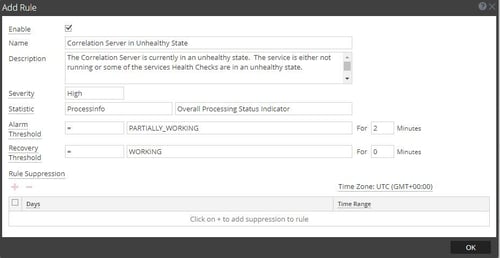
When the alarm is triggered, you can find the following message log.
2020-02-13 004822,095 [ scheduled-health-check] WARN HealthHealthStatus(name=memory-check, status=Unhealthy, details={Current usage %=60.10650508836204, Warning Threshold %=60, Fatal Threshold %=90})
If the customer would like to know how to be triggered for this internally, we can't find the details what this "Processinfo - Overall Processing Status indicator" trigger is.
Resolution
Referred to the SACE-13140.The stat ProcessInfo/Overall Processing Status Indicator, majorly checks the memory and cpu utilization metrics for analyzing the service health. Along with these two metrics there are some internal metrics related to buffer and threads which are not disclosed.
Setting threshold for cpu utilization by the customer is not supported currently. But the threshold for memory can be set in the Explore page of ESA.
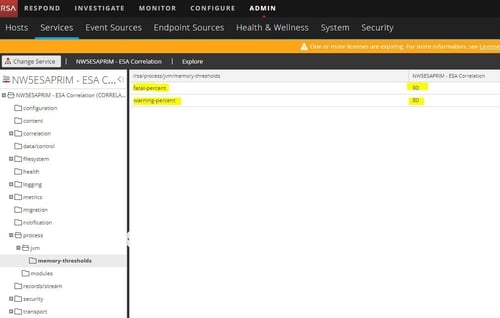
Customers can set the threshold for warning-percent and fatal-percent of memory stats by [Explorer⇒process⇒JVM⇒memory-thresholds]. You can refer to the following screenshot.
Product Details
RSA Product Set: NetWitness PlatformRSA Product/Service Type: Health & Wellness
RSA Version/Condition:11.3.x and later version
Approval Reviewer Queue
RSA NetWitness Suite Approval Queue