.png?width=180&height=32&name=NW%20Logo%20(2).png)
Issue
This article provides how-to information on how to navigate the boot sequence on a Security Analytics 4S appliance to accomplish such functions as initiating a bootstick installation.Tasks
Before beginning, determine how to secure console access to the appliance. Either connect a monitor and keyboard and perform the functions directly on the system, or have a reliable iDrac connection configured and a remote resource to insert whatever boot media is to be used (USB or dvd-rom).Resolution
Method One (preferred):- Reboot your appliance using the reboot command
- Monitor your appliance until it gets to the following screen and press F11

- It will eventually prompt you for the UEFI BIOS password. Enter the password and press ENTER. The default password is rsabios

- Navigate to the BIOS Boot Menu

- The system will then load the bios boot manager. Select your USB drive from the list provided using the keyboard arrow keys

- The USB drive should now load
Method Two:
- Reboot your appliance using the reboot command
- Monitor your appliance until it gets to the following screen and press F2

- Select your System BIOS

- Select Boot Settings

- Select BIOS Boot Settings
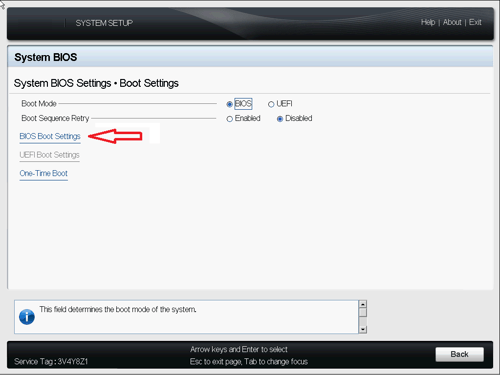
- Change the order of Hard-Disk Drive Sequence making the USB the first item in the list.

- Save your settings and exit the UEFI BIOS it will prompt you to reboot.
Notes
If for some reason a forced reboot is required during this sequence, press the key combination ctrl+alt+del.Also, remember to revert your settings after completing these steps so that the system auto boots off the hard drive.
Product Details
RSA Product Set: RSA NetWitness Logs & NetworkRSA Product/Service Type: RSA Security Analytics 4S Appliance
RSA Version/Condition: 10.x, 11.x
Platform: CentOS
O/S Version: EL6
Summary
This article details the process navigating the UEFI BIOS for the Series 4S Security Analytics appliance, providing a means to boot off alternate boot media (USB or dvd)
Approval Reviewer Queue
Technical approval queue