.png?width=180&height=32&name=NW%20Logo%20(2).png)
Issue
ESA is triggering alerts for old logs from the Concentrator. This can be because the ESA is unable to consume the logs in real-time.
Tasks
This article describes the steps to check if the ESA is falling behind.
Resolution
For all releases prior to 11.3:Connect to the ESA appliance using SSH as the root user and run the commands below.
carlos:offline||jmx:localhost:com.rsa.netwitness.esa:/> carlos-connect
RemoteJmsDirectEndpoint { jms://localhost:50030?carlos.useSSL=true } ; running = true
carlos:localhost||jmx:localhost:com.rsa.netwitness.esa:/> cd nextgen
/Workflow/Source/nextgenAggregationSource
carlos:localhost||jmx:localhost:com.rsa.netwitness.esa:/Workflow/Source/nextgenAggregationSource> get.
The commands above will provide an output as shown below and the sessionsBehind value will indicate if the ESA is behind the Concentrator or not.
"note" : "",
"sessionId" : 24462390949,
"sessionsBehind" : 58501036,
"state" : "IDLE_QUEUED",
"status" : "Streaming",
"time" : 1459508373000
}, {
"filterCount" : 0,
"name" : "10.xx.xx.xx:56005",
"note" : "",
"sessionId" : 34177054228,
"sessionsBehind" : 149462451,
"state" : "IDLE_QUEUED",
"status" : "Streaming",
"time" : 1459507000000
For 11.3 and above:
The platform for the ESA Device has changed with the release of the Correlation Server as opposed to the traditional rsa-esa and rsa-nw-esa-server. The esa-client will no longer work in 11.3 and above.
You have two ways to find this information. The easy way is to go to Health and wellness and look for the sessions behind value in the UI like below. Note you will have one for each deployment and each device being aggregated from.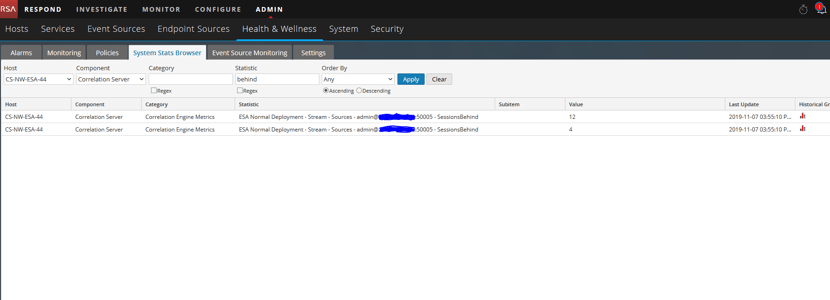
The alternative:
Similar stats are now available in the UI under the explore view for the correlation service. Take the below screenshot as an example: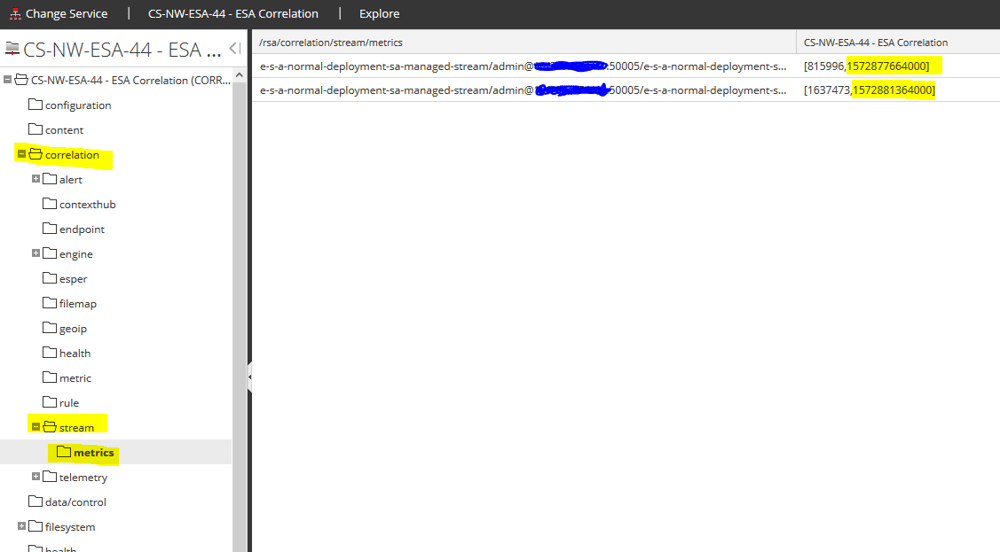
The highlighted value on the right is a Unix Epoch time (time since the Epoch). Truncate the last 3 zeros and put it into an Epoch timestamp converter and you'll have the time it has for the last session in the concentrator. This will give you an idea of how far you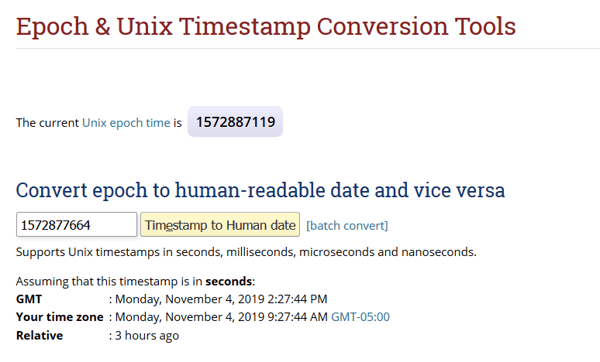
Notes
To clear the backlog and resume consumption from now for 10.6 to 11.2 releases:Please follow the instructions in the https://community.netwitness.com/t5/netwitness-knowledge-base/how-to-aggregate-esa-events-from-the-current-time-in-the-rsa/ta-p/677353 article to clear the backlog so that the ESA service starts consuming from the current session.
To clear the backlog and resume consumption from now in 11.3 and above:
Please follow the instructions in the https://community.netwitness.com/t5/netwitness-knowledge-base/how-to-aggregate-esa-events-from-the-current-time-in-the-rsa/ta-p/677549 article to clear the backlog so that the correlation server starts consuming from the current session.
Product Details
RSA Product Set: RSA NetWitness PlatformRSA Product/Service Type: Event Stream Analysis, Correlation Server
RSA Version/Condition: 10.4.x, 10.5.x, 10.6.x, 11.X
Approval Reviewer Queue
Technical approval queue