.png?width=180&height=32&name=NW%20Logo%20(2).png)
Issue
Occasionally when a user is experiencing a browser issue relating to the RSA Link website, the RSA Customer Support and/or RSA Link teams will ask that user to collect a network trace in the form of a .HAR file so that it can be analyzed.
Resolution
The steps below explain how to capture a network trace from within the Google Chrome web browser.- Open the Google Chrome web browser and navigate to the specific page that is experiencing the issue.
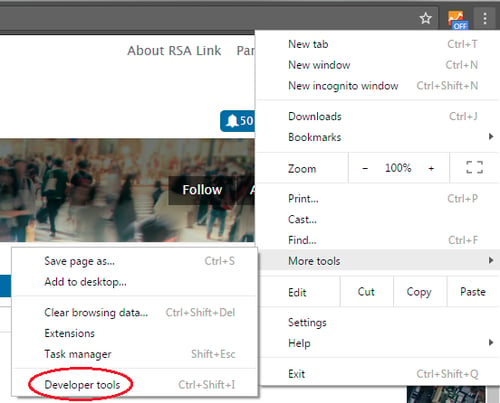
- Open the Developer Tools by clicking the Options button in the top-right corner and selecting More Tools > Developer tools.
(The Developer Tools can also be opened by pressing F12 or Ctrl+Shift+I in Windows or Option+Command+I in macOS / Mac OS X.)
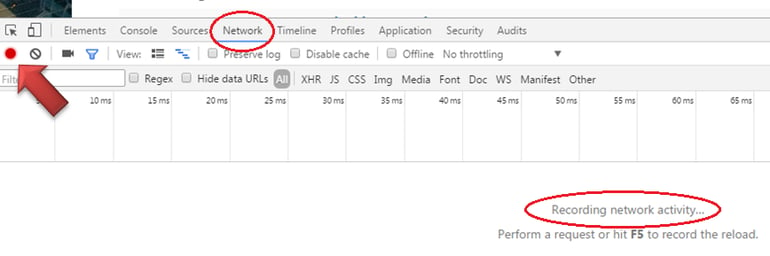
- Click on the Network tab within the Developer Tools pane and ensure that there is a red circle in the left corner and that, which indicates that the network activity is being recorded.
(If a gray circle is displayed instead, simply click on it to begin recording the network activity.)
- Reload the page by pressing F5 or Ctrl+R (or Command+R on macOS / Mac OS X), or by clicking on the Refresh icon in the browser toolbar.
- Perform any other activity relating to the issue, such as clicking on certain links or buttons, so that the activity can be captured in the trace.
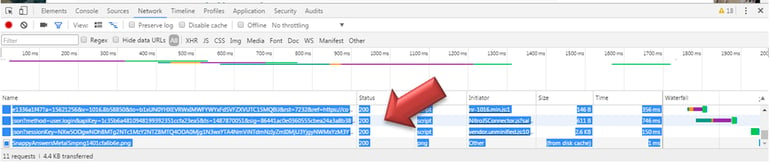
- Within the Developer Tool pane, click anywhere within the Status column as shown below and then press Ctrl+A (or Command+A on macOS / Mac OS X) to select everything.
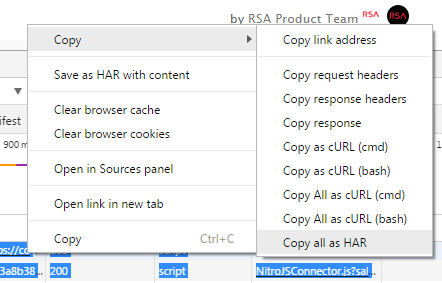
- Right-click on any of the blue highlighted text and then select Copy > Copy all as HAR.
- Open a simple text editor (such as Notepad or Notepad++ in Windows or TextWrangler in macOS / Mac OS X) and paste the copied data into the application.
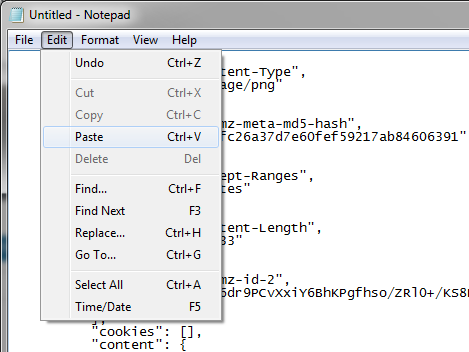
- Save the text file with the .har extension.
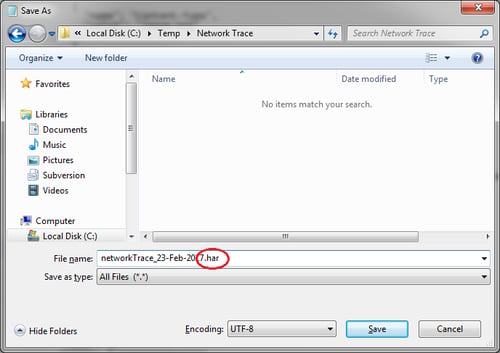
After saving the file, provide it to RSA Customer Support via the support case for it to be analyzed.
Notes
If the Developer Tools pane appears on the right side of the screen instead of at the bottom, you have the option to move it by clicking on the Options button for the Developer Tools and clicking on the middle option next to the Dock side label.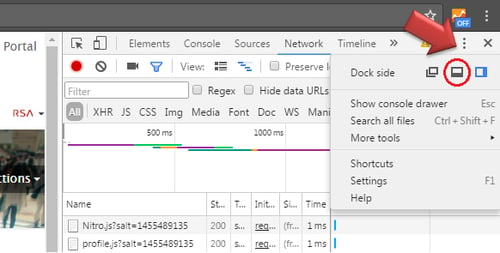
Product Details
RSA Product Set: RSA Link (community.rsa.com)Platform: Google Chrome
Approval Reviewer Queue
RSA NetWitness Suite Approval Queue