.png?width=180&height=32&name=NW%20Logo%20(2).png)
Issue
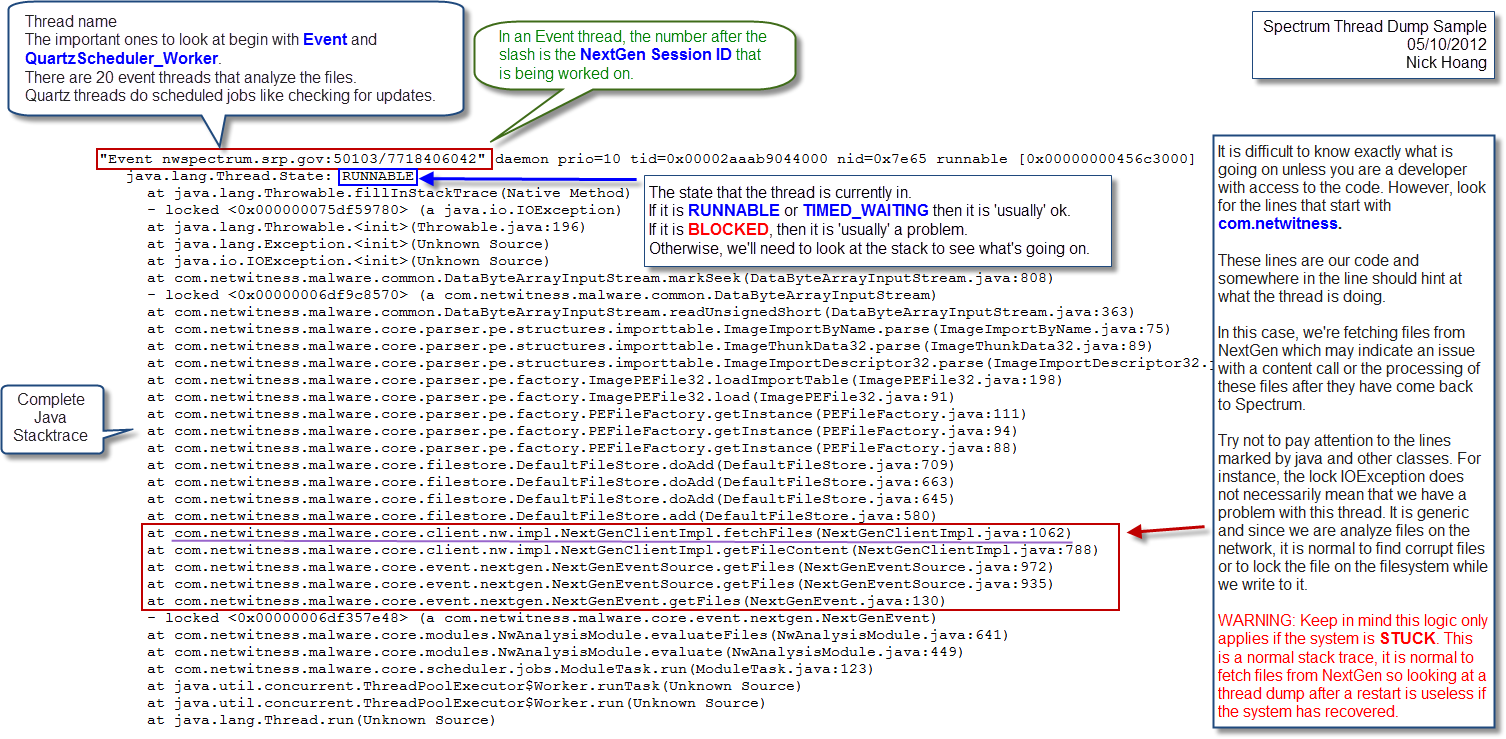
I need to collect a Malware Analysis Java threadDump.
Tasks
Java thread dump should be collected if system is STUCK such as Malware Service hang, Analysis Rate slow and Performance degraded issue before performing a service restart as it will not contain any useful information after the service restart.It should be run manually as nwtech won't collect the thread dump.
Resolution
How to collect Java threaddump
1. SSH to Malware/Spectrum appliance
2. Check the service process ID owned by root (in this case, PID is 2005) with the following command:
[root@malware ~]# ps -ef |grep malware
2. Check the service process ID owned by root (in this case, PID is 2005) with the following command:
Example output:
root 2005 1 0 Apr14 ? 00:00:00 sudo -u rsamalware /usr/bin/java -Xms2382M -Xmx4288M -Djetty.home=/var/lib/netwitness/rsamalware/jetty -Djava.io.tmpdir=/tmp -Djava.library.path=/var/lib/netwitness/rsamalware/lib -Dcom.rsa.netwitness.carlos.CONFIG_XML=true -XX:+UnlockDiagnosticVMOptions -XX:+LogVMOutput -XX:LogFile=/tmp/rsaMalwareDeviceVM.log -XX:NewSize=400M -XX:PermSize=128m -XX:MaxPermSize=256m -XX:+OptimizeStringConcat -XX:+AggressiveHeap -XX:+UseAdaptiveGCBoundary -XX:MaxGCPauseMillis=2000 -Djdk.tls.ephemeralDHKeySize=2048 -jar /var/lib/netwitness/rsamalware/jetty/start.jar --pre=etc/jetty-logging.xml --daemon
498 2031 2005 0 Apr14 ? 00:30:17 /usr/bin/java -Xms2382M -Xmx4288M -Djetty.home=/var/lib/netwitness/rsamalware/jetty -Djava.io.tmpdir=/tmp -Djava.library.path=/var/lib/netwitness/rsamalware/lib -Dcom.rsa.netwitness.carlos.CONFIG_XML=true -XX:+UnlockDiagnosticVMOptions -XX:+LogVMOutput -XX:LogFile=/tmp/rsaMalwareDeviceVM.log -XX:NewSize=400M -XX:PermSize=128m -XX:MaxPermSize=256m -XX:+OptimizeStringConcat -XX:+AggressiveHeap -XX:+UseAdaptiveGCBoundary -XX:MaxGCPauseMillis=2000 -Djdk.tls.ephemeralDHKeySize=2048 -jar /var/lib/netwitness/rsamalware/jetty/start.jar --pre=etc/jetty-logging.xml --daemon
root 32617 32579 0 10:13 pts/0 00:00:00 grep malware
3. If the previous Thread Dump exists and you need to back up, please copy it to another location. This is because generating a new Thread Dump will overwrite the previous output. (DO NOT run with mv.)
Thread Dump Output : /var/lib/rsamalware/spectrum/logs/rsaMalwareDeviceVM.log
[root@malware ~]# cp /var/lib/rsamalware/spectrum/logs/rsaMalwareDeviceVM.log /root/
4. Generate Thread Dump with kill -3. The process won't be killed or restarted. No Malware/Spectrum service intervention.
[root@malware ~]# kill -3
2005
5. Compare timestamp of the output with system time to double check if it was generated as of now. There are many cases where the outputs were not generated properly in case of Malware service hang. If the threaddump has old timestamp, it means the collection was not properly executed due to picking up wrong pid or unavailable due to the service hang.
6. Open a JIRA case with the Thread Dump to get it investigated.
Internal Comments
UserName:bairoa16/19/2012 6:00:36 PM - Solution Number 00000595
Solution Number 00000595
UserName:shurtj
8/25/2014 9:48:11 PM - Updated Article
Updated article and made changes to abide by Primus best practices.
Product Details
RSA Product Set: NetWitness and Security AnalyticsRSA Product/Service Type: Spectrum and Malware Analysis
Approval Reviewer Queue
Technical approval queue