.png?width=180&height=32&name=NW%20Logo%20(2).png)
Issue
Need to collect the /var/log/audit/audit.log logs on a specific Red Hat Linux system without disabling the SELinux under /etc/selinux/config file.
Resolution
Please follow the steps below to configure collection of audit logs on the Linux event source:- Write audit logs to /var/log/messages
With the default configuration, rsyslog will not send the audit logs to any syslog server. Configure audit logs to write on /var/log/messages by editing /etc/audisp/plugins.d/syslog.conf- Change active = yes
- Add LOG_LOCAL6 in args

- Set rule in /etc/rsyslog.conf to route the logs to Netwitness Log Collector or remote collectors. <
Add the following:
#audit log
$ModLoad imfile
$InputFileName /var/log/audit/audit.log
$InputFileTag tag_audit_log:
$InputFileStateFile audit_log
$InputFileSeverity info
$InputFileFacility local6
$InputRunFileMonitor
:
#Log Forwarding to RSA Netwitness
*.* @@:514
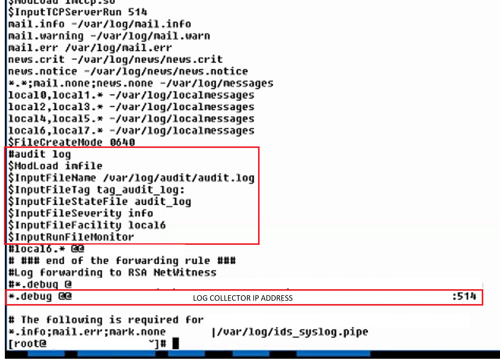
/li> - Restart auditd and rsyslog services as follows:
[root@ldecoder3 ~]# service auditd restartOnce completed, go to Investigation > Navigate and you should see the audit logs on NetWitness console
Stopping auditd: [ OK ]
Starting auditd: [ OK ]
[root@ldecoder3 ~]# service rsyslog restart
Shutting down system logger: [ OK ]
Starting system logger: [ OK ]

Product Details
RSA Product Set: NetWitness Logs & NetworkRSA Product/Service Type: Log Collector, Remote Collector
RSA Version/Condition: 10.6.x, 11.x
Platform: Linux
O/S Version: RHEL 7.6
Summary
Collect /var/log/audit/audit.log through existing syslog channel without changing the SELinux ‘enforcing’ mode.
Approval Reviewer Queue
RSA NetWitness Suite Approval Queue