.png?width=180&height=32&name=NW%20Logo%20(2).png)
Issue
- Some processes cause a memory leak.
- Degraded performance due to lack of memory.
- Degraded performance because memory is drained by one major parent process.
- CPU is over utilized.
- Hard disk is filling up with large files.
Tasks
To use the serv_mon.sh script (attached to this article), perform the steps below.- Copy the serv_mon.sh file to your server machine using scp.
- Login to the appliance as the root user, make the script executable, and execute the script as shown below..
chmod +x serv_mon.sh
./serv_mon.sh
./serv_mon.sh
NOTE: This script must be executed as the root user and Python 2.x or later must be installed on the appliance.
Notes
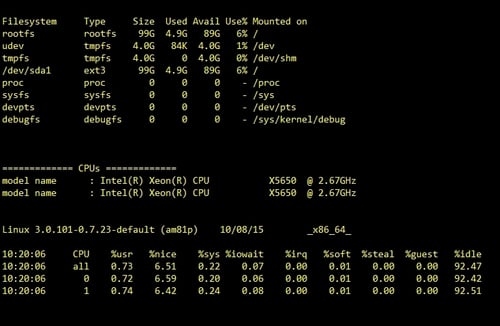
This script prints a human readable table with the collective memory utilization for each parent process separately, and performs the following:- It shows info about CPU, CPU utilization.
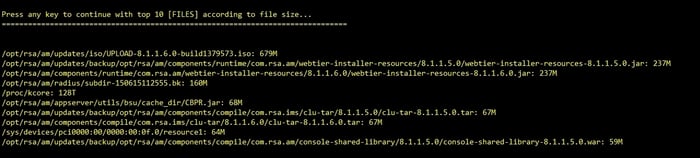
- It shows disk space usage for each partition, the largest 10 files on the system.
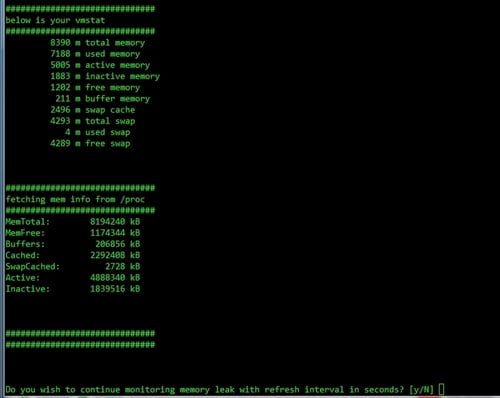
- It collects /proc/meminfo.
- It collects the output of the vmstat command.
- It watches free –m according to a user specified time interval.
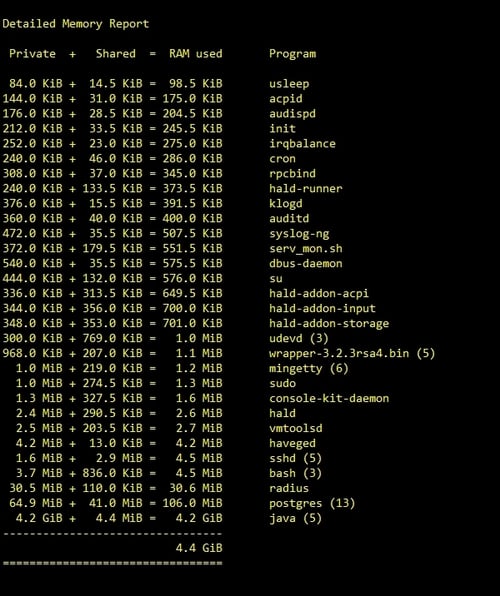
Product Details
RSA Product Set: Security Analytics, NetWitnessRSA Product/Service Type: Decoder, Log Decoder, Concentrator, Broker, Archiver, Event Stream Analysis (ESA), Malware Analysis, Security Analytics Server
RSA Version/Condition: All Versions
Platform: CentOS
O/S Version: EL5, EL6
Approval Reviewer Queue
Technical approval queue