.png?width=180&height=32&name=NW%20Logo%20(2).png)
Issue
How to collect windows powershell logs using winrm method?
Resolution
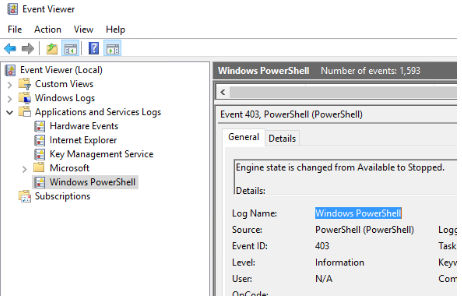
In Windows server Event Viewer Navigate to Application and Service logs <Copy the Log Name: Windows PowerShell as below.
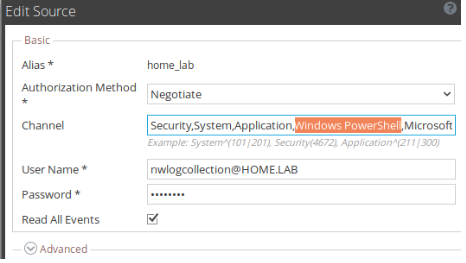
On the NetWitness UI go to the Windows event collection channel in your Log collector (Local and/or Remote, depending on your environment), add the channel as below:
Product Details
NetWitness Product Set: NetWitness PlatformNetWitness Product/Service Type: LogCollector
NetWitness Version/Condition: 12.x
Platform: CentOS 7 / Alma
Approval Reviewer Queue
Technical approval queue