.png?width=180&height=32&name=NW%20Logo%20(2).png)
Resolution
In order to create a WARM tier on an RSA Security Analytics Archiver appliance, follow the steps below.- Create an NFS mount on the NAS, e.g: /mnt/Archiver.
- Verify that the NFS mount is reachable from the Archiver. In the example below, 10.44.10.68 is the IP address of the NAS.
[root@saarchiver archiver]# showmount -e 10.44.10.68
Export list for 10.44.10.68:
/mnt/Archiver (everyone) - Create a directory on the Archiver to mount the NFS.
mkdir /var/netwitness/archiver/nas
- Add the NFS mount to /etc/fstab.
10.44.10.68:/mnt/Archiver /var/netwitness/archiver/nas nfs rw,nolock,tcp,auto,addr=10.44.10.68 0 0
- Issue the command mount -a to apply the change.
- Verify the change with the df -h command, which should show output similar to the example below.
10.44.10.68:/mnt/ArchiverNote: Step 7,8 and 9 applicable to 10.4.X version.
96G 223M 96G 1% /var/netwitness/archiver/nas
- In the Security Analytics UI, navigate to Administration -> Services, click on the Action button for the Archiver, select View -> Config, and click on Add Tier.
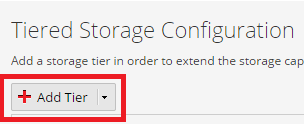
- Configure the following under Warm tab then click the Save button:

- Click on the Apply button.

Note: Step A and B applicable to 10.6 and 11.X versions.- Click on Settings button highlighted below.

- Configure mount directory as below and click Save.
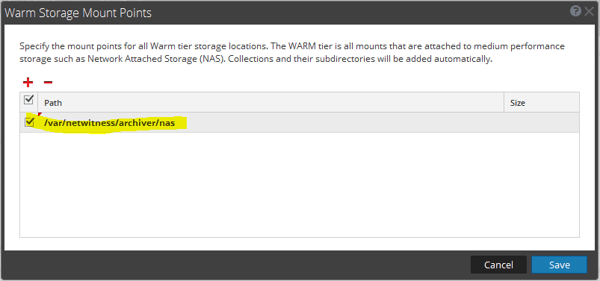
- Click on Settings button highlighted below.
- At the prompt, click the Yes button.

- Once the Archiver service is back up, verify that it is seeing the Warm storage.
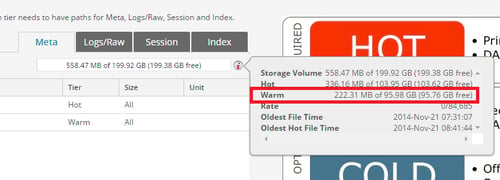
If you are unsure of any of the steps above or experience any issues, contact RSA Support and quote this article number for further assistance.
Please use below documents as a reference for warm storage configuration.
Configure Total Warm Storage for an Archiver in 11.X
Configure Total Warm Storage for an Archiver in 10.6
Product Details
RSA Product Set: Security AnalyticsRSA Product/Service Type: Archiver
RSA Version/Condition: 10.4.x, 10.6.X, 11.X
Platform: CentOS
O/S Version: EL6
Summary
Steps for configuring a WARM storage tier on an Archiver appliance in Security Analytics 10.4 and above.
Approval Reviewer Queue
RSA NetWitness Suite Approval Queue