.png?width=180&height=32&name=NW%20Logo%20(2).png)
Issue
When the number of alerts stored in the ESA database has reached such a high quantity that the database size becomes very large, performance can be negatively impacted.
Cause
Automatic deletion for Alerts/Incident older than specific date is not enabled from Respond Server Explore page, which will cause the old alerts/Incidents to be accumulated in Mongo Database of ESA server
Resolution
Automatic deletion for the old alerts/Incidents should be enabled from Respond-server Explore page to delete old Alerts/Incidents from Mongo Database in ESA severReference :
page 75 in https://community.netwitness.com/t5/netwitness-platform-online/respond-configuration-guide-for-12-3-1/ta-p/705366
Prerequisites :
The Administrator role must be assigned to you.
Procedure :
1. Go to (Admin) > Services, select the Respond Server service, and then select > View > Explore
2. In the Explore view node list, select respond/dataretention
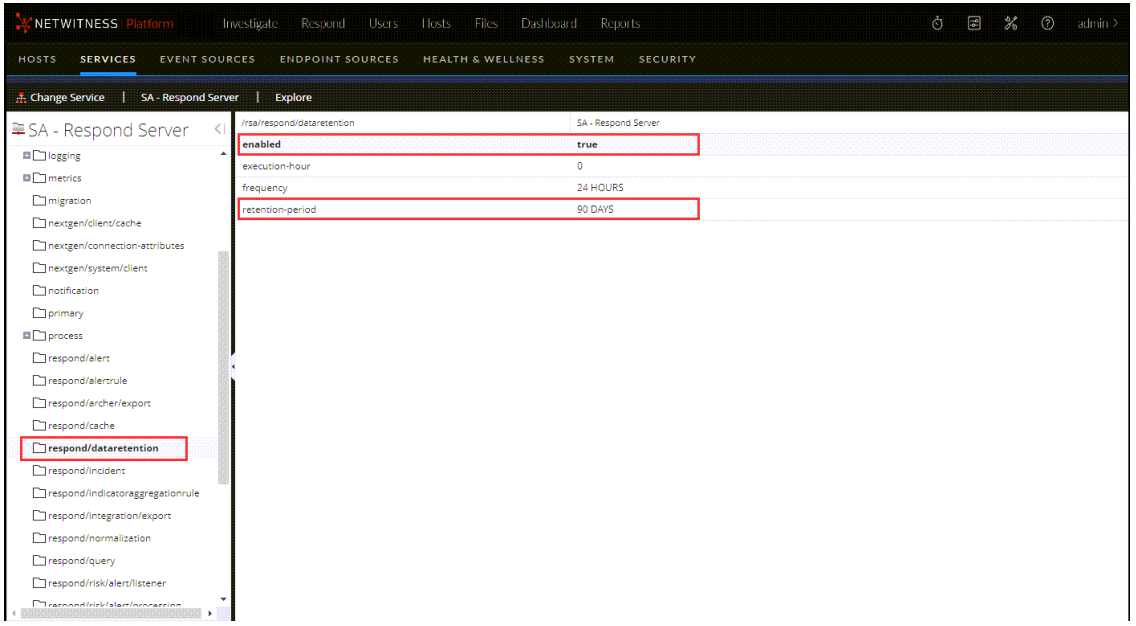
3. In the enabled field, select true to delete incidents and alerts older than the retention period. The scheduler runs every 24 hours at 23:00. You will see a notice that the configuration was successfully updated.
4. In the retention-period field, type the number of days to retain incidents and alerts. For example, type 30 DAYS, 60 DAYS, 90 DAYS, 120 DAYS, 365 DAYS, or any number of days. A message informs you that the configuration was successfully updated.
Result :
Within 24 hours after the retention period ends, the scheduler permanently deletes all alerts and incidents older than the specified period from NetWitness Respond. Journal entries and tasks associated with the deleted incidents are also deleted.
Product Details
RSA Product Set: NetWitness Logs & networkRSA Product/Service Type: Event Stream Analysis (ESA), Security Analytics UI
RSA Version/Condition: 12.x
Platform: CentOS
O/S Version: 7
Approval Reviewer Queue
Technical approval queue