.png?width=180&height=32&name=NW%20Logo%20(2).png)
Issue
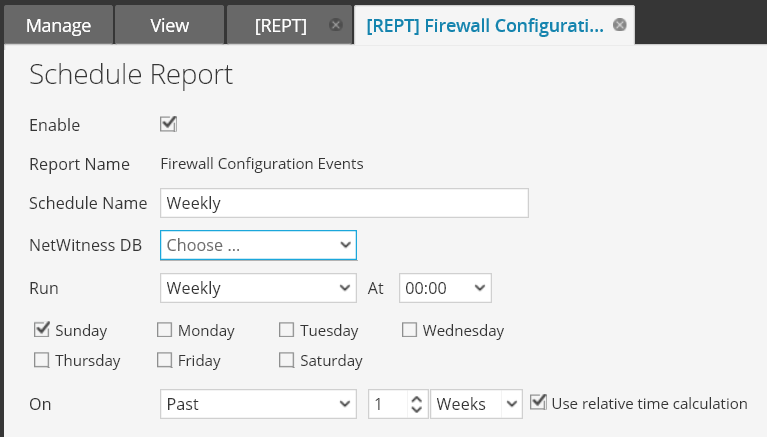
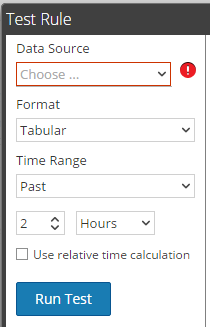
If you schedule a report or test a rule and you use a user that has been assigned a new security role, why are the “NetWitness DB” or "Data Source" select lists empty?Schedule a report: (Administration > Reports > Manage tab - Reports > Click on Actions config tool next to the Report and select "Schedule Report")
Test a rule: (Administration > Reports > Manage tab - Rules > Select the report you would like to edit and click on the edit button above the reports > click on the "Test Rule" button at the bottom of the rule config)
Cause
The "Sources" permissions configured on the Reporting Engine are not configured for the new role configured.
Resolution
- Select Administration > Services in the RSA Security Analytics UI.
- In the Services panel, select a Reporting Engine service.
- Click View > Config. The Services Config - View of Reporting Engine is displayed.
- Select the Sources tab. The Service Config View is displayed with the Reporting Engine Sources tab open.
- Select the data source for which you want to configure permissions by selecting the checkbox. (Note: If there are no Data Sources you will need to create a data source before you can create rules)
- Click "The Data Source Permissions" button above the sources.
- Modify the access permission for different roles based on the type of service account of the data source. The permission can be either Read Only or No Access. If the role of the user is set to No Access the data source will not show up in the list.
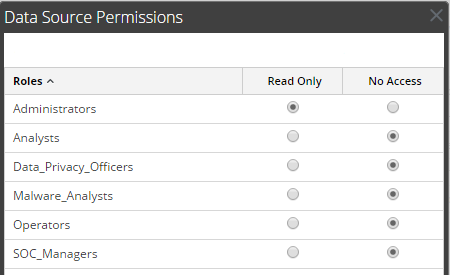
- Click Save. The required permissions are configured for the data source.
Internal Comments
Product Details
RSA Product Set: Security AnalyticsRSA Product/Service Type: Core Appliance, User Interface
RSA Version/Condition: 10.5.x, 10.6.x, 11.0.X, 11.1.X, 11.2.X, 11.3.X
Summary
The Data Source select drop down to create a rules for reports is empty, what do I need to configure?
Approval Reviewer Queue
RSA NetWitness Suite Approval Queue