.png?width=180&height=32&name=NW%20Logo%20(2).png)
Issue
In some circumstances, it may be necessary to create a new lockbox for the Log Collector in RSA Security Analytics. An example of this would be when Event Sources cannot be added and the user is getting the error "Can't open lockbox."
Resolution
Please note that all stored passwords for the event sources will need to be re-entered after the new lockbox is created.
- Login to the Windows Legacy Collector as an administrator.
- Make sure you can view the hidden folders in the system.
- Move the files in C:\ProgramData\netwitness\ng\vault to a different directory
- Log in to the RSA Security Analytics UI and navigate to Administration/Admin -> Services.
- Select the Log Collector device and click on View -> Config.
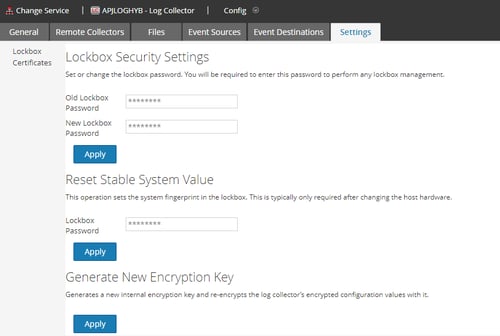
- Click on the Settings tab.
- Leave the "Old Lockbox Password" field blank and enter a new password in the "New Lockbox Password" field.
- Click Apply.
Notes
To create a new lockbox on a Local Collector refer to the knowledgebase article How to create a new Log Collector lockbox within RSA Security Analytics.Product Details
RSA Product Set: Security Analytics, NetWitness Logs & NetworkSA Product/Service Type: Windows Legacy Collector
RSA Version/Condition: 10.x, 11.x
Platform: CentOS
O/S Version: EL6, EL7
Approval Reviewer Queue
RSA NetWitness Suite Approval Queue