.png?width=180&height=32&name=NW%20Logo%20(2).png)
Issue
How to create a new Log Collector lockbox within NetWitness.
Cause
This article is useful for the below use-cases.
- When the lockbox password is not known or is forgotten.
- When there is an error in UI password does not match Lockbox value during reset password.
- When there is an error in SYSLOG Lockbox Initialization Failed.
Resolution
In some circumstances, it may be necessary to create a new lockbox for the Log Collector in the NetWitness UI.
For example, when Event Sources cannot be added and the user is getting the error "Can't open lockbox." or "Failed to open lockbox".
To create a new lockbox, follow the steps below.
Note: All stored passwords for the event sources must be re-entered after the new lockbox is created.
- Connect to the Log Collector appliance via SSH as the root user.
- Change directory to /etc/netwitness/ng/vault/ with the following command:
cd /etc/netwitness/ng/vault - Make a new directory to backup the existing lockbox with the following command:
mkdir old - Move the existing lockbox files to that directory with the following command:
- In version earlier than 12.0 versions run:
mv -vi lockbox lockbox.FCD lockbox.bak lockbox.bak.FCD old - In 12.0.0.0 and higher versions, run:
mv -vi lc.lockbox lockbox lockbox.FCD lockbox.bak lockbox.bak.FCD old
- In version earlier than 12.0 versions run:
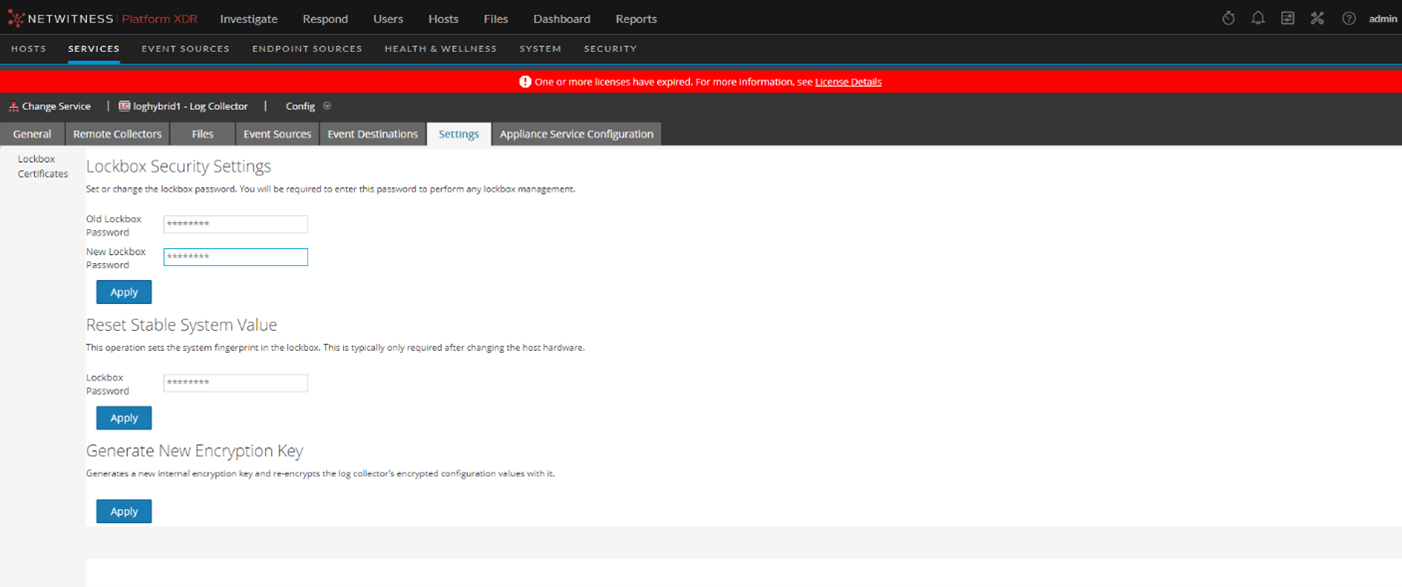
- Log in to the NetWitness UI and navigate to Administration -> Services->LogCollector.
- Click on the red Actions(gear icon) button for the Log Collector service and select View->Config.
- Click on the Settings tab.
- Leave the "Old Lockbox Password" field blank and enter a new password in the "New Lockbox Password" field.
- Click Apply.
- Check the directory /etc/netwitness/ng/vault/ for the file lc.lockbox is newly created in 12x and higher version.
- Restart NWLogCollector service.
- Enter the password of all the configured event sources.
If you are unsure of any of the steps above or experience any issues, contact NetWitness Support and quote this article ID for further assistance.
Internal Comments
UserName:shurtj8/7/2014 4:51:46 PM - Updated Article
Updated article and made changes to abide by Primus best practices.
Product Details
NetWitness Product Set: NetWitness Logs & Network
NetWitness Product/Service Type: LogCollector
NetWitness Version/Condition: 11.x , 12.x
Platform: CentOS , AlmaLinux
Summary
This document outlines the procedure to set new lockbox password in Log Collector.
Approval Reviewer Queue
Technical approval queue