.png?width=180&height=32&name=NW%20Logo%20(2).png)
Issue
I need to download a full install package or OVA file for my RSA NetWitness Logs & Network environment.When viewing my list of products on the Upgrades tab in the Case Management portal or on the Version Upgrades portal, there is no Upgrade hyperlink for my RSA NetWitness product.

Resolution
Follow the instructions below to access and download the full install packages and OVA files for the RSA NetWitness Logs & Network (formerly RSA Security Analytics) product.- Log in to RSA Link and then navigate to one of the version downloads pages, such as the RSA Security Analytics 10.6.6 Downloads page.

- Click on the maroon Version Upgrades button just below the search bar.

- On the myRSA home page that loads after logging on, locate and click on the appropriate product in the table that is displayed. If you have multiple sites, you will first need to select the appropriate site in the order location drop-down menu.
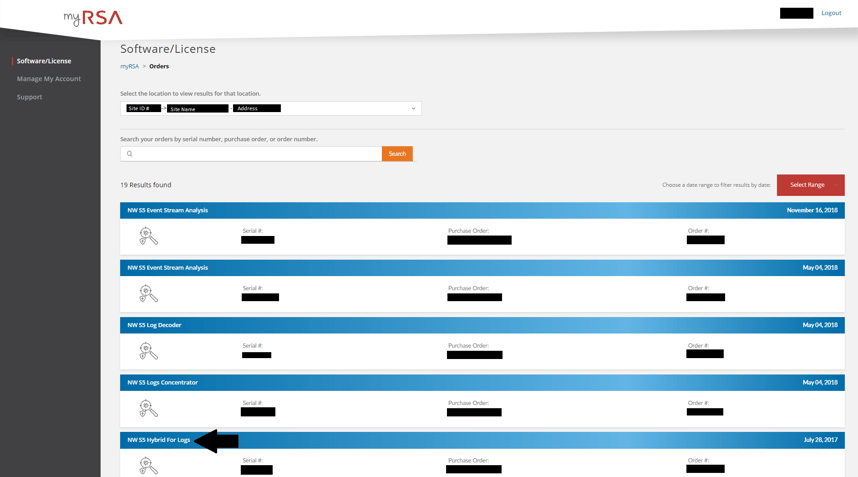
- On the Order Detail page for the product, hover over the hamburger icon for the listed product (which may have a name such as NW Series 5 Hybrid for Logs) and then click on the Product List option that appears.

- If presented with a list of available versions, click on the hyperlinked description for the version that you wish to download.

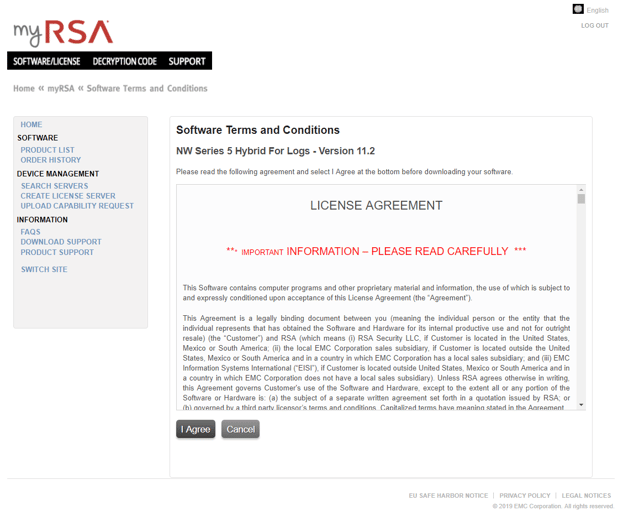
- Agree to the EULA that is presented.
- Download the required files individually by clicking on the file names or utilize the Download Manager by selecting multiple downloads with the checkboxes and then clicking on the Download Selected Files option.
Clicking on the plus (+) symbol for an item will display the checksum signature and allow you to view the compressed file contents for ZIP and TAR files.

Notes
Not all users on a customer account will have access to myRSA. If you get an error message when attempting to access the myRSA portal in Step 2 above, then you will need to open a support case with the licensing team in order to gain access. This can be done by accessing the Case Management portal, selecting the Create Case tab and then selecting the License, Token Media or Download Inquiries in the I need assistance with the drop-down menu.
Product Details
RSA Product Set: NetWitness Logs & Network, Security AnalyticsRSA Product/Service Type: NetWitness Appliance (Physical or Virtual)
RSA Version/Condition: 10.x, 11.x
Platform: RSA Link (community.rsa.com), RSA Download Central (download.rsasecurity.com)
Approval Reviewer Queue
RSA NetWitness Suite Approval Queue