.png?width=180&height=32&name=NW%20Logo%20(2).png)
Issue
Default monitoring policies are not editable in the Health and Wellness, but an Administrator would like to change thresholds or even remove rules from certain policies.
Resolution
In order to customize Rules or Policies within Health & Wellness, you must first duplicate the policy and then make your changes to the duplicated version. In the example below, I will demonstrate duplicating the default Host Policy so I may remove the "High System Swap" rule, but leave the remaining default rules.
- Select the the "Host Monitoring Policy" and click the Duplicate button.
- Name the duplicate with context about the changes for easy review:
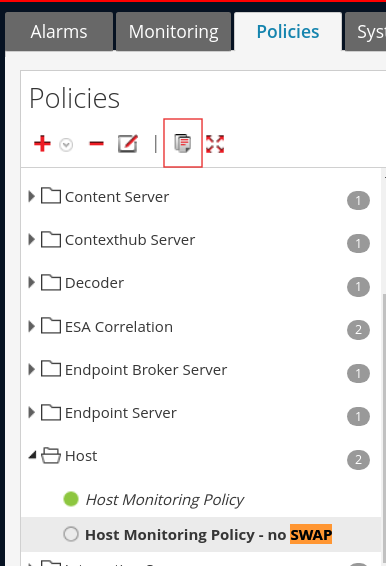
- Select the newly duplicated policy, and find the rule you want to alter and select it:

- Click the "-" (minus) button to delete the selected rule
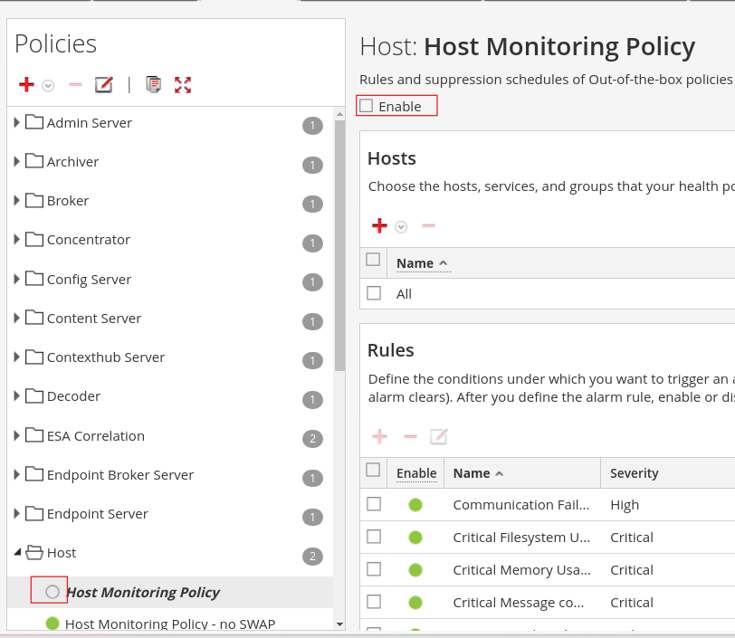
- Ensure the "Enable" checkbox at the top of the policy is checked and then Save the policy:

- Once saved, go back to the default policy that you duplicated, and ensure the "Enable" checkbox is unchecked and Save to disable the default policy:
Important Notes
- Do not have multiple policies of the same type (aka Host, Concentrator, Admin-Server, etc) enabled at the same time, unless the rule sets are different. If you have the same rules in multiple policies, you will get multiple notifications and it will add additional load
- Once cloning the Default policy, you should always disable the default to ensure you don't have duplicated rule sets
- You can have multiple duplicated policies, and they can be used to:
- subdivide the rules
- apply different rules or thresholds to different targeted hosts
Product Details
NetWitness Product Set: NetWitness Logs & Network
NetWitness Product/Service Type: Admin Server, Health & Wellness
NetWitness Version/Condition: 11.x , 12.x
Platform: CentOS , AlmaLinux
Summary
Changing the monitoring policies of the H&W is not valid in the default policy, you have to create a duplicate and then edit.
Approval Reviewer Queue
Technical approval queue