.png?width=180&height=32&name=NW%20Logo%20(2).png)
Issue
How to Disable And Enable IPv6 In Netwitness11.x Hosts?
Resolution
Here are the steps to disable IPv6 in RSA NetWitness Logs & Packets hosts.
Method 1:
- Edit file /etc/sysctl.conf
vi /etc/sysctl.conf - Add the following lines:
net.ipv6.conf.all.disable_ipv6 = 1
net.ipv6.conf.default.disable_ipv6 = 1
- Save and exit the file.
- Execute the following command to reflect the changes.
sysctl -p
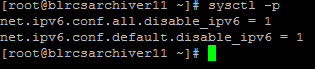
To re-enable IPv6, remove the above lines from /etc/sysctl.conf and reboot the machine.
Method 2:
1. To disable IPv6 in a running system, enter the following commands one by one:sysctl -w net.ipv6.conf.all.disable_ipv6=1
sysctl -w net.ipv6.conf.default.disable_ipv6=1
OR
echo 1 > /proc/sys/net/ipv6/conf/all/disable_ipv6
echo 1 > /proc/sys/net/ipv6/conf/default/disable_ipv6
2. To enable IPv6 on a running system, enter the following commands one by one:sysctl -w net.ipv6.conf.all.disable_ipv6=0
sysctl -w net.ipv6.conf.default.disable_ipv6=0
ORecho 0 > /proc/sys/net/ipv6/conf/all/disable_ipv6
echo 0 > /proc/sys/net/ipv6/conf/default/disable_ipv6
Product Details
RSA Product Set: NetWitness Logs & NetworkRSA Version/Condition: 11.0
Component: All hosts
Platform: CentOS
O/S Version: EL7
Approval Reviewer Queue
RSA NetWitness Suite Approval Queue