.png?width=180&height=32&name=NW%20Logo%20(2).png)
Issue
The Full System Scan feature was introduced in NetWitness 11.7 as beta software and it does not appear by default in the NetWitness User Interface as described in the online documentation.Resolution
Prerequisites to enable the new Full System Scan Endpoint Beta feature
Warning: Enable the Full System Scan only on the Endpoint servers that you want to use this feature, as the effect on performance and service stability is still being reviewed/tested. It is suggested that you start with one Endpoint server, monitor performance for about a week, then add any additional Endpoint servers one at a time. This allows for proper monitoring and easier reversion if needed.- Select the available Endpoint Server that you want the Full System Scan process enabled on.
- SSH to the Endpoint Server and run the following command to get the endpoint-server service id.
cat /etc/netwitness/platform/nodeinfo/endpoint-server/service-id
- Copy the service-id value displayed for later use in this article. Refer to the following figure as an example.

To enable the Full System Scan beta feature
- SSH to the NW Admin Server.
- Run the following commands on the NW Admin Server to enable the feature.
Note: In the below commands,
[password] is the admin password and
[EP service-id] is the previously collected endpoint-server service id.
nw-shell
login
admin
[password]
connect --service endpoint-server.[EP service-id]
cd endpoint/config
cd set-config-property
invoke "{\"rsa.endpoint.feature.full-scan-extensions\":true}"
cd ..
cd get-config-properties
invoke '^rsa.endpoint.feature.full-scan-extensions*'
exit
login
admin
[password]
connect --service endpoint-server.[EP service-id]
cd endpoint/config
cd set-config-property
invoke "{\"rsa.endpoint.feature.full-scan-extensions\":true}"
cd ..
cd get-config-properties
invoke '^rsa.endpoint.feature.full-scan-extensions*'
exit
Important:
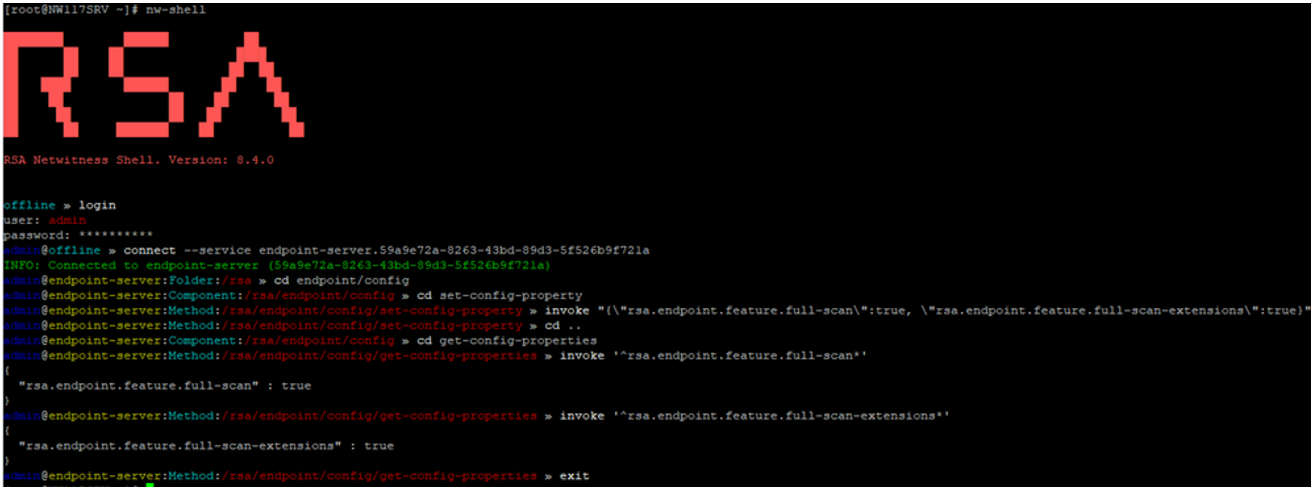
The output from the invoke command invoke '^rsa.endpoint.feature.full-scan-extensions*' should confirm the full-scan-extensions features are set to "true".
The output from the invoke command invoke '^rsa.endpoint.feature.full-scan-extensions*' should confirm the full-scan-extensions features are set to "true".
Example Output:
- After enabling the full scan extensions, you must update the required extensions in Admin > Services > the selected Endpoint Server > View > Explore > endpoint/command > extensions.
For Example:
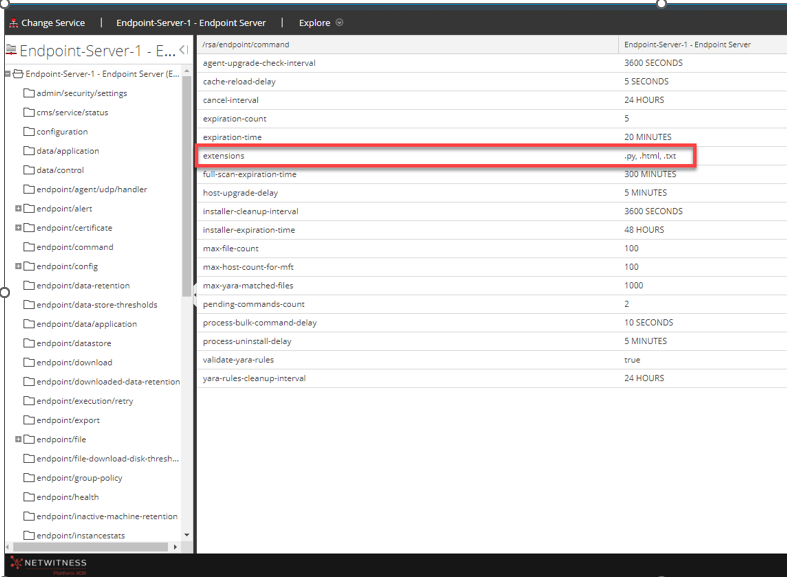
If you want to perform a full scan on a Python file, HTML file, and Text file, enter .py, .html, .txt in the Admin > Services > selected Endpoint Server > View > Explore > endpoint/command > extensions field. Refer to the following figure.
If you want to perform a full scan on a Python file, HTML file, and Text file, enter .py, .html, .txt in the Admin > Services > selected Endpoint Server > View > Explore > endpoint/command > extensions field. Refer to the following figure.
- The Full System Scan beta feature will be immediately available in the NW UI Hosts view after enabling, just as outlined in the online documentation.
Note: The Full Scan is only available for Manual Scans and Advanced agents.
Product Details
RSA Product Set: RSA NetWitness PlatformRSA Product/Service Type: Endpoint Log Hybrid
RSA Version/Condition: 11.7.X and above
Platform: CentOS
O/S Version: 7
Approval Reviewer Queue
Technical approval queue