.png?width=180&height=32&name=NW%20Logo%20(2).png)
Tasks
The following steps will provide important information regarding the meta key (eg. size consumed, number of unique values, etc.)
Resolution
From the RSA NetWitness UI, follow the steps below:
1. Navigate to Administration -> Services -> Concentrator -> View -> Explore
2. From the panel on the left-hand side of the page: right click on the "index" directory and choose the option "Properties."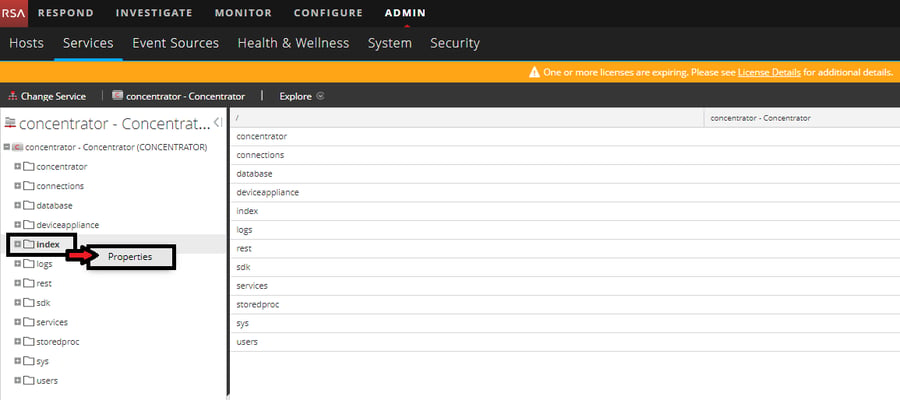
3. Choose "inspect" from the first drop-down menu, and in the "Parameters" box next to it, type in the meta key in question, and press "Send." "key=reference.id" is the parameter used in this specific example below. You can replace the "reference.id" with the meta key of your choice.
4. Part of the output that you receive should be similar to the output below:
session2:1523490
meta1:1
meta2:34891779
size:2772588674
key:reference.id
pathname:/var/netwitness/concentrator/index/managed-values-1/reference.id.nwindex
values:50
summaries:1
pages:1
sessions:50
size:18392
packets:50
summary1:250455
summary2:250455
session1:1171876
session2:117195
Notes
- Information about the values in Steps 3 and 4 can be found here: Appendix B: Index Inspect
- The screenshots and outputs are taken from an 11.x environment but are very similar in a 10.6.x environment, with the order of the output slightly modified
Product Details
RSA Product Set: Security Analytics, NetWitness Logs & NetworkRSA Product/Service Type: Security Analytics Server, Concentrator
RSA Version/Condition: 10.5.x, 10.6.x, 11.x
Platform: CentOS
O/S Version: 6, 7
Summary
How to get information regarding the meta key (eg. size consumed, number of unique values ..etc)
Approval Reviewer Queue
RSA NetWitness Suite Approval Queue