.png?width=180&height=32&name=NW%20Logo%20(2).png)
Issue
How to perform connectivity test to the RSA cloud which is used by RSA NetWitness Malware Analysis service to perform Community scoring.Resolution
Option 1. Using the UI.- Navigate to ADMIN (for NW11) or Administration (for SA10)-> Services-> Config page of Malware Analysis -> Integration tab and click on Test Connection button under RSA Cloud Connection Test and Registration per the User Guide.
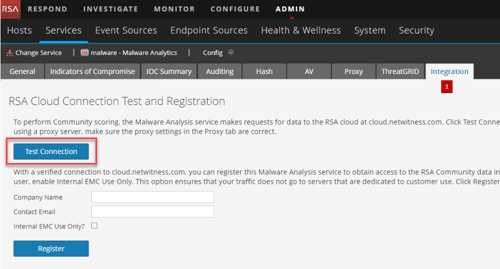
- If proxy is in use, please ensure the detail is added to the Proxy tab.
- If the Test Connection fails, try Option 2 below.
Option 2. Using the console.
- SSH into the Malware Analysis host.
- Run one of the following commands depending on the setup.
curl -v https://cloud.netwitness.com
A successful result would be similar to below. Note the lines in red.
[root@MA] ~# curl -v https://cloud.netwitness.com
* About to connect() to cloud.netwitness.com port 443 (#0)
* Trying 52.224.176.196...
* Connected to cloud.netwitness.com (52.224.176.196) port 443 (#0)
* Initializing NSS with certpath: sql:/etc/pki/nssdb
* CAfile: /etc/pki/tls/certs/ca-bundle.crt
CApath: none
* SSL connection using TLS_RSA_WITH_AES_128_GCM_SHA256
* Server certificate:
* subject: CN=cloud.netwitness.com,O=RSA Security LLC,L=Round Rock,ST=Texas,C=US
* start date: Feb 28 21:05:46 2018 GMT
* expire date: Feb 28 21:35:44 2020 GMT
* common name: cloud.netwitness.com
* issuer: CN=Entrust Certification Authority - L1K,OU="(c) 2012 Entrust, Inc. - for authorized use only",OU=See www.entrust.net/legal-terms,O="Entrust, Inc.",C=US
> GET / HTTP/1.1
> User-Agent: curl/7.29.0
> Host: cloud.netwitness.com
> Accept: */*
>
< HTTP/1.1 403 Forbidden
< Server: nginx
< Date: Wed, 28 Aug 2019 06:41:26 GMT
< Content-Type: text/html
< Content-Length: 162
< Connection: keep-alive
<
<html>
<head><title>403 Forbidden</title></head>
<body bgcolor="white">
<center><h1>403 Forbidden</h1></center>
<hr><center>nginx</center>
</body>
</html>
* Connection #0 to host cloud.netwitness.com left intact
[root@MA] ~#
* About to connect() to cloud.netwitness.com port 443 (#0)
* Trying 52.224.176.196...
* Connected to cloud.netwitness.com (52.224.176.196) port 443 (#0)
* Initializing NSS with certpath: sql:/etc/pki/nssdb
* CAfile: /etc/pki/tls/certs/ca-bundle.crt
CApath: none
* SSL connection using TLS_RSA_WITH_AES_128_GCM_SHA256
* Server certificate:
* subject: CN=cloud.netwitness.com,O=RSA Security LLC,L=Round Rock,ST=Texas,C=US
* start date: Feb 28 21:05:46 2018 GMT
* expire date: Feb 28 21:35:44 2020 GMT
* common name: cloud.netwitness.com
* issuer: CN=Entrust Certification Authority - L1K,OU="(c) 2012 Entrust, Inc. - for authorized use only",OU=See www.entrust.net/legal-terms,O="Entrust, Inc.",C=US
> GET / HTTP/1.1
> User-Agent: curl/7.29.0
> Host: cloud.netwitness.com
> Accept: */*
>
< HTTP/1.1 403 Forbidden
< Server: nginx
< Date: Wed, 28 Aug 2019 06:41:26 GMT
< Content-Type: text/html
< Content-Length: 162
< Connection: keep-alive
<
<html>
<head><title>403 Forbidden</title></head>
<body bgcolor="white">
<center><h1>403 Forbidden</h1></center>
<hr><center>nginx</center>
</body>
</html>
* Connection #0 to host cloud.netwitness.com left intact
[root@MA] ~#
With a proxy in use -
curl -x webproxy:port https://cloud.netwitness.com -v -U proxyusername:proxypassword
A successful result would be similar to below. Note the lines in red.
[root@MA] ~# curl -x 10.10.10.1:8081 https://cloud.netwitness.com -v -U user:password
* About to connect() to proxy 10.10.10.1 port 8081
* Trying 10.10.10.1... connected
* Connected to cloud.netwitness.com (10.10.10.1) port 8081
...
> GET / HTTP/1.1
> User-Agent: curl/7.29.0
> Host: cloud.netwitness.com
> Accept: */*
>
* Connection #0 to host cloud.netwitness.com left intact
* Closing connection #0
[root@MA] ~#
* About to connect() to proxy 10.10.10.1 port 8081
* Trying 10.10.10.1... connected
* Connected to cloud.netwitness.com (10.10.10.1) port 8081
...
> GET / HTTP/1.1
> User-Agent: curl/7.29.0
> Host: cloud.netwitness.com
> Accept: */*
>
* Connection #0 to host cloud.netwitness.com left intact
* Closing connection #0
[root@MA] ~#
If the test connection fails still, please check with the Network team to confirm if the required port (443 without proxy or the proxy port) is open.
Product Details
RSA Product Set: Security Analytics, NetWitness Logs & NetworkSA Product/Service Type: Malware Analysis
RSA Version/Condition: 10.x, 11.x
Platform: CentOS
O/S Version: EL6, EL7
Approval Reviewer Queue
RSA NetWitness Suite Approval Queue