.png?width=180&height=32&name=NW%20Logo%20(2).png)
Issue
Devices appear to be in a trial or unlicensed state in the Security Analytics UI, even when a permanent Service-based license is available on RSA Download Central (DLC) for the device or under the System -> Administration -> Licensing page and Overview tab.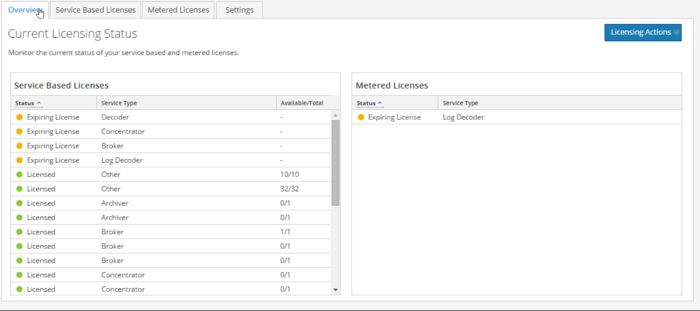
Tasks
Security Analytics 10.5 altered the licensing model to trust based. Under this model, it is not possible to explicitly entitle a device from Administration->Services--->Licenses as previously done in 10.3 and 10.4.This UI structure is still present but only for legacy purposes, and will be removed from the UI in a later release. As of version 10.5.0.0, all license management is centralized under the SA server, with entitlements syncing details between the FNEserver and RSA Download Center (DLC). These entitlements are stored in a separate, local database (MongoDB). This article provides information about how to view the database
Resolution
Make sure that the appropriate numbers of service-based licenses are available.Please note:
- Those entitlements need to be mapped appropriately to a Server ID (Administration -> System -> Info) in RSA Download Central (DLC) for as many as are required by the SA environment
- After mapping, entitlements must be synced manually by downloading a license .bin response file from DLC or dynamically if the Security Analytics server is not externally facing or able to resolve rsasecurity.subscribenet.com. (NOTE: a script to sync runs every 24 hours automatically).
- For more information, refer to the Security Analytics 10.5 Licensing Guide.
If a similar condition to that seen below with devices occurs after the license .bin is uploaded or after completing the License Actions, then refresh and perform the following actions:
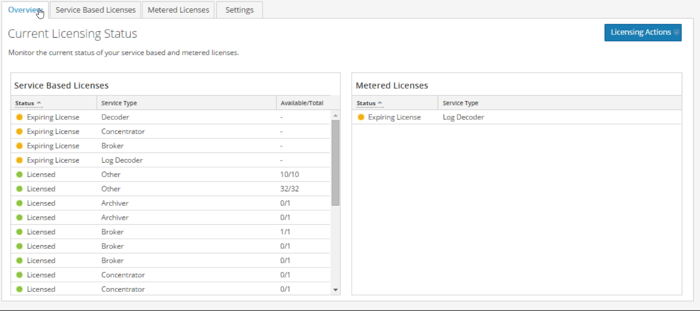
1. Open an SSH connection to the SA server and run the following command:
tailf /var/lib/netwitness/uax/logs/sa.log
- From the Administration -> System -> Overview page, on the Licensing Actions tab, click on Refresh Licenses. The FNEserver will restart and will log messages similar to the example below in the /var/lib/netwitness/uax/logs/sa.log file:
2015-11-16 15:42:37,271 [qtp684874119-182562] INFO com.rsa.smc.sa.core.licensing.LLSManager - fneserver restarting
2015-11-16 15:42:41,377 [Entitlement Resolving Thread 1702466548] ERROR com.rsa.smc.sa.core.licensing.EndpointLicenseResolver - Error occurred while replacing expired licenses - Unknown endpoint for id 55c23e78f280694992e55827
2015-11-16 15:42:41,638 [qtp684874119-182375] WARN com.rsa.smc.sa.admin.service.entitlement.DefaultEntitlementService - Couldn't get endpoint with ID: 55c23e78f280694992e55827
2015-11-16 15:42:43,848 [Reporting Status Polling 1961375982] INFO com.rsa.smc.sa.reporter.jobs.ReporterChartPollingTask - Fetching data for chart /Gerald/Gerald Hourly Charts/PPS Hourly Chart from 2015-11-16 15:19:59.999 +0000 to 2015-11-16 15:41:59.999 +0000
2015-11-16 15:42:44,022 [Reporting Status Polling 1961375982] INFO com.rsa.smc.sa.reporter.jobs.ReporterChartPollingTask - Fetching data for chart /Exarro Threat Hits from 2015-11-16 15:14:59.999 +0000 to 2015-11-16 15:41:59.999 +0000
2015-11-16 15:42:44,105 [Reporting Status Polling 1961375982] INFO com.rsa.smc.sa.reporter.jobs.ReporterChartPollingTask - Fetching data for chart /Gerald/Gerald Hourly Charts/PG Group Hourly Chart from 2015-11-16 15:14:59.999 +0000 to 2015-11-16 15:41:59.999 +0000
2015-11-16 15:30:18,490 [Entitlement Resolving Thread 1702466548] ERROR com.rsa.smc.sa.core.licensing.EndpointLicenseResolver - Error occurred while replacing expired licenses - Unknown endpoint for id 55c23e20f280694992e5580e
2015-11-16 15:30:18,818 [qtp684874119-182435] WARN com.rsa.smc.sa.admin.service.entitlement.DefaultEntitlementService - Couldn't get endpoint with ID: 55c23e20f280694992e5580e
2015-11-16 15:30:18,818 [qtp684874119-182435] WARN com.rsa.smc.sa.admin.service.entitlement.DefaultEntitlementService - Couldn't get endpoint with ID: 55c23e78f280694992e55827
2015-11-16 15:30:25,850 [qtp684874119-182375] WARN com.rsa.smc.sa.admin.service.entitlement.DefaultEntitlementService - Couldn't get endpoint with ID: 55c23e20f280694992e5580e
2015-11-16 15:30:25,850 [qtp684874119-182375] WARN com.rsa.smc.sa.admin.service.entitlement.DefaultEntitlementService - Couldn't get endpoint with ID: 55c23e78f280694992e55827
2. Take note of the IDs in the log entry, marked in red above.
3. First of all make sure that the fneserver is stopped:
service fneserver stop
4. Object ID 55c23e78f280694992e55827 needs to be removed from MongoDB because a related service with an available permanent entitlement is already using a trial license. Therefore, we need to delete this entry from the database. To do so, first connect to the mongoDB CLI and then delete the entry, as shown below.
[root@SAServer ~]# mongo sa
TokuMX mongo shell v1.4.2-mongodb-2.4.10
connecting to: sa
> db.entitlement.remove( { _id: ObjectId("55c23e78f280694992e55827") } )
TokuMX mongo shell v1.4.2-mongodb-2.4.10
connecting to: sa
> db.entitlement.remove( { _id: ObjectId("55c23e78f280694992e55827") } )
5. To list all of the available service-based and meter license entitlements from the CLI, issue the command below.
> db.entitlement.find().pretty()
6. Observe similar output to that below:
{
"_id" : ObjectId("55bc8bc4f280bcd335fd33db"),
"_class" : "com.rsa.smc.sa.admin.domain.bean.entitlement.EntitlementDeviceInfo",
"deviceName" : "CHN-LOG CONC",
"identity" : "",
"featureId" : "smcConcentrator-ootb-rsa",
"featureType" : "PERPETUAL",
"deviceType" : "CONCENTRATOR",
"licensedDate" : "2015-10-29 08:59:28",
"licenseVendor" : "RSA-OOTB"
}
{
"_id" : ObjectId("55bc8bc4f280bcd335fd33dd"),
"_class" : "com.rsa.smc.sa.admin.domain.bean.entitlement.EntitlementDeviceInfo",
"deviceName" : "CHN-PACKET DECODER",
"identity" : "",
"featureId" : "smcDecoder-ootb-rsa",
"featureType" : "PERPETUAL",
"deviceType" : "DECODER",
"licensedDate" : "2015-10-29 08:59:28",
"licenseVendor" : "RSA-OOTB"
}
{
"_id" : ObjectId("55bc8bc4f280bcd335fd33de"),
"_class" : "com.rsa.smc.sa.admin.domain.bean.entitlement.EntitlementDeviceInfo",
"deviceName" : "CHN-SA-Packet concentrator",
"identity" : "",
"featureId" : "smcConcentrator-ootb-rsa",
"featureType" : "PERPETUAL",
"deviceType" : "CONCENTRATOR",
"licensedDate" : "2015-08-01 09:05:54",
"licenseVendor" : "RSA-OOTB"
}
{
"_id" : ObjectId("55bc8bc4f280bcd335fd33e5"),
"_class" : "com.rsa.smc.sa.admin.domain.bean.entitlement.EntitlementDeviceInfo",
"deviceName" : "NCR-MALWARE ANALYSIS",
"identity" : "c2f39652-476d-42bc-a4ce-1d4c8609f325",
"featureId" : "smcMalwareMetered-ootb-rsa",
"featureType" : "METERED",
"deviceType" : "SPECTRUM",
"licensedDate" : "2015-10-29 08:59:28",
"licenseVendor" : "RSA-OOTB"
}
7. List the
trial licenses currently associated with an Object ID with the command below.
"_id" : ObjectId("55bc8bc4f280bcd335fd33db"),
"_class" : "com.rsa.smc.sa.admin.domain.bean.entitlement.EntitlementDeviceInfo",
"deviceName" : "CHN-LOG CONC",
"identity" : "",
"featureId" : "smcConcentrator-ootb-rsa",
"featureType" : "PERPETUAL",
"deviceType" : "CONCENTRATOR",
"licensedDate" : "2015-10-29 08:59:28",
"licenseVendor" : "RSA-OOTB"
}
{
"_id" : ObjectId("55bc8bc4f280bcd335fd33dd"),
"_class" : "com.rsa.smc.sa.admin.domain.bean.entitlement.EntitlementDeviceInfo",
"deviceName" : "CHN-PACKET DECODER",
"identity" : "",
"featureId" : "smcDecoder-ootb-rsa",
"featureType" : "PERPETUAL",
"deviceType" : "DECODER",
"licensedDate" : "2015-10-29 08:59:28",
"licenseVendor" : "RSA-OOTB"
}
{
"_id" : ObjectId("55bc8bc4f280bcd335fd33de"),
"_class" : "com.rsa.smc.sa.admin.domain.bean.entitlement.EntitlementDeviceInfo",
"deviceName" : "CHN-SA-Packet concentrator",
"identity" : "",
"featureId" : "smcConcentrator-ootb-rsa",
"featureType" : "PERPETUAL",
"deviceType" : "CONCENTRATOR",
"licensedDate" : "2015-08-01 09:05:54",
"licenseVendor" : "RSA-OOTB"
}
{
"_id" : ObjectId("55bc8bc4f280bcd335fd33e5"),
"_class" : "com.rsa.smc.sa.admin.domain.bean.entitlement.EntitlementDeviceInfo",
"deviceName" : "NCR-MALWARE ANALYSIS",
"identity" : "c2f39652-476d-42bc-a4ce-1d4c8609f325",
"featureId" : "smcMalwareMetered-ootb-rsa",
"featureType" : "METERED",
"deviceType" : "SPECTRUM",
"licensedDate" : "2015-10-29 08:59:28",
"licenseVendor" : "RSA-OOTB"
}
> db.OOTBInfo.find().pretty()
8. Start the fneserver:
service fneserver start
9. Refresh the browser page if necessary and you should see the permanent license applied correctly.
Product Details
RSA Product Set: Security AnalyticsRSA Product/Service Type: Security Analytics Server
RSA Version/Condition: 10.5.x
Platform: CentOS
Platform (Other): MongoDB, Flexera FNEserver
O/S Version: EL6
Summary
This article describes a possible way to clear error conditions with the 10.5 license keys when they appear to be in a trial or unlicensed state.
Approval Reviewer Queue
Technical approval queue