.png?width=180&height=32&name=NW%20Logo%20(2).png)
Tasks
This article addresses how to purge the data in the data queues if they utilize the bandwidth between a remote Log Collector and a Local Log Collector.Resolution
To purge the data in the shovel queue, follow the steps below.- Connect to the Virtual Log Collector (VLC) via SSH as the root user.
- Issue the command below.
curl -s --user 'admin:netwitness' 'http://<VLCIP>:50101/event-broker?msg=purge&force-content-type=text/plain&expiry=600&<shovel.queue.name<%20%20>>'
Where:
- VLCIP = The Virtual Log Collector IP address
- shovel.queue.name = The shovel queue name that you want to purge. You can get that from the explore view of the VLC as per snapshot below
- This example assumes using the default admin password.
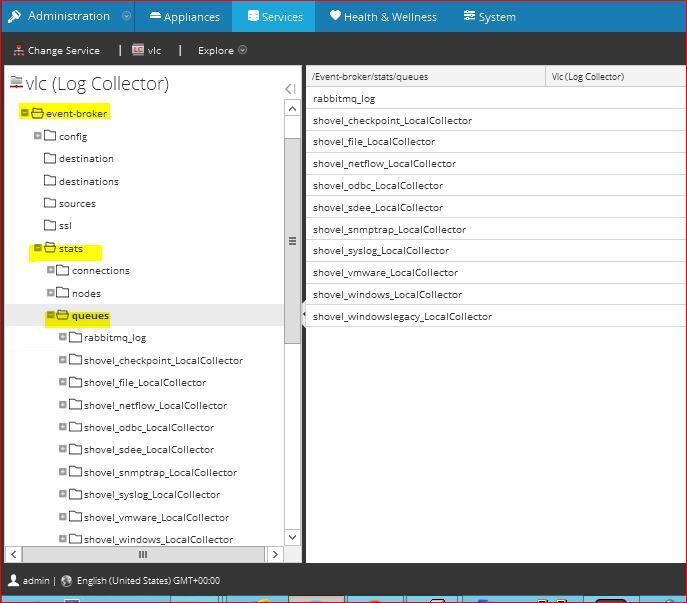
Notes
Remember to replace the *underscore* "_" with the *dot* "." as per the command above.
Product Details
RSA Product Set: Security AnalyticsRSA Product/Service Type: Virtual Log Collector (VLC), Security Analytics UI
Platform: CentOS
Summary
How to purge the data in the data queues if they utilize the bandwidth between a remote Log Collector and a Local Log Collector.
Approval Reviewer Queue
ASOC Approval Group