.png?width=180&height=32&name=NW%20Logo%20(2).png)
Issue
When working in the Investigation module, some traffic may be identified as suspicious, although further investigation reveals that it is safe traffic.The article explains how to tag this traffic as safe so that it can be excluded from future investigations.
This allows you to concentrate on events that may be suspicious by excluding events that you know to be safe.
An alternative method would be to edit rules downloaded from RSA Live, but if these rules changed in the future, any modification made would be overwritten.
Tasks
Follow the steps below to flag traffic as safe so that it will be excluded from future investigations.1. Create a custom meta key called "safe.traffic" This is done by editing the /etc/netwitness/ng/index-concentrator-custom.xml file on each of your concentrators.
A sample file is shown below: Restart the concentrator for the change to take effect.

2. Create App Rules on your Log and/or Packet decoders so that traffic that you consider safe is tagged with the meta safe.traffic In this example ip.src=192.168.202.1 && ip.dst=192.168.123.27 && service=80 is considered safe traffic.
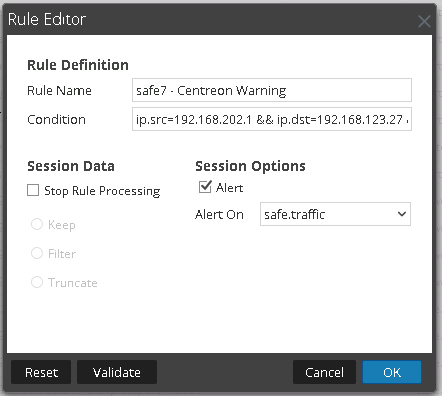
3. Add additional App Rules for other traffic that you consider safe.

4. Future safe traffic will now be tagged with a meta key safe.traffic

5. In Investigator View, Create a new profile "Exclude Safe Traffic" with a preQuery "safe.traffic !exists".
Any traffic that you have considered as safe, will no longer be shown when you use this Profile View.

If you are unsure of any of the steps above or experience any issues, contact RSA Support and quote this article number for further assistance.
Notes
Below is a sample index-concentrator-custom.xml file.
<?xml version="1.0" encoding="utf-8"?>
<language level="IndexNone" defaultAction="Auto">
<key description="RiskyIPs" format="Text" level="IndexValues" name="risk.ip" valueMax="100000" defaultAction="Open"/>
<key description="LogCollectorID" format="Text" level="IndexValues" name="lc.cid" valueMax="100000" defaultAction="Open"/>
<key description="SrcPort" format="Text" level="IndexValues" name="ip.srcport" valueMax="100000" defaultAction="Open"/>
<key description="ecat.macaddress" level="IndexValues" name="ecat.macaddress" format="Text" valueMax="100000" defaultAction="Open"/>
<key description="ecat.OS" level="IndexValues" name="ecat.OS" format="Text" valueMax="100000" defaultAction="Open"/>
<key description="ecat.AgentID" level="IndexValues" name="ecat.AgentID" format="Text" valueMax="100000" defaultAction="Open"/>
<key description="ecat.stime" level="IndexValues" name="ecat.stime" format="Text" valueMax="100000" defaultAction="Open"/>
<key description="ecat.ctime" level="IndexValues" name="ecat.ctime" format="Text" valueMax="100000" defaultAction="Open"/>
<key description="ecat.score" level="IndexValues" name="ecat.score" format="Text" valueMax="100000" defaultAction="Open"/>
<key description="gateway.ip" level="IndexValues" name="Gateway.ip" format="Text" valueMax="100000" defaultAction="Open"/>
<key description="local.ip" level="IndexValues" name="Local.ip" format="Text" valueMax="100000" defaultAction="Open"/>
<key description="remote.ip" level="IndexValues" name="Remote.ip" format="Text" valueMax="100000" defaultAction="Open"/>
<key description="host.dst" level="IndexValues" name="host.dst" format="Text" valueMax="1000000" defaultAction="Open"/>
<key description="result.code" level="IndexValues" name="result.code" format="Text" valueMax="1000000" defaultAction ="Open"/>
<key description="safe.traffic" level="IndexValues" name="safe.traffic" format="Text" valueMax="1000" defaultAction="Open"/>
</language>
<language level="IndexNone" defaultAction="Auto">
<key description="RiskyIPs" format="Text" level="IndexValues" name="risk.ip" valueMax="100000" defaultAction="Open"/>
<key description="LogCollectorID" format="Text" level="IndexValues" name="lc.cid" valueMax="100000" defaultAction="Open"/>
<key description="SrcPort" format="Text" level="IndexValues" name="ip.srcport" valueMax="100000" defaultAction="Open"/>
<key description="ecat.macaddress" level="IndexValues" name="ecat.macaddress" format="Text" valueMax="100000" defaultAction="Open"/>
<key description="ecat.OS" level="IndexValues" name="ecat.OS" format="Text" valueMax="100000" defaultAction="Open"/>
<key description="ecat.AgentID" level="IndexValues" name="ecat.AgentID" format="Text" valueMax="100000" defaultAction="Open"/>
<key description="ecat.stime" level="IndexValues" name="ecat.stime" format="Text" valueMax="100000" defaultAction="Open"/>
<key description="ecat.ctime" level="IndexValues" name="ecat.ctime" format="Text" valueMax="100000" defaultAction="Open"/>
<key description="ecat.score" level="IndexValues" name="ecat.score" format="Text" valueMax="100000" defaultAction="Open"/>
<key description="gateway.ip" level="IndexValues" name="Gateway.ip" format="Text" valueMax="100000" defaultAction="Open"/>
<key description="local.ip" level="IndexValues" name="Local.ip" format="Text" valueMax="100000" defaultAction="Open"/>
<key description="remote.ip" level="IndexValues" name="Remote.ip" format="Text" valueMax="100000" defaultAction="Open"/>
<key description="host.dst" level="IndexValues" name="host.dst" format="Text" valueMax="1000000" defaultAction="Open"/>
<key description="result.code" level="IndexValues" name="result.code" format="Text" valueMax="1000000" defaultAction ="Open"/>
<key description="safe.traffic" level="IndexValues" name="safe.traffic" format="Text" valueMax="1000" defaultAction="Open"/>
</language>
Product Details
RSA Product Set: Security AnalyticsRSA Product/Service Type: Security Analytics UI
RSA Version/Condition: 10.4 and above
Summary
When working in investigator mode, some traffic may be identified as suspicious, although further investigation reveals that it is safe traffic. The article explains how to tag this traffic as safe so that it can be excluded from future investigations.
Approval Reviewer Queue
ASOC Approval Group