.png?width=180&height=32&name=NW%20Logo%20(2).png)
Issue
How to reload parsers on a Decoder or Log Decoder via the RSA Security Analytics UI.
Resolution
To perform a parser reload on a Decoder or Log Decoder in the RSA NetWitness UI, follow the steps below.
- In the RSA NetWitness UI, navigate to Administration/Admin > Services.
- Select the appropriate device and click on View > Explore.
- In the directory tree, navigate to decoder > parsers.
- Right-click on the parsers directory and select Properties.
- In the drop-down menu in the lower-right side, select reload.
- Click on the Send button.
If the operation was successful, the Response Output field will be populated with the following message: "The parsers have been reloaded"
If this does not solve your issue, please open a case with RSA Technical Support and reference this article so that we may better assist you.
Notes
Below is a screenshot of the parsers reload procedure via the RSA NetWitness UI. 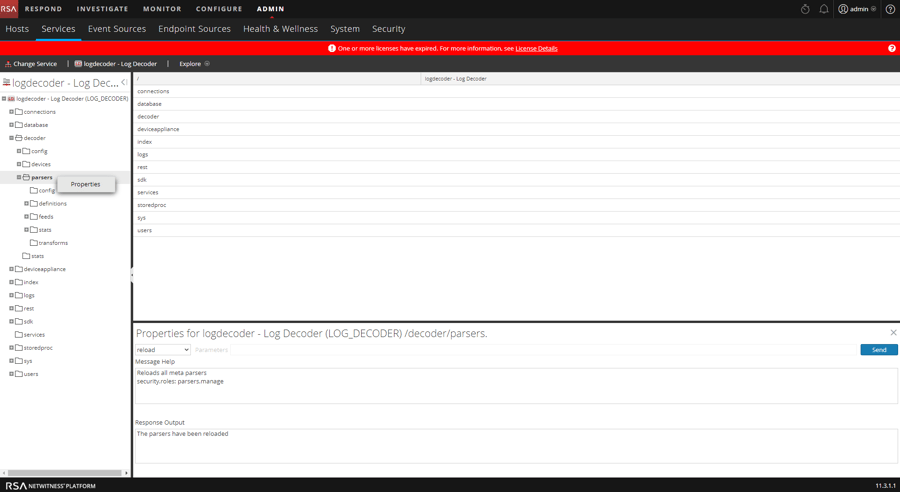
Product Details
Product Set: Security Analytics, NetWitnessProduct/Service Type: NetWitness UI, Decoder, Log Decoder
NetWitness Version/Condition: 11.X/12.x
Platform: CentOS 7 / Alma
Approval Reviewer Queue
Technical approval queue