.png?width=180&height=32&name=NW%20Logo%20(2).png)
Issue
In the below example, we are using the file collection type and want to remove the nw_test event source:On NetWitness UI -> Admin -> Services -> Log collector ->config ->event sources -> file , the below is the file config
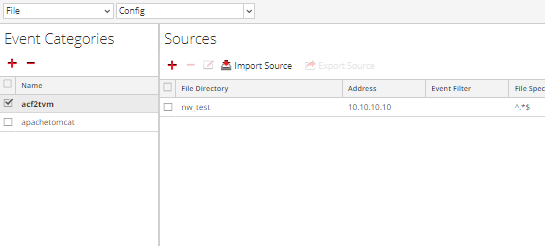
This can be done from the UI as well as the Rest API as explained below
Tasks
Overview: To remove event source 2k8r2-dc1.2k8r2-vcloud.local from the DC3 event category:
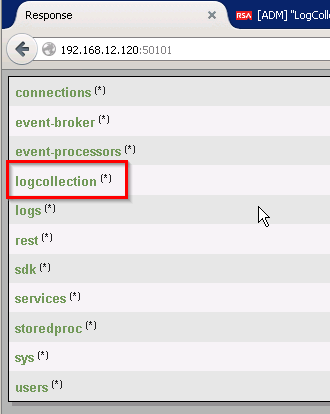
And select in this order ‘ logcollection -> windows -> eventsources’ until you arrive at the page which has the event category noted in the screenshot from the SA UI. In this case ‘DC3’ :
2. The arrow in the following image points to the asterisk (*) next to the event category name
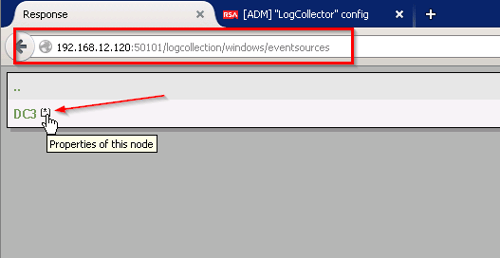
- Click on the asterisk and it will open the following property window of the event category:


name=_ALL_

When finished, going back to the SA UI, you will see that the event category DC3 is still intact but the event source has been removed:

If you do not see ‘success’ in the Output field after sending the ‘delete’ instruction, please contact RSA Support for assistance.
Resolution
Through the REST api, a number of configurations can be modified. In this circumstance, specific event sources were removed from an event category by using the host name of the event sources.
Please find the screenshots below to facilitate removal of the event sources from a Log Collector using the REST api:
-Go to Log collector REST API :
-for File collection type Go to

To remove event source
nw_test from the
acf2tvm event category,
click on (*) next to acf2tvm to display the options --> choose delete
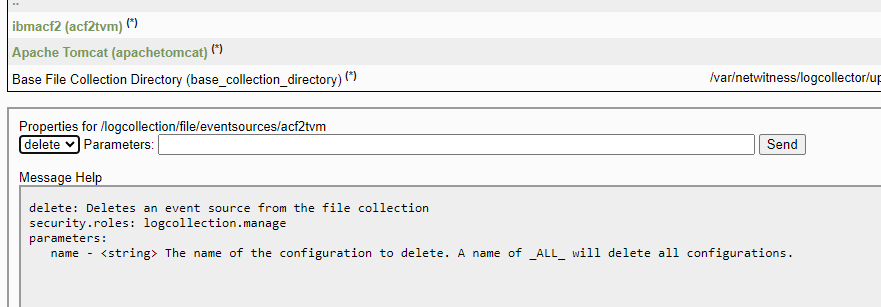 enter the name of the config to delete, in our case nw_test
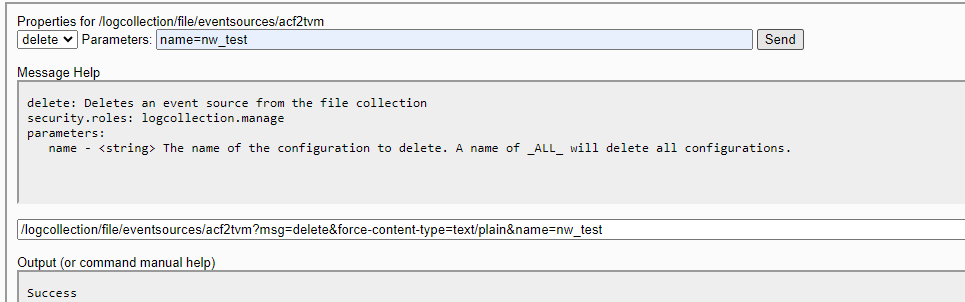
Note: This process can also be done in Explore following the same directions if REST access is unavailable.
Product Details
NetWitness Product Set: NetWitness Logs and NetworkNetWitness Product/Service Type: NetWitness Log Collector
NetWitness Version/Condition: 11.x ,12.x
Platform: CentOS, AlmaLinux
Summary
The following steps will allow you to remove event sources from a 11.x ,12.x Log Collector using the REST api.
Approval Reviewer Queue
Technical approval queue