.png?width=180&height=32&name=NW%20Logo%20(2).png)
Issue
The "admin" (Administrator) account may have expired or become locked out due to too many failed password attempts and needs to be reset.
Tasks
Follow the steps in the Resolution section to login to Postgres SQL and unlock and reset the "admin" user to a default password.
Resolution
- SSH to the host or VM where the NW Orchestrator ThreatConnect is installed
- Note the "tcuser" username and password from your installation directory using the example below. Note: The username and password are defined in the .env file under your Orchestrator installation directory.
[tcdocker@NW-THREATCONNECT ~]$ grep "DB_USER\|DB_PASS" /opt/rsa-orchestrator-docker/.env
DB_USER=tcuser
DB_PASS=netwitness - Login to our Postgres docker instance shell:
docker exec -ti postgres bash - Switch User (su) to the postgres user following the example below:
root@368aeab3b732:/# su postgres - Login to Postgres with the "tcuser" username and password. The username (most likely "tcuser") and password were obtained in step 2. In the example scenario, the username:password combo is "tcuser:netwitness"
postgres@368aeab3b732:~$ psql -U tcuser -d threatconnect - Once logged in, execute the following command, which will reset the password for the Orchestrator ThreatConnect GUI "admin" user to "password1"
UPDATE usertable SET password = 'JiNeQHkKWKmFtqcCT9GTLyWDO+ViMaA4kJHa6/7CBbo=', salt = '7173744076097521289', locked = 0, resetRequired = 1, failedAttempts = 0, lastFailedAttempt = NULL, disabled = 0, authenticatorSecretKey = NULL WHERE userName = 'admin';- Example Output:
threatconnect=> UPDATE usertable SET password = 'JiNeQHkKWKmFtqcCT9GTLyWDO+ViMaA4kJHa6/7CBbo=', salt = '7173744076097521289', locked = 0, resetRequired = 1, failedAttempts = 0, lastFailedAttempt = NULL, disabled = 0, authenticatorSecretKey = NULL WHERE userName = 'admin';
UPDATE 1
- Example Output:
- Connect to UI & login with newly reset default password "password1".
- The UI will then ask to reset the temporary password to a new password.
- Once logged in, the "admin" user can change the password for any additional users necessary by going to Organization Settings, switching to the netwitnes-tc organization and editing the accounts:
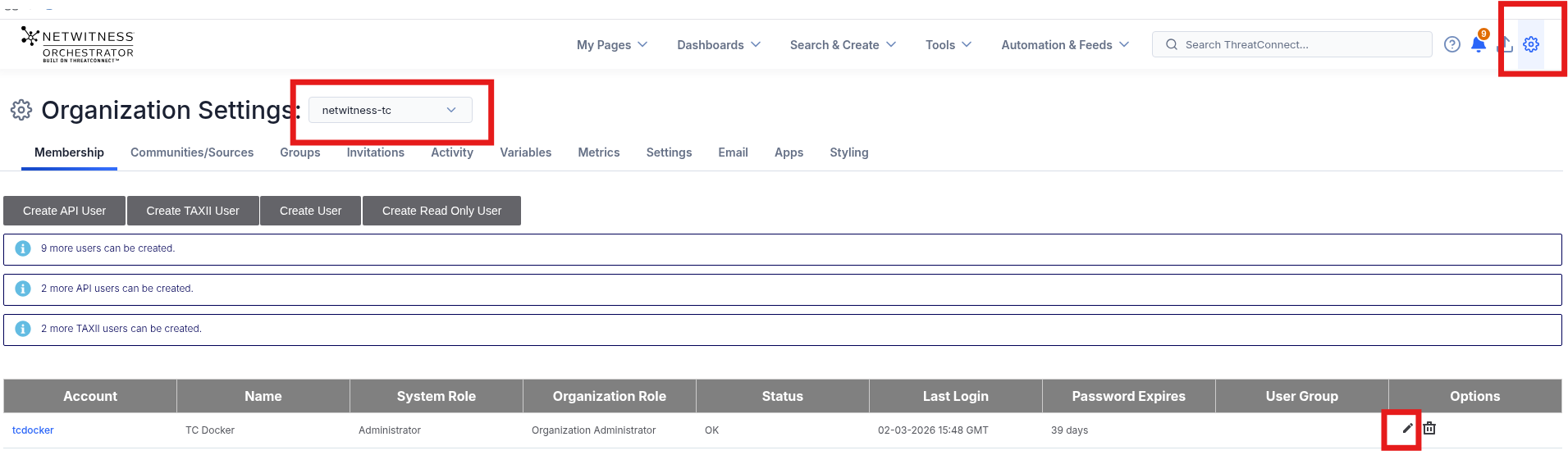
- Once logged in, the "admin" user can change the password for any additional users necessary by going to Organization Settings, switching to the netwitnes-tc organization and editing the accounts:
Product Details
NetWitness Product Set: NetWitness Logs & Network
NetWitness Product/Service Type: Orchestrator, ThreatConnect
NetWitness Version/Condition: Orchestrator/ThreatConnect 7.x and above
Platform: AlmaLinux, CentOS, RHEL, Postgres SQL, Docker
Approval Reviewer Queue
Technical approval queue