.png?width=180&height=32&name=NW%20Logo%20(2).png)
Issue
Netwitness Log Collector lockbox password requires a reset if one of the following situations arise.
- When the lockbox password is not known or forgotten
- When there is an error in UI password does not match Lockbox value during Reset Password
- When there is an error in /var/log/messages Lockbox Initialization Failed
- When there is an error i/var/log/messages
NwLogCollector_PreInstall: Lockbox Status : Failed to open lockbox: The Lockbox stable value threshold was not met because the system fingerprint has changed. To reset the system fingerprint, open the Lockbox using the passphrase.
Cause
This issue could be due to forgotten password, hardware change or recent NetWitness version upgrade.
Resolution
In some circumstances, it may be necessary to create a new lockbox for the Log Collector in Netwitness UI. An example of this would be when Event Sources cannot be added and the user is getting the error "Failed to open lockbox." To do so, follow the steps below.
Note: Please note that all stored passwords for the event sources will need to be re-entered after the new lockbox is created.
- Connect to the Log Collector appliance via SSH as the root user.
- Change the directory to /etc/netwitness/ng/vault/ with the following command:
cd /etc/netwitness/ng/vault
- Make a new directory to backup the existing lockbox with the following command:
mkdir old
- Move the existing lockbox file if exists to that directory with the following command:
mv -vi lc.lockbox lockbox lockbox.FCD lockbox.bak lockbox.bak.FCD old
- Log in to the Netwitness UI, navigate to the Admin -> Services -> Logcollector
- Click on the red Actions(gear icon) button for the Log Collector service and select View -> Config.
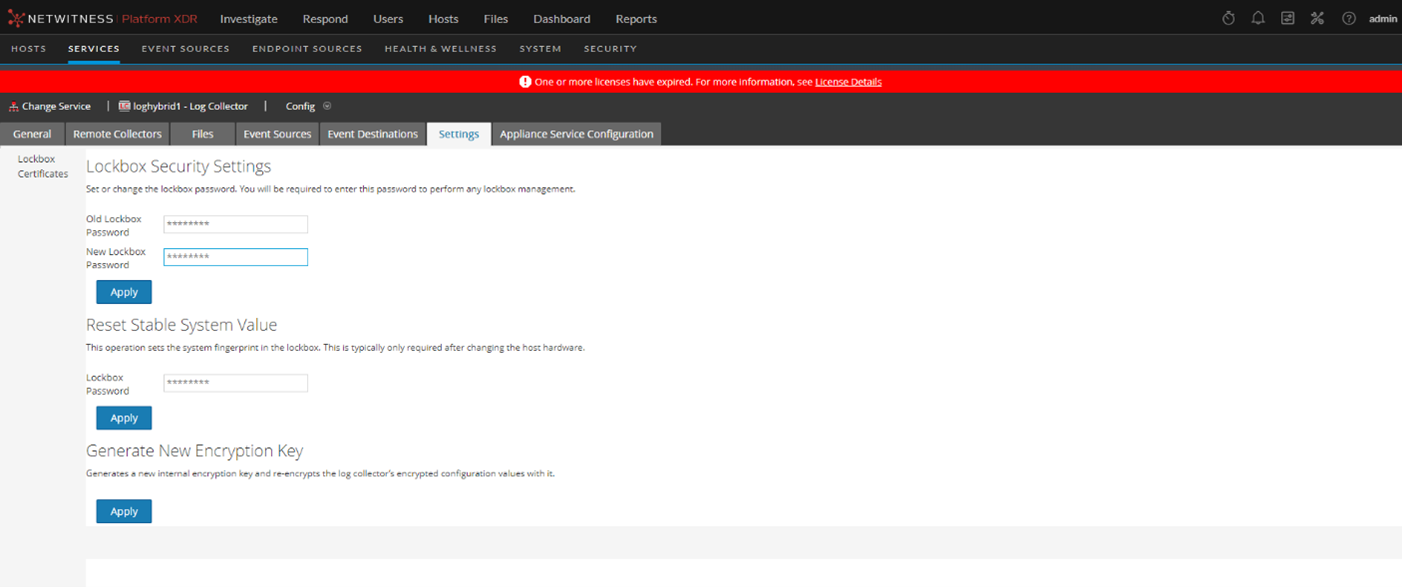
- Click on the Settings tab.
- Leave the "Old Lockbox Password" field blank and enter a new password in the "New Lockbox Password" field.
- Click Apply.
- Check the directory /etc/netwitness/ng/vault/ for the file lc.lockbox is newly created.
- Restart NWLogCollector service using the following command.
systemctl restart nwlogcollector
- Enter the password of all the configured event sources.
Product Details
NetWitness Product Set: NetWitness Logs & Network
NetWitness Product/Service Type: Log Collector
NetWitness Version/Condition: 12.3.1 and later
Platform: CentOS, AlmaLinux
Summary
This document outlines the procedure to reset lockbox password in Netwitness logcollector.
Approval Reviewer Queue
Technical approval queue