.png?width=180&height=32&name=NW%20Logo%20(2).png)
Issue
We want to modify the Subject Line of an Email that was fired from an Alert to reflect some additional information, such as the name of the Alert.
Tasks
Information can be dynamically added to the subject line of an alert as long as it exists in the information that is returned from the alert. This can all be modified from the Admin > System > Global Notifications and add/edit a value under the Output tab that is of email type. For example: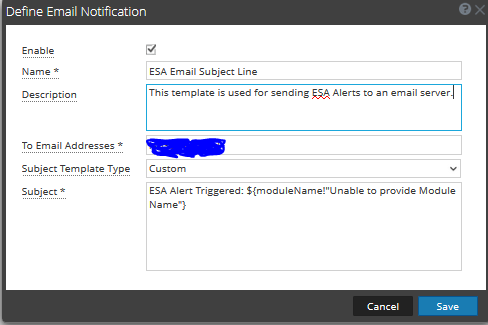
When an alert is triggered using this email template, the subject line returns the value of moduleName in our Freemarker. In this instance, this will be the name of the ESA/Correlation Server rule that triggered. If this value does not exist, for some reason, it will print "Unable to Provide Module Name" where the name would exist. We recommend you use this type of syntax when defining keys as if there is any problem with the email's Freemarker syntax, it will not send at all. To explore the other options that can be used in our syntax, I recommend you have a look at this blog post as well as the Freemarker site for more syntax help. Building the Notifications of Your Dreams
If you feel your emails should be firing for some reason and you are unsure why, please review the /var/log/netwitness/correlation-server/correlation-server.log on the ESA that is firing the alert or the /var/log/netwitness/integration-server/integration-server.log from the Admin Server. If you are unable to understand why your template is not working from those logs, please provide these logs and the Email Template you are attempting to use when contacting RSA Support.
Product Details
RSA Product Set: RSA NetWitness PlatformRSA Product/Service Type: Event Stream Analysis (ESA), Correlation Server
RSA Version/Condition: 11.3, 11.4
Platform: CentOS
O/S Version: EL7
Approval Reviewer Queue
RSA NetWitness Suite Approval Queue