.png?width=180&height=32&name=NW%20Logo%20(2).png)
Issue
When installing a 10G Fiber Daughter Card to replace the 10G Copper Daughter card, it is best to reimage the appliance to automatically generate the necessary udev rules. However, in many cases, a reimage is not possible and sometimes data destructive (in the case of a hybrid appliance). This document will explain how to update these rules when installing a card and not subsequently reimaging the appliance!!Tasks
- Back up /etc/sysconfig/network-scripts/ifcfg-em3 and ifcfg-em4
- Shutdown the appliance and install the card (See RSA University Training “RSA NetWitness Logs and Packets 10G Interface Installation and Configuration” for more information)
- Log into the appliance with the root account via the console or if you still have access, SSH.
- Update the udev rules by navigating to the rules.d directory, backing up the 70-persisent-rules file, and examining it. em1 and em2 should always be the 1G interfaces (igb) and em3 and em4 should be the 10G Interfaces (ixgbe). Please see the below commands.
[root@NW10GPKTDEC ~]# cd /etc/udev/rules.d/
[root@NW10GPKTDEC rules.d]# cp 70-persistent-net.rules 70.rules.old
[root@NW10GPKTDEC rules.d]# vi 70-persistent-net.rules
Find the ixgbe lines (e.g. you can type /ixgbe while in vi and press n for the next ixgbe listing) as this will be where you will find the mac addresses of the 10g interfaces.
Replace the mac addresses of em3 and em4 with the mac addresses of your 10g card (you may see them in 70-persistent.rules as ixgbe interfaces but not configured under em3 and em4). Then, write and save your changes: :wq.
[root@NW10GPKTDEC rules.d]# cp 70-persistent-net.rules 70.rules.old
[root@NW10GPKTDEC rules.d]# vi 70-persistent-net.rules
Find the ixgbe lines (e.g. you can type /ixgbe while in vi and press n for the next ixgbe listing) as this will be where you will find the mac addresses of the 10g interfaces.
Replace the mac addresses of em3 and em4 with the mac addresses of your 10g card (you may see them in 70-persistent.rules as ixgbe interfaces but not configured under em3 and em4). Then, write and save your changes: :wq.
Note: You can also find the 10g configured mac and its current configured interface in dmesg with the first half of your 10g mac address
For example, if your 10g mac interface started with 24:6e:96:02 you could find what interface this is configured with the following command:
dmesg |grep 24:6e:96:0e
If you haven't yet configured the ixgbe mac addresses to em3 and em4 in 70-persistent-net.rules dmesg will not see em3 or em4 configured to your new mac addresses.
For example, if your 10g mac interface started with 24:6e:96:02 you could find what interface this is configured with the following command:
dmesg |grep 24:6e:96:0e
If you haven't yet configured the ixgbe mac addresses to em3 and em4 in 70-persistent-net.rules dmesg will not see em3 or em4 configured to your new mac addresses.
- Configure the management interface by editing the ifcfg-em3 and ifcfg-em4 files with the updated HWADDR (MAC address) and restart networking.
[root@NW10GPKTDEC ~]# cd /etc/sysconfig/network-scripts/
[root@NW10GPKTDEC network-scripts]# vi ifcfg-em3
[root@NW10GPKTDEC network-scripts]# vi ifcfg-em4
[root@NW10GPKTDEC network-scripts]# service network restart
Update ifcfg-em3 and ifcfg-em4 with the correct MAC to match the MAC configured for em3 and em4 in 70-persistent-net.rules
[root@NW10GPKTDEC network-scripts]# vi ifcfg-em3
[root@NW10GPKTDEC network-scripts]# vi ifcfg-em4
[root@NW10GPKTDEC network-scripts]# service network restart
Update ifcfg-em3 and ifcfg-em4 with the correct MAC to match the MAC configured for em3 and em4 in 70-persistent-net.rules
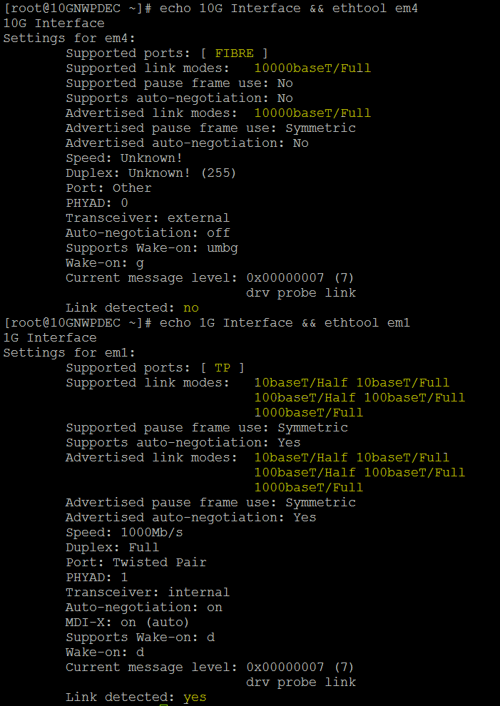
- After confirming networking, continue to setup the decoder and interfaces accordingly. In troubleshooting, ethtool is very useful to determine the exact interface name to physical port mappings if there are any issues. Please see the example below to find whether the interface is configured for 10G or 1G :
Resolution
There is currently no permanent resolution to this issue. It is advised to reimage the appliance after installing the card, but if that is not possible, these steps must be followed.
Product Details
RSA Product Set: RSA NetWitness Suite
RSA Product/Service Type: NetWitness Logs and Packets Series 5 appliances
RSA Version/Condition: 10.6 and higher
Platform: CentOS
O/S Version: 6
Summary
After installing a 10G Fiber Daughter Card, existing networking is unavailable until the 70-persistent-net.rules udev rules are updated. This article explains how to update those rules and restore connectivity.
Approval Reviewer Queue
Technical approval queue