.png?width=180&height=32&name=NW%20Logo%20(2).png)
Issue
How to utilize NetWitness Live content in RSA NetWitness Logs & Network
Resolution
RSA NetWitness Platform Live is the gateway to a rich environment that offers users to deploy custom feeds and packages, and other resources.
Prerequisites:
Setup:
Setting up Live integration for NetWitness Logs & Network requires your NetWitness Live account username and password as well as Internet access from a computer running NetWitness Logs & Network 10.6 and above.Note: If your organization uses a proxy server for Internet access, make sure your Internet Explorer proxy settings are connection on the computer where Investigator is installed before continuing.
For 10.x
1. Go to Administration > System > Live Services
2. Configure the connection to the CMS server and the Live account.
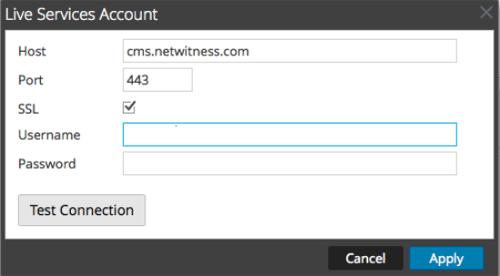
3. Enter your RSA Live credentials on the username and password field.
4. Click Test Connection to make sure your connection is working.
For 11.x
1. Navigate to ADMIN > System > Live Services.
2. Click Sign In and enter your credentials in the Live Services Account dialog box.
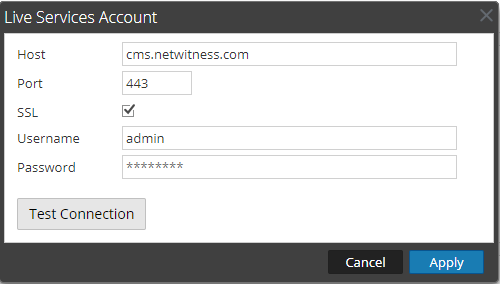
3. Click Test Connection to make sure your connection is working.
4. If the test is successful, click Apply. If not, contact RSA Customer Support for help connecting to the Live server.
Usage:
10.x: Go to Live > Search
11.x: Go to Configure > Live Content
From here you can locate and select various types of NetWitness Live content to apply on your investigations.
Internal Comments
UserName:wirthr16/20/2012 1:21:22 PM - Solution Number 00000373
Solution Number 00000373
UserName:shurtj
8/26/2014 2:15:39 PM - Updated Article
Updated article and made changes to abide by Primus best practices.
UserName:almirm
8/28/2019 5:19 PM - Updated Article
Update article for NW 10.6.x/11.x
Product Details
RSA Product Set: NetWitness Logs & Network, RSA NetWitness LiveRSA Product/Service Type: Admin Server
RSA Version/Condition: 10.6.x, 11.x
Approval Reviewer Queue
RSA NetWitness Suite Approval Queue