.png?width=180&height=32&name=NW%20Logo%20(2).png)
How Role-Based Access Control Works
In the NetWitness Platform, roles determine what users can do. A role has permissions assigned to it and you must assign a role to each user. The user then has permission to do what the role allows. Role-bsed access control (RBAC) is established when there is a trusted connection between NetWitness Server and a Core service.
Preconfigured Roles
To simplify the process of creating roles and assigning permissions, there are preconfigured roles in NetWitness. You can also add roles customized for your organization.
The following table lists each preconfigured role and the permissions assigned to it. All permissions are assigned to the Administrators role. A subset of permissions is assigned to each of the other roles.
Trusted Connections Between Server and Service
In a trusted connection, a service explicitly trusts NetWitness Server to manage and authenticate users. This reduces administration on each service because authenticated users do not have to be defined locally in each Core service.
As the following table shows, you perform all user management tasks on the server.
The benefits of a trusted connection and centralized user management are that:
- You perform all user administration tasks once, on NetWitness Server only.
- You control access to services but do not have to set up and authenticate users on the services.
- Users enter passwords once at NetWitness logon and are authenticated by the server.
- Users, already authenticated by the server, access every Core service in
 (Admin) > Services without entering a password.
How Trusted Connections Are Established
When you install or upgrade to 11.x, trusted connections are established by default with two settings:
- SSL is enabled.
- The Core service is connected to an encrypted SSL port.
Common Role Names on the Server and Services
Trusted connections rely on common role names on the server and service. On a fresh installation, NetWitness installs the five preconfigured roles on the server and each Core service.
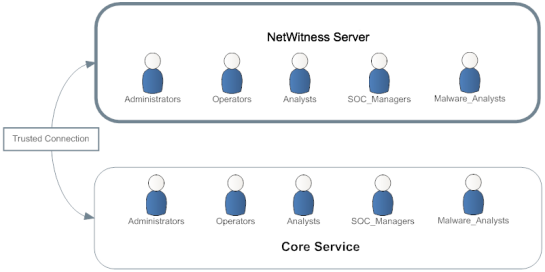
If you add a custom role, such as JuniorAnalysts, you must add the role to each service, such as ArchiverA and BrokerB. Role names are case-senstive, cannot contain spaces and must be identical. For example, JuniorAnalyst (singular) and JuniorAnalysts (plural) do not meet the requirements for common role names.
End-to-End Workflow for User Setup and Service Access
This workflow shows how role-based access control works when there is a trusted connection between NetWitness Server and the service BrokerB.
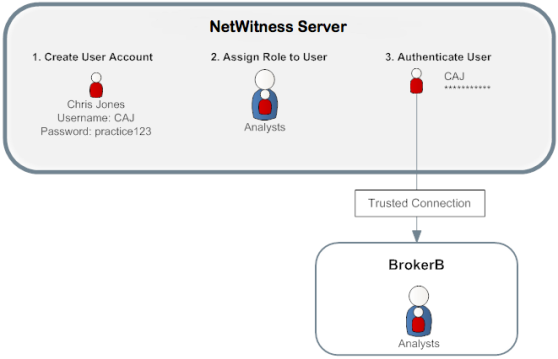
- On NetWitness Server, create an account for a new user:
Name: Chris Jones
Username: CAJ
Password: practice123 -
Determine if you want to assign a preconfigured or custom role to Chris Jones:
-
Preconfigured role
- Keep or modify the default permissions assigned to the Analysts role, which include permissions such as access to the Alerting, Investigation and Malware modules,
- Assign the Analysts role to Chris Jones.
-
Custom role
- Create the custom role, such as JuniorAnalysts.
- Assign permissions to the JuniorAnalysts role.
- Assign the JuniorAnalysts role to Chris Jones.
- Add the JuniorAnalysts role to the service, such as BrokerB.
-
-
The user, Chris Jones, logs on to NetWitness Server:
- Username: CAJ
- Password: practice123
- The server authenticates Chris.
- The trusted connection allows the authenticated user, Chris, to access BrokerB without entering another password.
For more detailed descriptions and procedures, see Manage Users with Roles and Permissions.