Incident Email Notification Settings View
The Incident Email Notification Settings view enables you to send email notifications when incidents are created or updated to SOC Managers and the Analysts assigned to the incidents.
Note: The information in this topic applies to NetWitness 11.1 and later.
What do you want to do?
- Role: Administrator
- I want to ...: Configure an email server.
- Show me how: Refer to "Configure the Email Settings as Notification Server" in the System Configuration Guide. (To access these settings, click the Email Server Settings link and go to the Servers tab or alternatively go to
(Admin) > System > Global Notifications > Servers tab.)
- Role: Incident Responders, Analysts, Content Experts, SOC Manager
- I want to ...: Configure email notifications for when an incident is created or updated.
- Show me how: Configure Incident Notification Settings
Go to the NetWitness All Versions Documents page and find NetWitness Platform guides to troubleshoot issues.
Related Topics
Quick Look
To access the incident email notification settings, go to
(Configure) > Incident Notifications.
The Incident Email Notification Settings view is displayed.
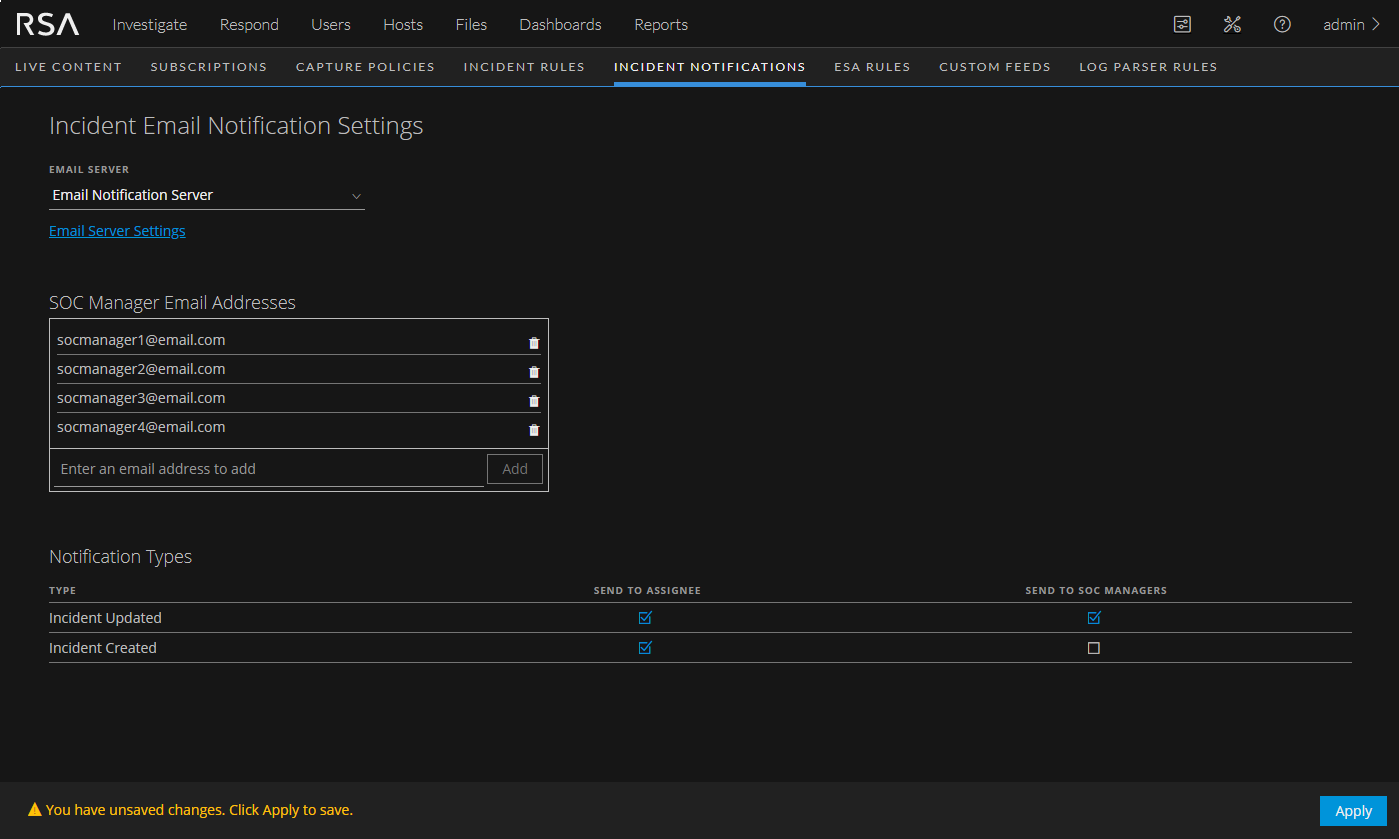
The following table lists the incident email notification settings.
- Setting:
Email Server
- Description:
Specifies the Email server that will send the email notifications.
- Setting: Email Server Settings
- Description:
Allows you to configure an Email server if the one you want to use for notifications is not listed.
Clicking the Email Server Settings link goes to
(Admin) > System > Global Notifications. Configure the email server on the Servers tab. For instructions, refer to "Configure the Email Settings as Notification Server" in the System Configuration Guide.
- Setting:
SOC Manager Email Addresses
- Description:
Lists the SOC Manager email addresses that receive email notifications when you select Send to SOC Manager in the Notification Types section. You can add and remove email addresses as needed.
- Setting: Notification Types - Incident Created
- Description:
Specifies who should receive an email notification when an incident is created.
- Send to Assignee: When an incident is created, an email is sent to the Analyst assigned to the incident.
- Send to SOC Manager: When an incident is created, an email is sent to all of the addresses listed in the SOC Manager Email Addresses list.
- Setting:
Notification Types - Incident Updated
- Description:
Specifies who should receive an email notification when an incident is created.
- Send to Assignee: When an incident is updated, an email is sent to the Analyst assigned to the incident.
- Send to SOC Manager: When an incident is updated, an email is sent to all of the addresses listed in the SOC Manager Email Addresses list.
- Setting:
Apply
- Description:
Applies changes made to the incident notification settings. Changes to these settings take effect immediately.
Note: If user email address information is updated in the
(Admin) > Security > Users tab, it can take up to two minutes for the new email changes to take effect. Any incident creation or incident update email notifications sent during this time go to the old email address.