.png?width=180&height=32&name=NW%20Logo%20(2).png)
Issue
This article provides supplemental information and directions on how to direct an RSA NetWitness Platform log decoder device to use a specific device parser during log collection.
Resolution
Follow these directions to configure a specific device parser when collecting logs from a given event source. These steps are conducted in the Security Analytics UI as an administrator.- Go to Explore view of the Log Decoder service.
- For 10.6.x, Administration -> Services -> <Log Decoder> -> View -> Explore
- For 11.x, Admin -> Services -> <Log Decoder > -> View -> Explore
- Navigate to Decoder -> Parsers.
- Right-click Parsers and select Properties.
- From the drop-down, select ipdevice.
- In the parameters field, enter the following: op=edit entries=+
=

- Then type the following to confirm the entry: op=describe
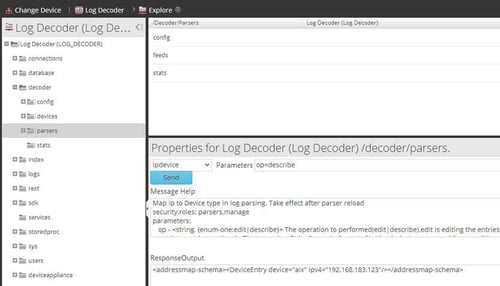
If you are unsure of any of the steps above or experience any issues, contact RSA Support and quote this article number for further assistance.
Notes
The device to parser mapping file is found on the following directories on the Log Decoder appliance:For 10.6.x: /etc/netwitness/ng/envision/etc/devicetbl.xml
For 11.x: /etc/netwitness/ng/envision/etc/devicetbl.csv
The output of the file appears similar to the example below.
<IpAddressMap>
<DeviceEntries>
<DeviceEntry device="aix" ipv4="192.168.183.123"/>
</DeviceEntries>
</IpAddressMap>
<DeviceEntries>
<DeviceEntry device="aix" ipv4="192.168.183.123"/>
</DeviceEntries>
</IpAddressMap>
Product Details
RSA Product Set: RSA NetWitness PlatformRSA Product/Service Type: Log Decoder, User Interface (UI)
RSA Version/Condition: 10.6.x, 11.x
Summary
This article details how to direct an RSA NetWitness Platform log decoder device to use a specific device parser during log collection.
Approval Reviewer Queue
RSA NetWitness Suite Approval Queue