Skip to content
  • There are no suggestions because the search field is empty.

Initial Set Up

NetWitness Platform Licensing Overview

After you have purchased the licenses and have received all the relevant email communications, perform the steps required to map entitlements in NetWitness. You must perform each step in the proper sequence.

This document is divided into three parts:

  • How to obtain license information from myRSA and view in the NetWitness Platform UI

  • Understanding License Types and its functionality

  • Troubleshooting or maintenance information

Workflow

The following workflow illustrates the end-to-end licensing process after you have the NetWitness product installed .
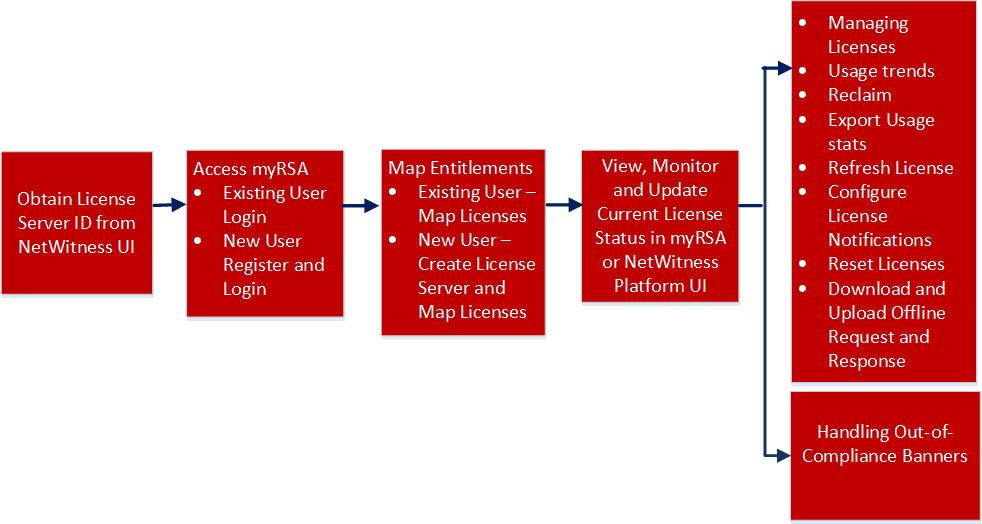
netwitness_licovwwf2.png

  • Configuration Step:

    Obtain License Server ID from NetWitness Platform User Interface

  • Description: Before you begin the licensing process, you must ensure that you obtain the License Server ID displayed on the NetWitness User Interface.

  • Configuration Step:

    Access myRSA

  • Description: Your myRSA Welcome e-mail message contains system log in instructions to myRSA. Instructions for downloading your product licenses can be found in this document, as well as the myRSA website.

  • Configuration Step:

    Register the Server (Online Registration)

  • Description: Your NetWitness Server must be registered to myRSA and entitlements must be mapped. There are two methods of synchronizing NetWitness with myRSA: online and offline.