Investigate Dialog
Investigate DialogInvestigate Dialog
In the Investigate dialog, analysts can select a service or a collection to investigate. The dialog is automatically displayed when you first go to the Navigate view or Legacy Events view and have not selected a default service to investigate. To access the dialog from a current investigation, select the current service name in the toolbar.
WorkflowWorkflow
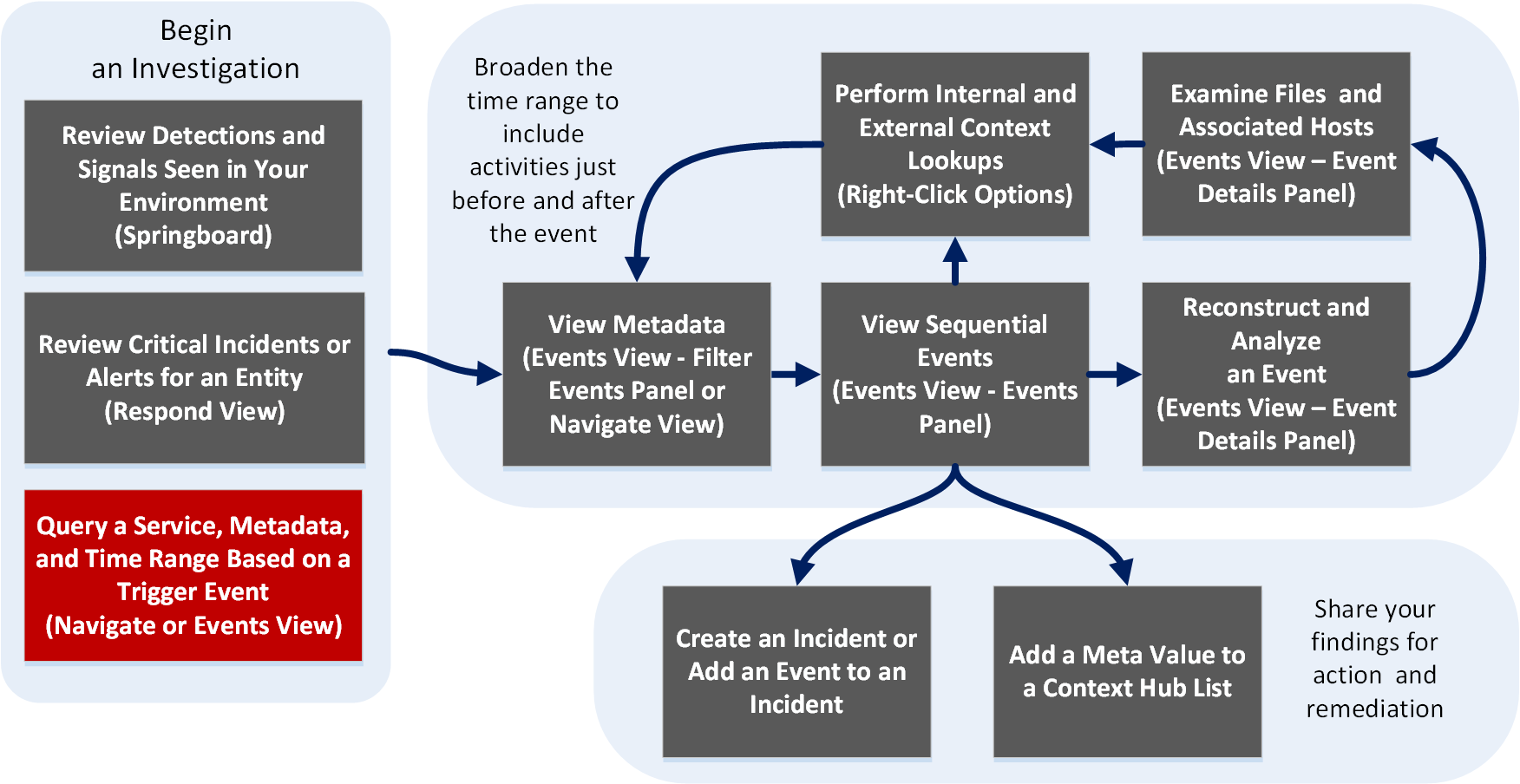
What do you want to do?What do you want to do?
- User Role:
Incident Responder or Threat Hunter
- I want to ...:
review detections and signals seen in my environment
- Show me how:
NetWitness Platform Getting Started Guide
- User Role: Incident Responder
- I want to ...:
review critical incidents or alerts
- Show me how:
NetWitness Respond User Guide
- User Role: Threat Hunter
- I want to ...: query a service, metadata, and time range*
- Show me how:
Begin an Investigation in the Events View
Begin an Investigation in the Navigate or Legacy Events View
- User Role: Threat Hunter
- I want to ...:
view metadata
- Show me how:
- User Role: Threat Hunter
- I want to ...:
view sequential events
- Show me how:
- User Role:
Threat Hunter
- I want to ...:
reconstruct and analyze an event
- Show me how:
- User Role: Threat Hunter
- I want to ...: examine files and associated hosts
- Show me how:
Download Data in the Events View
- User Role: Threat Hunter
- I want to ...: perform lookups
- Show me how:
- User Role: Threat Hunter
- I want to ...: create an incident or add to an incident
- Show me how:
- User Role:
Threat Hunter
- I want to ...:
add a meta value to a Context Hub list
- Show me how:
*You can perform this task in the current view.
Related TopicsRelated Topics
Quick LookQuick Look
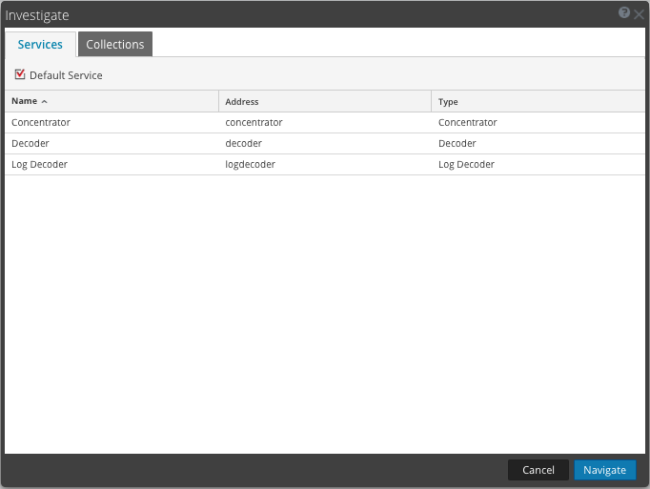
The Investigate dialog has two tabs: Services and Collections.
Note: Collections are also known as workbench collections. You can only view workbench collections that you have created, and only administrators can create a workbench collection.
The Services tab includes a list of services available for investigation, and three buttons. All features are described in the following table.
- Feature: Default Service
- Description: Clicking this button sets or clears the default service to investigate. When a service has been set as the default service, the word (Default) is appended to the service name.
- Feature: Name
- Description: The name of the service.
- Feature: Address
- Description: The IP address of the service.
- Feature: Type
- Description: The type of service.
- Feature: Cancel
- Description: Closes the dialog.
- Feature: Navigate
- Description: Opens the selected service in the Navigate or Legacy Events view.
The Collections tab has two buttons and two panels: Workbench and Collections.
The Workbench panel lists available Workbench services by name. After a Workbench service is selected, you can select a collection from the Collections panel.
The Collections panel lists available collections to investigate. After a collection is selected, you can click Navigate to view the collection.
The following table describes the features of the Collections panel.
- Feature: Name
- Description: The name of the collection.
- Feature: Type
- Description: The type of collection.
- Feature: Size
- Description: The size of the collection.
- Feature: Data Type
- Description: The type of data within the collection.
- Feature: Date Created
- Description: The date the collection was created.