.png?width=180&height=32&name=NW%20Logo%20(2).png)
Issue
During the File collection event source integration, the below error is received during the sftp connection on the event source.sample1:
2020-09-24 16:24:35 ERROR stderr: I've read & consent to terms in IS user agreement.
2020-09-24 16:24:35 ERROR stderr: Your account has expired; please contact your system administrator
2020-09-24 16:24:35 ERROR stderr: Connection closed by xx.xx.xx.xx
2020-09-24 16:24:35 ERROR stderr: Couldn't read packet: Connection reset by peer
2020-09-24 16:24:35 ERROR stderr: Your account has expired; please contact your system administrator
2020-09-24 16:24:35 ERROR stderr: Connection closed by xx.xx.xx.xx
2020-09-24 16:24:35 ERROR stderr: Couldn't read packet: Connection reset by peer
sample2:
E:\sasftpagent>
psftp -i private.ppk -l sftp -v X.X.X.X
Connecting to X.X.X.X port 22
We claim version: SSH-2.0-PuTTY_Release_0.70
Server version: SSH-2.0-OpenSSH_7.4
Using SSH protocol version 2
Doing ECDH key exchange with curve nistp256 and hash SHA-256
Server also has ssh-rsa host key, but we don't know it
Host key fingerprint is:
Host key was located in the environment
Initialized AES-256 SDCTR client->server encryption
Initialized HMAC-SHA-256 client->server MAC algorithm
Initialized AES-256 SDCTR server->client encryption
Initialized HMAC-SHA-256 server->client MAC algorithm
Reading key file "private.ppk"
Using username "sftp".
server unexpectedly closed network connection
Fatal: server unexpectedly closed network connection
Connecting to X.X.X.X port 22
We claim version: SSH-2.0-PuTTY_Release_0.70
Server version: SSH-2.0-OpenSSH_7.4
Using SSH protocol version 2
Doing ECDH key exchange with curve nistp256 and hash SHA-256
Server also has ssh-rsa host key, but we don't know it
Host key fingerprint is:
Host key was located in the environment
Initialized AES-256 SDCTR client->server encryption
Initialized HMAC-SHA-256 client->server MAC algorithm
Initialized AES-256 SDCTR server->client encryption
Initialized HMAC-SHA-256 server->client MAC algorithm
Reading key file "private.ppk"
Using username "sftp".
server unexpectedly closed network connection
Fatal: server unexpectedly closed network connection
Cause
For File Collection, event sources connect to the Log Collector(LC)/Remote Log Collector(VLC) through the sftp user, and connection denied is due to the sftp user being expired or inactive in LC/VLC.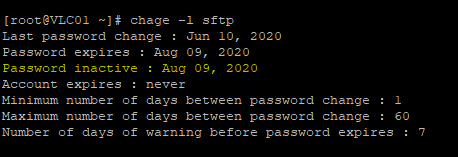
Resolution
In order to reset the user, please follow the below steps in LC/VLC.- Connect to the LC/VLC via SSH as the root user.
- Run the below command to change the sftp user account password expiration to never.
[root@VLC01 ~]# chage -I -1 sftp - Change sftp user password with a temporary password.
[root@VLC01 ~]#passwd sftp
Changing password for user sftp.
New password:
Retype new password:
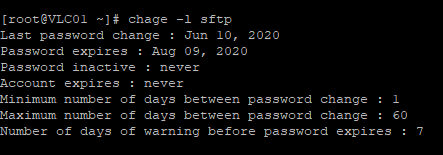
passwd: all authentication tokens updated successfully. - Run 'chage -l sftp' command and verify sftp user current aging information.
Product Details
RSA Product Set: RSA NetWitness PlatformRSA Product/Service Type: Core Appliance
RSA Version/Condition: 11.x
Platform: CentOS
O/S Version: 7
Approval Reviewer Queue
RSA NetWitness Suite Approval Queue