.png?width=180&height=32&name=NW%20Logo%20(2).png)
Issue
After mapping the licenses on Download Central to License Server ID, the status of the mapped license remains "License Not Generated".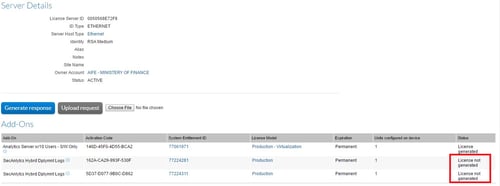
Workaround
In Flexera, under the License Server ID:- Unmap all the entitlements
- Then Edit the License Server -->Assign Owner
- Search for OBSOLETE Account using the Magnifying Glass and the pop up window
- Select the OBSOLETE Account and click “Assign owner”; the Account Owner then becomes OBSOLETE.
- Navigate to Edit in the View Server page and then choose Make Obsolete
- Navigate to Manage Hosts > Add License Server
- Read the License Server ID to the Account
- Map the the PHYSICAL Entitlements to the License Server ID and hit Generate Response—the PHYSICAL ENTITLEMENTS have to be added and generated FIRST
- Map the Virtual Entitlement to the License Server ID and hit Generate the Response – all of the addons now should show as “License Generated”
Product Details
NetWitness Product Set: NetWitness PlatformNetWitness Product/Service Type: All Nodes
NetWitness Version/Condition: 12.x
Platform: CentOS/Alma
Approval Reviewer Queue
Technical approval queue